 Sam Oliver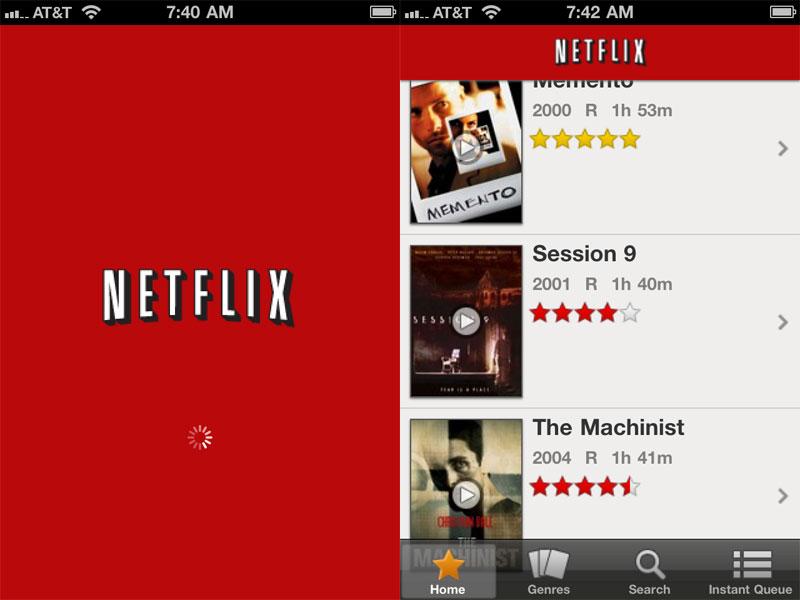
The new universal application (iTunes link) is now available for the iPhone, iPod touch and iPad. The free software allows Netflix customers with unlimited memberships to stream content from their Instant Watch queue.
Users can pick up watching where they left off with a movie or TV show on another device, such as their iPad, TV, or computer. The application also allows users to manage their Netflix queue, but only for Instant Watch. There is not currently a way to manage the queue for mailed discs.
As with on the iPad, the streaming service even works over 3G on the iPhone. The software uses adaptive technology that allows instant switching between Wi-Fi and 3G connections.
Version 1.1 of the Netflix application requires iOS 3.1.3 or later.
Netflix originally released its iPad application when the device was first released in April. At the time, the company promised that it was also working on a version for iPhone and iPod touch users — a promise that was delivered Thursday.
The movie rental company then showed off the new version of its mobile software at Apple's Worldwide Developers Conference in June, garnering cheers from the audience.

-xl-m.jpg)

 William Gallagher
 Amber Neely
 Andrew Orr

 Christine McKee

33 Comments
My only complaint is you can't manage your mailer queue via the app. When a friend suggests a movie to me, I immediately pop open PhoneFlix and put it in my queue. I guess I'll just keep using that for mobile queue management.
Glad the app is out. lame that it's one of those not optimized for the Retina display. Kind of inexcusable that the interface icons aren't high res since this is shipping two months after the iPhone 4 release. I can understand all of their movie artwork not yet being optimized but the splash screen and interface? Lame.
Glad the app is out. lame that it's one of those not optimized for the Retina display. Kind of inexcusable that the interface icons aren't high res since this is shipping two months after the iPhone 4 release. I can understand all of their movie artwork not yet being optimized but the splash screen and interface? Lame.
Seriously?!
Does it really matter? This is an app to watch movies not look at pretty graphics and icon.
Seriously?!
Does it really matter? This is an app to watch movies not look at pretty graphics and icon.
When you stop being satisfied with mediocrity your world will vastly improve.
Can you output to your tv with this app? I've heard you can do that with the iPad version. Anyone actually tried this?
It is lame that you can't manage your dvd queu. I have a free app (Movieflick I think or something like that) that lets you manage both queues so I don't see how it can be that difficult. Not a deal breaker by any stretch though.