 Prince McLean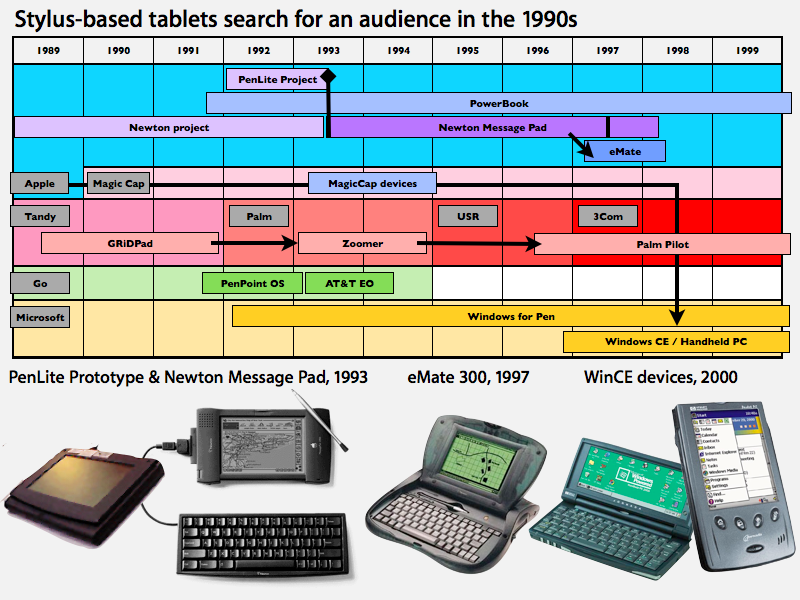
This article features the evolution of the software side of tablets and technology related to multitouch interfaces. The hardware side of historical tablet products was profiled earlier in The inside track on Apple's tablet: a history of tablet computing.
The infusion of technology developed by FingerWorks meshed with research Apple had already been working on in the area of touch-based interfaces as an alternative to the keyboard. Since the origins of the personal computer in the mid 1970s, the conventional keyboard has always been its primary interface. But investigation into alternative finger touch methods of computer input was in progress at least as early as 1982, when Nimish Mehta at the University of Toronto published research involving cameras, placed behind a translucent panel, that could record multiple touch points of a user's hands.
Mice and then trackballs were added to provide pointer-centric navigation within the graphical environment that the Macintosh popularized in the 1980s. Having a keyboard still remained essential in personal computing however, in many cases being more efficient than trying to use an alternative device to point to items in a menu.
The stylus takes on the keyboard: 1990s
In the 1990s, the idea of stylus-based "pen computing" questioned whether the keyboard was still absolutely necessary, particularly in mobile devices. Apple's 1993 Newton Message Pad offered an external keyboard accessory, but it was primarily designed to be used via its stylus, using a series of pen gestures and handwriting recognition for text input. Apple also prototyped a PowerBook-based tablet system called the PenLite in 1993, but did not release it to avoid affecting Newton sales.
The Newton's advanced ink technology was criticized and mocked for its initial inaccuracy, a problem Apple largely corrected in its Newton 2.0 release. By then however, many were convinced that its ink recognition technology wasn't really feasible. When Palm launched the Pilot in 1996, it used a simplified alphabet system called Graffiti that greatly reduced recognition errors, although it also required learning a new handwritten input system of simplified letter forms.
Palm's Graffiti input software had premiered on the Newton, but Apple's PDA platform failed to reach a critical mass in sales. Palm's popular Pilot PDAs powered by Graffiti initially seemed to suggest a rosy future for stylus input as a keyboard alternative. While compact external keyboards were available for it as well, the value of the Palm Pilot's portability came largely from its pen.
in 1997, Apple released a new Newton form factor: the eMate, which paired a stylus with a conventional keyboard in a mini-laptop design. The device was aimed at education at a time when schools were unlikely to spring for full-powered, full priced notebooks for every student. Before it had much time to be evaluated by the market however, the entire Newton line was pulled in early 1998 as Apple worked to focus on its most promising platforms in an effort to return to profitability.
Microsoft belatedly attempted to deliver its own alternative to Palm's PDAs by morphing its unsuccessful Handheld PC product line (clamshell mini-laptops with keyboards) into stylus-based Palm PC PDAs around 2000 (they were later renamed Pocket PC after Palm objected to the name). The company also attempted to resurrect Newton-style freehand handwriting recognition by licensing technology from Apple spinoff General Magic in 1998.
Microsoft licensed its Pocket PC operating system (built on the Windows CE kernel) to a variety of hardware manufacturers over the decade of the 2000s, but the PDA category failed to materialize as a significant market. Since 2001, the company has also marketed a stylus-based tablet version of its desktop Windows platform (based on the Windows NT/XP kernel), which has also been unsuccessful outside of a few niche markets. Bill Gates' 2001 prediction that "within five years [the stylus-drive Tablet PC] will be the most popular form of PC sold in America" simply failed to materialize.
On page 2 of 3: Touch takes on the keyboard.
The venerable keyboard survived unscathed through all the pen-centric hype of the 1990s, when the enthusiastic suggestion that mainstream users would migrate away from typing and back towards the older convention of writing with a stylus simply didn't pan out. Instead, the use of keyboards began to expand and morph into the unrestricted touch-based interfaces long envisioned by science fiction writers.
Rather than advancing the efficiency of keyboard typing by shifting toward a supposedly more "natural" input system designed to mimic the ancient writing instrument (as Pen Computing was largely seen to be fated to accomplish in the 90s, and as Gates predicted for the following decade), the stylus only gave users a slower, clumsier way to interact with their devices.
Vast sums invested into developing the technology to read handwritten text had failed to solve many of the problems associated with typing on a keyboard: the physical stress of writing was not much of an improvement over banging on a keyboard; the input speed was much lower; and benefits in the area of physical size were somewhat nullified by the inconvenience of having a stylus device that had to be stowed and was easy to lose.
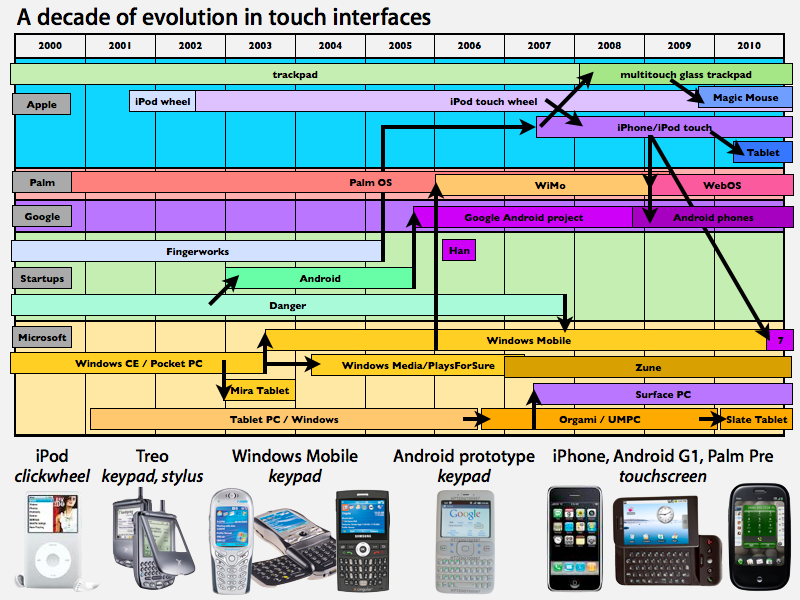
Just as Palm's stylus-driven PDAs began reaching the height of their popularity, Apple launched a mobile device that similarly avoided any use of a keyboard. Rather than using a stylus input however, Apple's new iPod used a mechanical scroll wheel which made navigating through its menus quick and easy. It was not very good at entering any large amount of text, but it did become a very popular way to pilot through large music collections.
Starting in 2002, Apple's successive iPod designs used solid state (non-mechanical) touch-sensitive click wheels. Apple had previously pioneered the use of touch-sensitive trackpads in its 1994 PowerBook 500, which was the first notebook to use a solid state pointing device rather than a mechanical trackball or joystick. Nearly a decade later, the company was now making touch-sensitivity the primary user interface for a new class of mobile devices.
Meanwhile, Palm and Microsoft began adapting their stylus-driven PDA operating systems to serve as mobile phones. Palm's Treo line converted the conventional Pilot PDA into a device with a BlackBerry-like mini keypad and a stylus-driven screen. Microsoft's licensees developed a variety of devices with different combinations of mini-keyboards, full-sized sliding keyboards, and stylus-driven screens. Microsoft's original definition of its "Windows Smartphone" actually described a device without a touchscreen at all, navigated entirely by physical buttons.
Apple eyes FingerWorks: 2005
Early smartphone users commonly grew savvy enough at typing with their thumbs to simply ignore the unwieldy stylus provided to tap at the screen, particularly when entering text. As stylus use rapidly fell out a favor, new keyboard technology was released by a startup called FingerWorks. Its devices were essentially trackpads designed to respond to multiple touch points at once, enabling both keyboard-like chording and intuitive gestures similar to those used by the Newton, but performed by finger touch rather than a stylus.
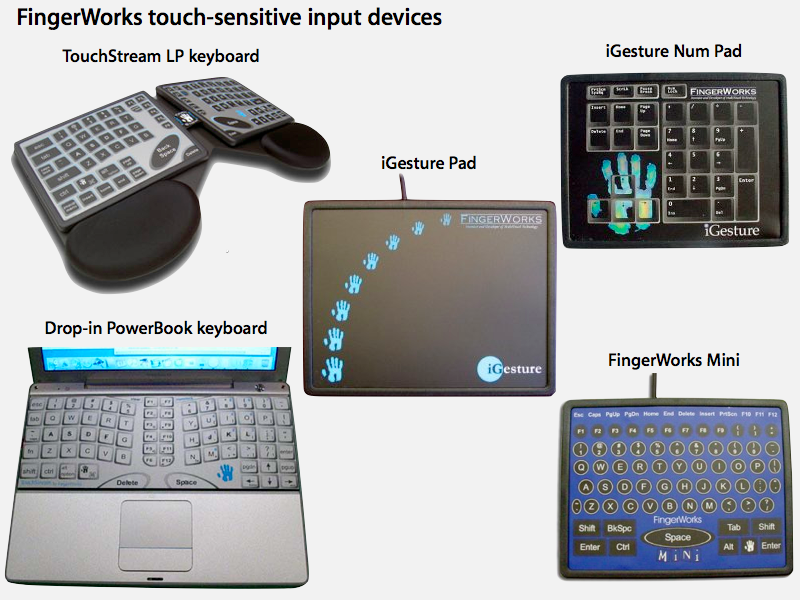
FingerWorks was led by John Elias and Wayne Westerman, two pioneering multitouch researchers who had worked together at the University of Delaware. After founding the company in 1998, the pair produced a series of devices that served as multitouch trackpad devices, from the full TouchStream keyboards to the iGesture Pad, a multifunction, programmable mouse replacement peripheral.
The company gained positive reviews among an enthusiastic niche of power users and people with Repetitive Stress Injury, who reported that FingerWorks' large, low-impact trackpad devices enabled them avoid the taxing pain associated with using mechanical keyboards. However, the company continued to struggle to reach mainstream users up until its assets were mysteriously bought out by an unnamed source in 2005.
It was later revealed that FingerWorks' technology and founders had become part of Apple, after lawsuits against the Mac maker referenced its acquisition of FingerWorks. Additionally, a series of new patents filed by Elias and Westerman were associated with Apple.
Over the next year and a half, research within the company adapted FingerWorks' multitouch ideas from an opaque trackpad surface to a transparent layer of a capacitive touchscreen enabling the kind of direct, multitouch manipulation demonstrated by the iPhone in January 2007.
On page 3 of 3: Steve Jobs kills the stylus.
During Apple's year and a half of multitouch development, Jeff Han at New York University's Courant Institute of Mathematical Sciences demonstrated his own independent research into multitouch user interfaces at TED in February 2006. Han's demonstration quickly spread interest in multitouch features.
After seeing the iPhone's debut, Han reportedly said, "The iPhone is absolutely gorgeous, and I've always said, if there ever were a company to bring this kind of technology to the consumer market, it's Apple. I just wish it were a bit bigger so I could really use both of my hands."
At the iPhone's introduction, Steve Jobs boldly announced that stylus-driven interfaces that Microsoft's Gates had hailed just a half decade earlier were no longer worth investigating. "Now, how are we going to communicate this?" Jobs said of the iPhone. "We don't want to carry around a mouse, right? So what are we going to do? Oh, a stylus, right? We're going to use a stylus. No. Who wants a stylus? You have to get em and put em away, and you lose em. Yuck. Nobody wants a stylus. So let's not use a stylus."
We're going to use the best pointing device in the world. We're going to use a pointing device that we're all born with — born with ten of them. We're going to use our fingers. We're going to touch this with our fingers. And we have invented a new technology called multi-touch, which is phenomenal. It works like magic. You don't need a stylus. It's far more accurate than any touch display that's ever been shipped. It ignores unintended touches, it's super-smart. You can do multi-finger gestures on it. And boy, have we patented it."
So we have been very lucky to have brought a few revolutionary user interfaces to the market in our time. First was the mouse. The second was the click wheel. And now, we're going to bring multi-touch to the market. And each of these revolutionary interfaces has made possible a revolutionary product: the Mac, the iPod and now the iPhone."
Competitors react to Apple's touch
Microsoft responded to the iPhone by demonstrating its own multitouch system: a camera-driven, table-top appliance called the Surface, which is designed to act as a large information kiosk that can respond to multiple touch points and to specially barcoded objects placed on it. However, the company has continued to sell a stylus-oriented interface for its ill-fated Tablet PC devices and Windows Mobile smartphones, with promises of a touch-based upgrade repeatedly delayed by technical problems. Windows Mobile 7 with iPhone-like touch features is now expected no sooner than early 2011, a full four years after the iPhone's debut.
Despite far more limited resources and failing fortunes, Palm was able to deliver its own multitouch device in the Palm Pre just three years after the iPhone. Palm's development team greatly benefitted from an infusion of Apple talent, from executive Jon Rubinstein to iPhone engineers looking to work on new projects outside of Apple.
In addition to Palm and Microsoft, other companies have also found it difficult to follow Apple's footsteps without also infringing upon its patented technology. RIM found its development of the iPhone-like BlackBerry Storm to be both challenging and problematic, while Google has cautiously worked to take its Android "Windows Mobile-killer" and modify it to work more like the iPhone, without also running into any multitouch grievances with Apple. The original Android prototypes were Windows Mobile-like devices with lots of physical buttons; years later, they are looking more and more like the iPhone, with expanded use of touch interface features.
The future of touch
Outside of smartphones, Apple has also applied its multitouch technology in MacBook trackpads and the new Magic Mouse. Both are rather conservative implementations of multitouch gestures which don't require much specialized training from users. For its tablet and future trackpad devices, Apple may introduce a new layer of sophistication in multitouch gestures. Patent filings suggest the possibility of a new interface that manipulates objects represented in a deep three dimensional space.
It's also possible Apple may release an advanced keyboard along the lines of FingerWorks' original TouchStream, presenting a flat touchpad with zero force, multitouch input. The company has steadily rolled out multitouch trackpad enhancements for its MacBook line, but has a long ways to go before it match the fancy gestures (with potential to learn programmable functions) that FingerWorks supported in its iGesture Pad and TouchStream keyboards. FingerWork's devices could enter modes suited to specific applications, such as games, Maya or Photoshop; or specific uses, including general desktop control, search, text selection and styling, and browsing functions.
Many critics initially assailed the iPhone's virtual keyboard, but the popularity of Apple's smartphone since suggests tremendous potential for new applications of multitouch interfaces that augment or even replace the conventional mechanical keyboard. In addition to helping users avoid RSI damage, touch sensitive input allows for a complex vocabulary of gestures, the input typing speed of a keyboard, the pointing accuracy of a mouse, and a customizable degree of complexity scaling from the needs of basic users to very advanced, specialized functionality.
The advantages of touch-driven interfaces are clear, and suggest lots of potential for future applications in both mobile devices and desktop systems. Apple certainly isn't alone in working to productize and deliver new technology in the category of multitouch devices, but the future of touch interfaces may make a big leap next week with Apple's expected tablet introduction.


-m.jpg)
 Brian Patterson
 Charles Martin
 Malcolm Owen
 William Gallagher
 Christine McKee
 Marko Zivkovic

161 Comments
At the iPhone's introduction, Steve Jobs boldly announced that stylus-driven interfaces that Microsoft's Gates had hailed just a half decade earlier were no longer worth investigating. "Now, how are we going to communicate this?" Jobs said of the iPhone. "We don't want to carry around a mouse, right? So what are we going to do? Oh, a stylus, right? We're going to use a stylus. No. Who wants a stylus? You have to get em and put em away, and you lose em. Yuck. Nobody wants a stylus. So let's not use a stylus."
We're going to use the best pointing device in the world. We're going to use a pointing device that we're all born with -- born with ten of them. We're going to use our fingers. We're going to touch this with our fingers. And we have invented a new technology called multi-touch, which is phenomenal. It works like magic. You don't need a stylus. It's far more accurate than any touch display that's ever been shipped. It ignores unintended touches, it's super-smart. You can do multi-finger gestures on it. And boy, have we patented it."
I’ve already started exercising my eye rolling in preparation of some posters crying foul on Apple for offering a stylus accessory despite the fact that the primary input for the tablet will be finger-based with the stylus being for select app features for particular users, like drawing diagrams in class.Start workout: superior rectus muscle intorsion with left extorsion with right and 1 and 2 and 3 and, superior rectus muscle extorsion with right and intorsion with left and 1 and 2 and 3 and… Also, do forget to drink plenty of fluids on Wednesday
A part of me feels we won't see a stylus.
I?ve already started exercising my eye rolling in preparation of some posters crying foul on Apple for offering a stylus accessory despite the fact that the primary input for the tablet will be finger-based with the stylus being for select app features for particular users, like drawing diagrams in class.
I agree, there is nothing like a sharp pencil, or the stylus equivalent.
Larry
A part of me feels we won't see a stylus.
As the de facto input method, absolutely not. As an included accessory, I doubt that, too.
But there is a need for a stylus if this tablet is going to be marketed across the board, like I think it is. A stylus for signatures, drawing in many various situations, and even replicating the annotations that we do in textbooks with a simple stylus that can change from a highlighter, underliner, strikethougher(?), etc.
They do have a fairly recent patent for a capacitance stylus.
I expect a stylus to be optional?or even left for third parties?as a compromise.
P.S. The fingerworks stuff is really cool... but strangely enough, I think that middle Windows Mobile phone with the sideways flip keyboard is kind of cool too.