iPhone Software 2.2 to add public transit & walking directions
 Sam Oliver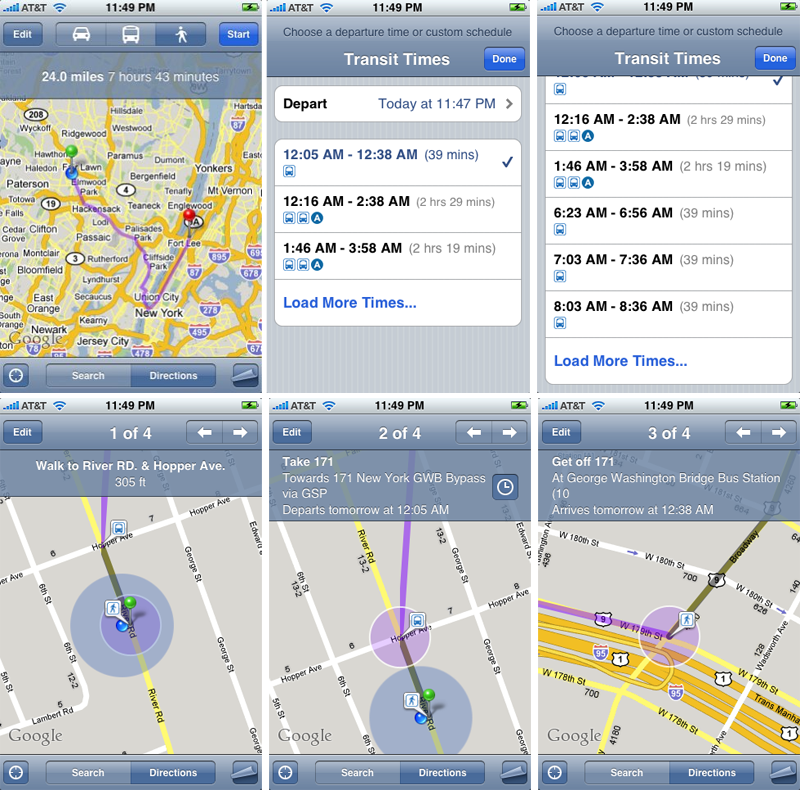
Public Transit Directions
iPhoneYap has posted an extensive screenshot gallery from iPhone Software 2.2 beta 2, released Friday, which offers a walkthrough and detailed descriptions of the new features.
When set in Directions mode, Maps now offers three icons — car, public transit, and walking — centered at the top of screen, in between the "Edit" and "Start" buttons. Selecting the transit icon provides a list of transit choices that can include subways, buses, or a combination of the two.
A list of departure times and estimated commute times accompany each transit option. Once you select a particular method of transit, the Maps application will serve up step-by-step directions from your current location, usually directing you to your chosen departure subway or bus stop on foot. During commutes, Maps will specify when you should board or disembark from a bus or train.
Screenshots of iPhone 2.2 beta 2 showing public transit directions | Source: iPhoneYap.com
Street View
Meanwhile, Street views on the iPhone will let you view street-level photographs, just as they would at maps.google.com. To activate the feature, iPhoneYap reports that you simply need to "drop a pin or click a searched location to get the tooltip to popup from the pin." The tooltip popup then serves as a gateway to the Street View interface.
Once in Street View, you'll notice two options in a bar at the top of the screen: "Report" and "Done." A small navigation circle showing your current location (on a map) overlays each Street View photograph.
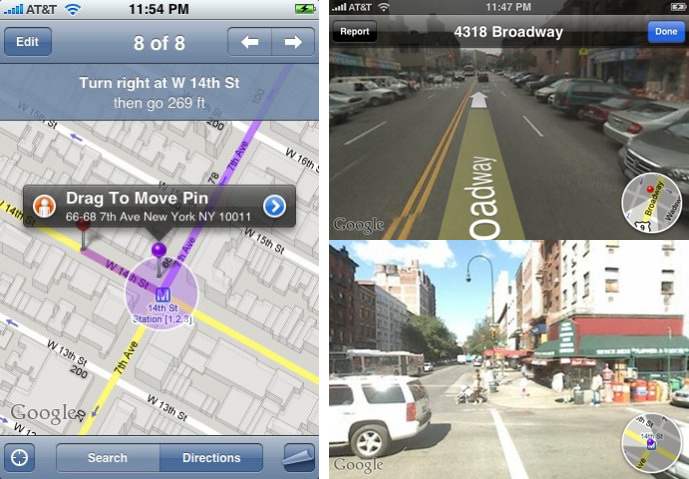
Screenshots of iPhone 2.2 beta 2 showing Street Views | Source: iPhoneYap.com
Location Sharing
One final feature noticed in the new version of Maps is location sharing. Selecting the "Share Location" option of an address will auto-fill an email with a hyperlink to the location, which will automatically launch and load in Maps application of the recipient, assuming they too have an iPhone.
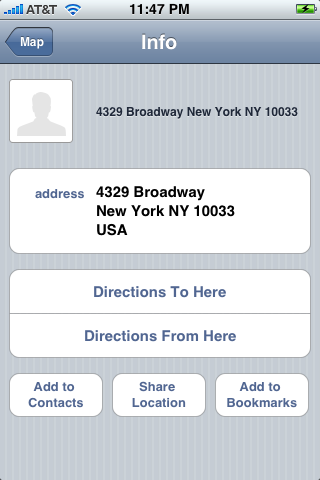
Screenshots of iPhone 2.2 beta 2 showing Share Location | Source: iPhoneYap.com








 Malcolm Owen
 Amber Neely

 Marko Zivkovic
 David Schloss
 Wesley Hilliard
 Mike Wuerthele and Malcolm Owen








50 Comments
Dammit. I would have paid another $100-150 for my touch if Apple had included a real functional GPS in it. Still not getting the iPhone until others carry it.
I've been wondering if those metro icons were actually useful or not. And does anyone know if Google is just supporting a few Metro systems are actively advocating getting information from all Metro bus systems? Limited or wide-spread support would be the difference form novelty to must-have.
Public transit sounds awesome! For them to include it the system must be reliable enough for the information to be meaningful, one would think. Now this is something I am really looking forward to.
zzzzz. Apple please wake me up when you get around to putting something significant, something 80% of users are waiting for since version 2.0
PUSH technology.
Public transit sounds awesome! For them to include it the system must be reliable enough for the information to be meaningful, one would think. Now this is something I am really looking forward to.
I predict that (like pretty much all "location aware" iPhone software), it will be accurate in California and New York, reasonably so in the rest of the USA and absolutely useless for the rest of the world.
Just sayin.