Livescribe Pulse smart pen demos crowd aisles at Macworld
 Prince McLean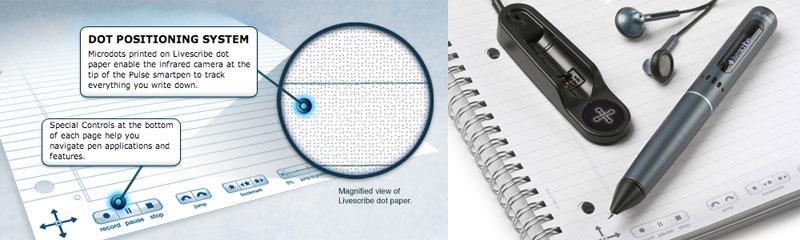
The Pulse smartpen springs from an Oakland, Calif-based firm that includes a number of former Apple employees. Much of the smartpen's power comes from a tiny scanner installed on the conventional ball point writing end. The scanner picks up invisible dot patterns printed on special "Dot Paper" to keep a timeline of where the pen contacts the paper.
Livescribe sells notebooks of the special Dot Paper, and users can even print out their own Dot Paper using a 600 dpi or greater printer. The Dot Paper scanning technology is central to what the company calls paper-based computing, and allows the pen to connect to a USB cradle (pictured below) and upload all the handwritten notes and drawings the pen was used to draw.
At the same time, the pen can have its voice recorder activated, so it records audio while taking notes. That enables the user to then control playback by touching the pen to the paper; when the pen is touched down on notes that were taken during a recording, the scanner determines where the pen was when it wrote the notes and begins playing the recording from that point.
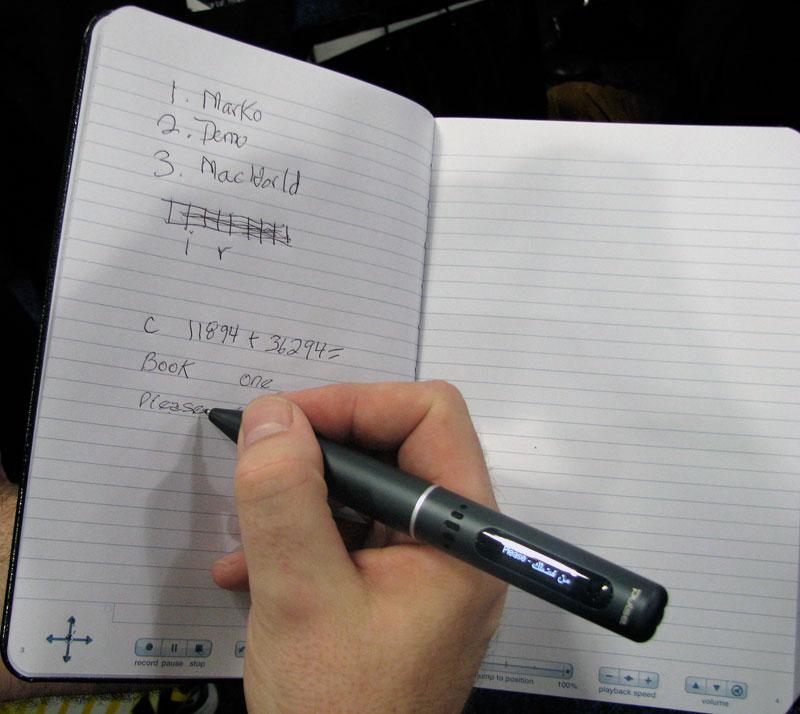
That allows notetakers to take a general outline rather than trying to write down every word. In addition to ambient recording, the smartpen can also perform intelligent tasks on words or numbers that the pen writes, as the scanning technology also performs handwritten recognition on what the pen writes. Select the calculator mode, and you can write out math problems that are answered on the unit's built in screen. It can also translate words you write into any available language, even speaking the foreign word out loud. In the demo below, the smartpen was used to calculate numbers and then translate words into Arabic.
The smartpen can load other applications, and Livescribe plans to open a software store for the device similar to Apple's App Store for the iPhone. The company already reports 2,600 registered developers working on smartpen apps. The 1GB version of the Pulse smartpen is priced at $149, and the 2GB model is $199. Each gigabyte supplies about 100 hours of audio recording capacity. The company also supplies desktop sync software for Windows and a newly released version for Mac OS X Leopard running on Intel Macs.
“Since our launch earlier this year, the number one consumer request was for the Pulse smartpen to be Mac compatible,†reported Jim Marggraff, the company's founder, Chairman, Chief Executive Officer and the inventor of paper-based computing. “We designed the software from the ground-up using Mac OS X developer tools to ensure the application meets the high-standards that Mac consumers expect.â€











 Malcolm Owen
 Chip Loder

 William Gallagher
 Christine McKee
 Michael Stroup
 William Gallagher and Mike Wuerthele