List of Passbook supported apps appears in iOS 6 App Store
 Katie Marsal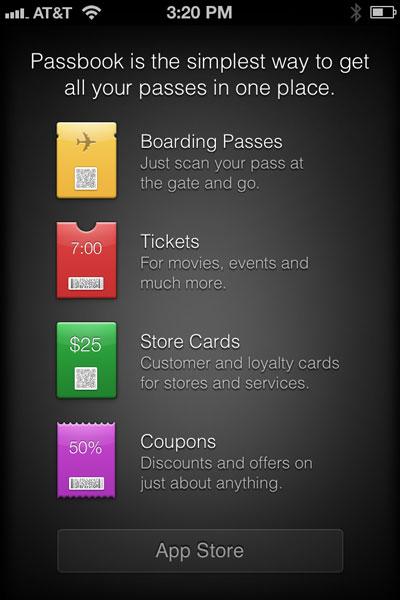
With the public release of iOS 6, Apple has also brought its Passbook section of the App Store online, giving for the first time a list of new companies that will support the new service.
Though a handful of applications are listed on the App Store as being Passbook compatible, downloading and installing them does not currently make the companies' respective store cards, tickets and other services appear in the Passbook application in iOS 6.
Launching Passbook in iOS 6 will inform users that the software is "the simplest way to get all your passes in one place." A summary of what Passbook can do is provided, and a link to the App Store is featured at the bottom of the screen.
As of Wednesday afternoon, the full list of highlighted Passbook applications on the App Store includes:
- Fandango Movies — Times & Tickets
- Live Nation
- Lufthansa
- MLB.com At Bat
- Sephora to Go
- Ticketmaster
- Walgreens
The relatively short length of the list is noteworthy, because a number of the applications highlighted by Apple in its public demonstrations are not immediately available.
Other companies that have been shown with Passbook include Delta Airlines, American Airlines, United Airlines, Amtrak, W Hotels, Starwood Hotels, Starbucks, Target, and Apple's own retail stores. The Apple Retail application was last updated on Sept. 5, but does not yet support Passbook.







 Mike Wuerthele
 Malcolm Owen
 Chip Loder

 William Gallagher
 Christine McKee
 Michael Stroup
 William Gallagher and Mike Wuerthele