iOS 4 includes Emoji input on Japanese keyboard
 Daniel Eran Dilger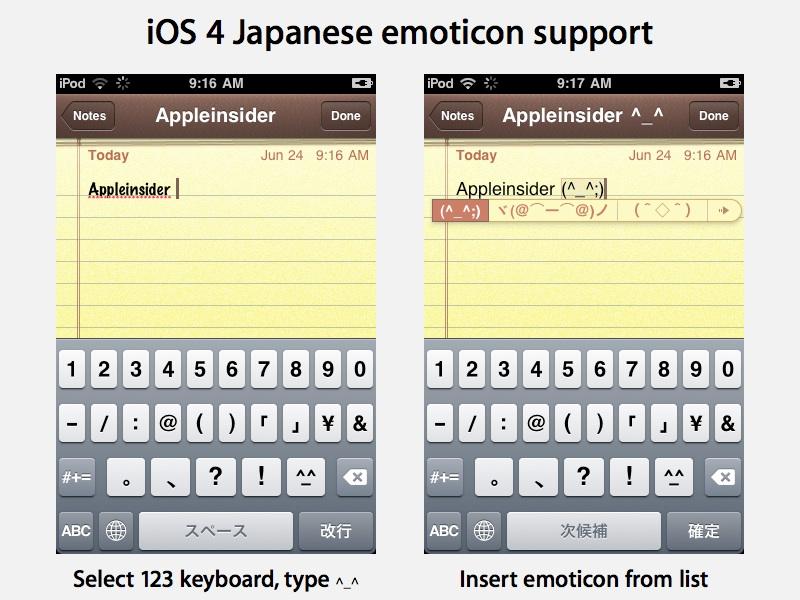
After activating the Japanese Romaji keyboard (used to enter Roman-style characters), reader Davide Crudo noted that a new character key appears on the numbers keyboard: the "^_^" smile.
Typing the key inserts a smile emoticon and presents a popup listing of alternatives below it. Clicking the arrow, or hitting space bar to cycle through the options, brings up an editing panel for choosing from around 50 different alternatives that are commonly used in Japan.
Users can flick through the pages of different Emoji character sequences by touch, or cycle through options by tapping the spacebar.
Once entered, an emoticon sequence acts like a regular block of characters. After entering an emotion in Notes, its default Marker Felt font is changed to Helvetica for all text within that note.







 Malcolm Owen

 Amber Neely

 Marko Zivkovic
 David Schloss
 Wesley Hilliard
 Mike Wuerthele and Malcolm Owen









27 Comments
^_^ they should make it standard for all language.
Those are Emoticons.
http://en.wikipedia.org/wiki/Emoticons
Emoji are the icons and pictures:
http://en.wikipedia.org/wiki/Emoji
Emoticons are enabled by default, you need an iPhone app, there are free ones, to enable Emoji. My guess is that they are not enabled by default because not all phones display them correctly.
This isn't a few feature, they just made it more accessible. They are called kaomoji in Japanese or face characters. When you'd type it in Japanese かおもじ the same list would appear. You can still do that now too. There have been a few hidden features for the Japanese that Apple could of done a better job of showing to people.
...you need an iPhone app, there are free ones, to enable Emoji.
I couldn't get my Emoji app to enable it in Settings with iOS 4.0.
You can also still enable them this way, which results in an Emoji keyboard under International instead of japanese: http://www.waterworld.com.hk/en/spell_number_easter_egg
Apple is targeting a feature request from Japanese users in iOS 4 with new support for several dozen "official" Emoji emoticons accessible from the Japanese Romaji keyboard.
After activating the Japanese Romaji keyboard (used to enter Roman-style characters), reader Davide Crudo noted that a new character key appears on the numbers keyboard: the "^_^" smile.
Typing the key inserts a smile emoticon and presents a popup listing of alternatives below it. Clicking the arrow, or hitting space bar to cycle through the options, brings up an editing panel for choosing from around 50 different alternatives that are commonly used in Japan.
Users can flick through the pages of different Emoji character sequences by touch, or cycle through options by tapping the spacebar.
Once entered, an emoticon sequence acts like a regular block of characters. After entering an emotion in Notes, its default Marker Felt font is changed to Helvetica for all text within that note.