Inside Mac OS X 10.7 Lion: New Spotlight and Quick View features
 AppleInsider Staff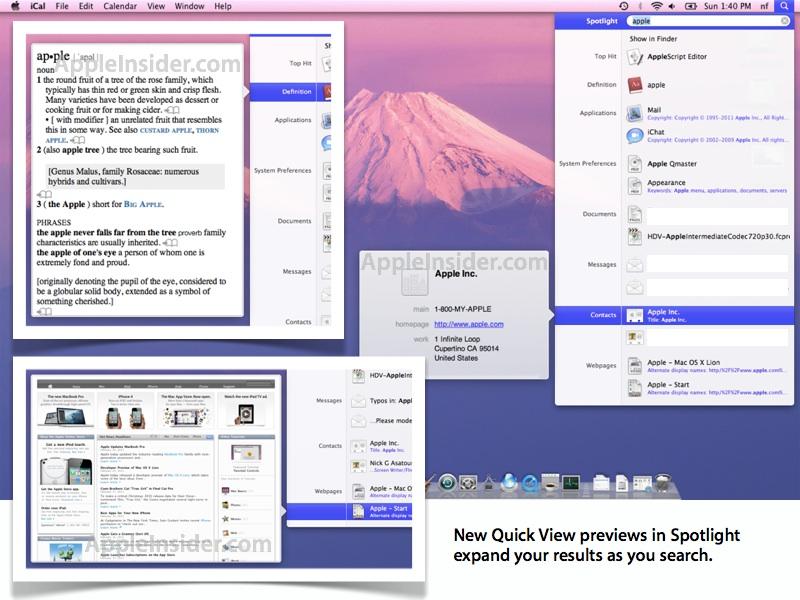
Quick View popovers in Spotlight, Stacks
The new Spotlight-integrated Quick View is reminiscent of Google's search results previews; simply mouse over results and previews (or additional information, for items that can't be previewed) are displayed as a popover.
Popovers are a relatively new user interface convention Apple began using in Snow Leopard's iCal to associate and tie information that would normally be presented in a floating panel window with a specific item on the screen.
Apple has also made significant use of popovers in the iOS interface, particularly on iPad where presenting or setting information about an item in a popover makes the new 'cartoon speech bubble' concept a perfect fit for the simplified computing experience of the hands-on iOS, without necessitating any additional user interface chrome to close, adjust, or manage the specialized new windows.
In Lion, popovers now provide a Quick View of Spotlight search results, including documents, web pages, contacts, emails and media files, and can also expand word definitions via Dictionary or present metadata for apps, preference files, and other items that offer nothing to preview.
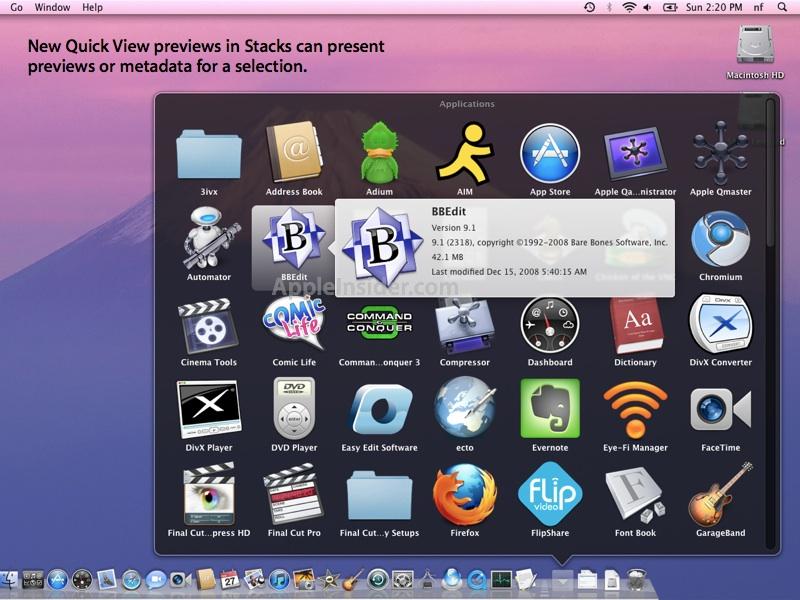
Quick View popovers are also visible from within Stacks, allowing users to target items with the mouse or arrow keys, and then hit the spacebar to present a preview or more information about the item.








 Malcolm Owen
 Amber Neely

 Marko Zivkovic
 David Schloss
 Wesley Hilliard
 Mike Wuerthele and Malcolm Owen






32 Comments
I somehow dislike those huge icons in the Spotlight menu. I would've found it logical to keep the smaller size since it's now ridiculously easy to take a closer look at any of the items in the menu. Maybe that will change as development progresses, maybe not.
Glad to see spotlight get some love. Its my favorite way to launch applications or documents, and get to just about anything on my Mac
I loved them. Don't mind the size at all.
YAY!!! I've been wanting Quick Look (or View, I guess) in Stacks since before I got Leopard.
Can you please choose a more neutral desktop image for these screen grabs before Apple sends you a C&D letter?
That ultra saturated pink/purple backdrop is the worst image imaginable behind the Apple UI.