Siri integrates with iOS phonetic name records to speak contacts correctly
 Daniel Eran Dilger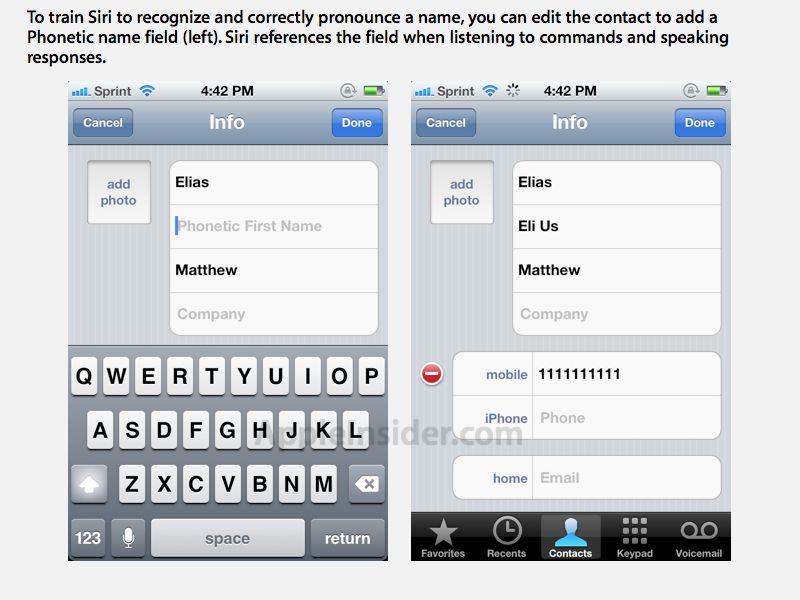
Previous versions of iOS have supported entering optional Phonetic First and Last Name fields, but for the iPhone 4S user, phonetic names are also a useful feature to optimize Siri's accuracy in name recognition and pronunciation.
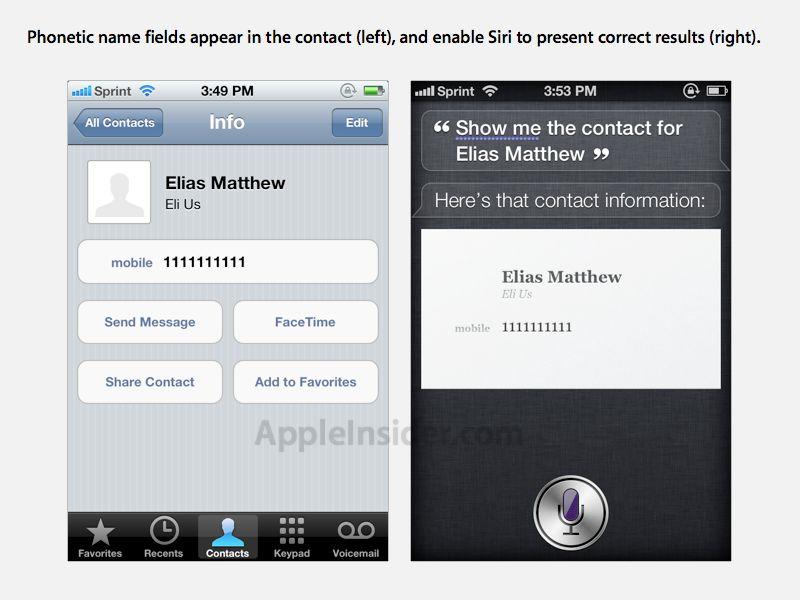
For example, Siri initially failed to recognize a contact named Elias, instead recognizing the name as "Alliance." After entering "Eli Us" as a Phonetic First Name field however, Siri was able to recognize commands referencing the contact.
To set a phonetic name, simply edit the contact, select "add field," and then pick either a "Phonetic First Name" or "Phonetic Last Name." It makes sense to use voice dictation when entering in this field to let the iPhone invent the phonetic transcription.
After entering a phonetic version of the contact name, Siri correctly recognized the name when referenced in a voice request.
Siri voice assistant is one of the primary distinguishing features of the new iPhone 4S released last week, and its development team is reportedly one of the largest groups at Apple.





 Malcolm Owen

 Amber Neely
 Marko Zivkovic
 David Schloss
 Wesley Hilliard
 Mike Wuerthele and Malcolm Owen






20 Comments
It still pronounces my wife's name wrong.
SIRI I am your friend. No you are not. You are my lover. Siri I am not your lover I am your master. No your not. you are my daddy boy. Siri I am not your daddy boy I am your God. I can't argue with that Steve.
It still pronounces my wife's name wrong.
You just need to come up with a better phonetic approximation. Try different spellings and hyphenated syllable breaks to see what works.
For instance, I have a (female) friend named "Joell", but Siri pronounced it like "Joel." After setting the phonetic pronunciation as "Joe-el" Siri says it just like that, which is correct.
Also, it's pretty gratifying to use the nickname feature to give someone you're not getting along with an insulting tag-- like "that stupid dickweed." Then you can just say to Siri "Send that stupid dickweed a message and tell him to stop being such a dickweed" and Siri gets right on it.
Just can't get this to work. I've tried using nicknames and phonetic names. It's very frustrating.