Never miss an update Follow AppleInsider
Wednesday, December 05, 2012, 06:34 pm
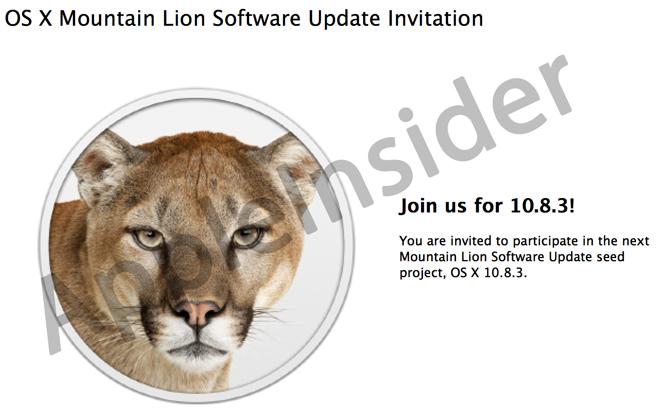
OS X 10.8.3 beta allows developers to download new builds through Software Update
A little over one week after Apple seeded build 12D32 of its OS X 10.8.3 beta to developers, the company has rolled out another version of the software adding a new functionality that allows developers to download and install pre-release versions directly from Software Update in the Mac App Store.
People familiar with new beta, dubbed build 12D38, informed AppleInsider that the latest pre-release builds are now available through Software Update with a tool called "OS X Software Update Seed Configuration Utility," allowing developers to access new builds in much the same way as consumers. When new seeds are made available, Apple will reportedly send out notifications to install the update via the Mac App Store, these people said. Email notices will also continue to be sent out.
As with the build released at the end of November, Apple is once again asking developers to focus on AirPlay, AirPort, Graphics and Game Center, but adds Safari into the mix with 12D38 without offering further explanation.
Known issues in the newest build mostly deal with graphics issues like blank or black screens when waking a machine from a sleep state, switching between applications or using VNC to remotely control a Mac.
For consumers, the most up-to-date version of OS X is 10.8.2, which was brought unified Messages support with phone numbers for Mac and iOS as well as system-wide Facebook integration to the operating system in September.

On Topic: General
- South Australia's first Apple Store draws line hours ahead of opening
- Rains once more cause damage at Apple's Fifth Avenue NY store
- Steve Jobs's family has been giving money away anonymously for more than 2 decades
- Judge says evidence will likely show Apple culpable in e-book price fixing case
- Google reportedly mulling $1B Waze bid, could spark bidding war with Facebook
Today's' Headlines
- South Australia's first Apple Store draws line hours ahead of opening
- Apple Store further drops refurbished 4th-gen iPad, iPad mini prices
- Best Buy to offer $50 off all iPhone 5 & 4S models starting Sunday
- Rains once more cause damage at Apple's Fifth Avenue NY store
- Haswell chips could bring 50% more battery life to Apple's next-gen MacBooks
- Verizon Cloud iPhone backup software launches on Apple's App Store
Related Articles
- Developers asked to focus on AirPlay, AirPort & Graphics in first OS X 10.8.3 beta
- OS X 10.8.3 Mountain Lion beta seeded to developers with minor changes
- New OS X 10.8.3 beta further details Software Update for pre-release seeds
- Apple seeds new OS X 10.8.3 build two days after previous version's release
- Apple's latest OS X 10.8.3 beta provided to developers
Previous Comments View All
Now if only they could fix the rendering issues and memory leaks that have been plaguing Safari on MacBook Pros when using integrated graphics since the release of Mountain Lion, that would be truly awesome.
1) I keep hearing of memory leaks but I have yet to see any actual memory leaks with RMBPs with Safari. There is a difference with an app using available memory and an app leaking memory.
2) There is a recent update to the nightly WebKit engine that will make it perform better with 4x the resolution. You should give it a try.
http://www.anandtech.com/show/6495/latest-webkit-build-doubles-scrolling-performance-on-macbook-pro-with-retina-display
1) I keep hearing of memory leaks but I have yet to see any actual memory leaks with RMBPs with Safari. There is a difference with an app using available memory and an app leaking memory.
An app with 8GB of privately allocated RAM with no windows open that keeps growing is hardly "using" it. This morning I couldn't even enter my password to resume OS X before it went back to sleep due to all the swapping.
2) There is a recent update to the nightly WebKit engine that will make it perform better with 4x the resolution. You should give it a try.
Other people have, the glitches remain for them. I don't have scrolling issues.
EDIT: As I was typing this, Safari was already eating 3GB of RAM and keeps growing:

An app with 8GB of privately allocated RAM with no windows open that keeps growing is hardly "using" it. This morning I couldn't even enter my password to resume OS X before it went back to sleep due to all the swapping.
Other people have, the glitches remain for them. I don't have scrolling issues.
EDIT: As I was typing this, Safari was already eating 3GB of RAM and keeps growing:
I shouldn't really, but I can't help it. I don't have the problem, so obviously you're lying.
Reminds me of all these people with iPhone 4 who did not have any antennagate issue.
Can someone help me? I have an i7 2011 air, 4gb ram (max).
When i open the activity monitor, even after startups, OSX never uses less than 1.7gb ram. Why? Isn't that a bit too much? I don't think I have ram related problems, because even when i use my mac for days i have 0 bites or only a few megas of pag outs.
What happens when someone has a 2gb machine bought this year?
Doesn't windows use much less than that?
Any chance future OS iterations/updates will "eat" less?
I read somewhere that snow leopard was faster and used half the ram.
Thank you, just curiosity. My machine is faster than a rocket.
An app with 8GB of privately allocated RAM with no windows open that keeps growing is hardly "using" it. This morning I couldn't even enter my password to resume OS X before it went back to sleep due to all the swapping.
Other people have, the glitches remain for them. I don't have scrolling issues.
EDIT: As I was typing this, Safari was already eating 3GB of RAM and keeps growing:
The terminology isn't complex stuff. The word leak should be understood by all English speakers.
Is the memory never released back to the system? Does it require a restart or to manually killing the process for the memory to be released? Does the system run out of RAM and never reduce the amount used by Safari in order to give more RAM to new apps? If you leave your Mac running with Safari on will it consume all available RAM and then crash when there is no more RAM to use? Have you tried to open up another memory heavy app like Aperture when you have less than 2GB free to see if Safari gives RAM back to the system?
What I've seen with people with RMBPs is that Safari is using a lot of RAM but they have moved from machines with an average of 4GB RAM to machines with 8 or even 16GB RAM. Mac OS X will allow a lot of apps, especially native OS apps, to hold a lot of RAM to make it perform better but if another app needs it more then that RAM from that process.
You have shown how much RAM WebProcess and Safari were currently using but you've shown no evidence of it leaking, a action that shows a change and has some detail as to what was going on between the two data points. I see WebProcess is using 8.4% of CPU. That's quite a bit which means it's actively running not sitting idle and holding onto RAM that the OS can't delegate to other apps.
That is not to say you and others do not have a memory leak but you nor anyone else have shown any tests that would prove your hypothesis. Until you can do so you shouldn't be spouting your assumptions as fact.
SolipsismX, I'm a software engineer, most likely with more experience in operating system development than you, so drop the condescending tool least you find yourself humiliated. I know what a memory leak is.
Good, because you make it sound like otherwise.
Ambiguous yes / no question; both answers would be "no", with the correct long version being "no, the memory is never released to the system". Notice that I did mention that Safari does that even with all of its windows closed. And before you even consider it, no, it's not an add-on; disabling add-ons actually makes it worse.
It needs a restart, yes, but doesn't crash (just causes a lot of swapping when its memory usage grows to 12-16GB).
What part of swapping did you not understand?
Again, what part of swapping did you not understand? Safari eats RAM that does and does not exist; it will happily eat my entire hard-drive's worth of swap if I let it.
You are confusing a lot of concepts. For starters, what you are most likely talking about is the paradigm in which applications are never closed but rather moved to the swap when they are unused and if their RAM is necessary (all operating systems do this if you don't close applications). This, however, does not give applications a free pass to privately allocate as much RAM as they wish, because those allocations are still wasting resources, and the amount of swapping that they cause slows everything else down as it causes the system to move other stuff to the swap sooner. There are also other cases in which all operating systems manage RAM intelligently as long as it's available, such as disk caches and shared memory maps, but we aren't talking about either of these here.
Of course it's running; sleeping processes can't allocate RAM...
I don't think you understand the subject you are debating.
That makes it even worse! If you really are a programmer then you should be ashamed of yourself for not making a viable case for your hypothesis.
I made a viable case, it's not my fault that you ignored half of what I said, like when I mentioned all the swapping as well as the increasingly growing size of the process. I'm sorry but there's no way you can spin this in your favor.
When i open the activity monitor, even after startups, OSX never uses less than 1.7gb ram. Why? Isn't that a bit too much? I don't think I have ram related problems, because even when i use my mac for days i have 0 bites or only a few megas of pag outs.
Essentially, free ram in your system is just a wasted resource that can be used to speed up access to the filesystem, so modern operating systems use almost all your free RAM for that purpose, leaving only a small portion of RAM actually free for allocations. When an application needs RAM, the operating system gives it parts of the truly free space and then shrinks the filesystem cache in the background in order to keep a reasonably sized free block to prevent slowing down small memory allocations. The advantage of using almost all the free memory to cache the filesystem is that accessing RAM is much faster than accessing the disk, especially for non-sequential access, so if all the data that your applications need to access is already cached in the RAM (because it was recently used), accessing it is much faster. Another advantage of caching the filesystem is that the operating system can effectively reduce and optimize disk IO by making it as sequential as possible and by merging multiple writes into a single commit. This is why upgrading your RAM is always a good idea.
Latest Apple Headlines
-
South Australia's first Apple Store draws line hours ahead of opening
~28 minutes ago -
Best Buy to offer $50 off all iPhone 5 & 4S models starting Sunday
~3 hours ago -
Rains once more cause damage at Apple's Fifth Avenue NY store
~3 hours ago -
Haswell chips could bring 50% more battery life to Apple's next-gen MacBooks
~5 hours ago -
Verizon Cloud iPhone backup software launches on Apple's App Store
~6 hours ago - more...
Lowest Prices Anywhere!
| Model | Price | You Save |
|---|---|---|
| Core i5 MacBook Pros w/ Retina | ||
| 13" 2.5GHz/8GB/128GB | $1,406.48 | $292.52 |
| 13" 2.5GHz/8GB/256GB | $1,479.99 | $519.01 |
| 13" 2.5GHz/8GB/512GB | $1,699.99 | $799.01 |
| Core i7 MacBook Pros w/ Retina | ||
| 13" 2.9GHz/8GB/256GB | $1,599.99 | $599.01 |
| 13" 2.9GHz/8GB/512GB | $1,799.99 | $899.01 |
| 15" 2.3GHz/8GB/256GB | $1,899.99 | $299.01 |
| 15" 2.6GHz/8GB/512GB | $2,299.99 | $568.01 |
| 15" 2.7GHz/16GB/768GB | $2,699.99 | $499.01 |
Active Forum Topics
-
New Microsoft Windows 8 ad turns Apple's Siri against her maker
138
-
Google's new 3D Maps destroy Manhattan in the wake of Apple's Flyover
75
-
Microsoft caught lying about tablet size in comparison to Apple's iPad
49
-
Apple on pace to double lobbying spending on taxes, other issues
35
-
Apple announces WWDC 2013 keynote for Monday, June 10
35
- more...
| Model | White | Black | |
|---|---|---|---|
| iPad mini (WiFi only) | |||
| 16GB WiFi | $329.99 | $329.99 | |
| 32GB WiFi | $429.99 | $429.99 | |
| 64GB WiFi | $529.99 | $529.99 | |
| iPad mini (WiFi + 4G) | |||
![]() |
|||
| 16GB 4G White | $459.99 | $459.99 | $459.99 |
| 32GB 4G White | $559.99 | $559.99 | $559.99 |
| 64GB 4G White | $659.99 | $659.99 | $659.99 |
| 16GB 4G Black | $459.99 | $459.99 | $459.99 |
| 32GB 4G Black | $559.99 | $559.99 | $559.99 |
| 64GB 4G Black | $659.99 | $659.99 | $659.99 |


Want to write for AppleInsider? Submit your application now!


Now if only they could fix the rendering issues and memory leaks that have been plaguing Safari on MacBook Pros when using integrated graphics since the release of Mountain Lion, that would be truly awesome.