Staying on top of your fitness goals is easier when you share your progress with friends, family, or a coach — here's how you can do it from iPhone.
Getting into the swing of a new fitness routine can be difficult. Holding yourself accountable is a great way to make sure you stay on track.
One way to do this is to share your activity with your family and friends. Or maybe you're training with a personal trainer or coach, and you'd like to keep them in the loop on your progress as well.
You can share your activity in Fitness directly from your iPhone, with no Apple Watch necessary. Here's how.
Add or remove a friend to Fitness sharing on iPhone
- Open the Fitness app on your iPhone
- Tap Sharing
- Tap Invite a friend
- Add a friend from your contacts
- Tap Send
To delete a friend, it's as easy as swiping left and tapping Delete.
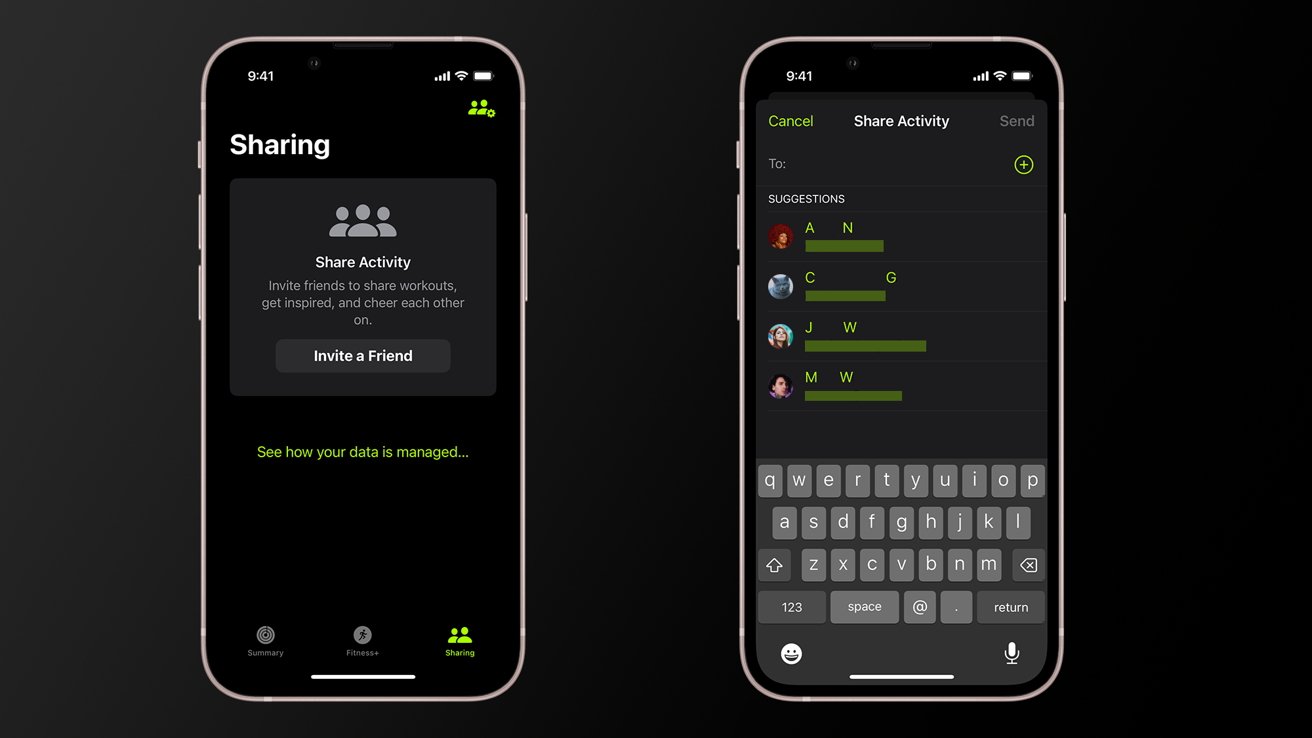
Inviting contacts to share activity
If you want to view your friends' activities, that's simple enough to do as well.
View friends' Fitness activity on iPhone
- Open the Fitness app on your iPhone
- Tap Sharing
Here you'll be able to view highlights of your friends' activity in the Highlights bar. Tapping on a friend's name in the Activity Rings section will give you a summary of their activity rings for the last 7 days and recently completed activities.