
As an Apple user, you have everything you need to start a YouTube channel on your iPhone or Mac right now. Here's what you need to know and what you need to avoid.
YouTube lets any adult upload videos, so you just need an internet connection, a free Google account, and a video to upload. That could seriously be it, and since you have an iPhone, an iPad, or a Mac, you could be making a YouTube channel as easily as making an audio podcast.
But in practice, even though you probably have all of the equipment you need, and certainly all of the software, and you are easily capable of every part of the job, there is more. More that's technical, more that's editorial, and more that's simply about organizing yourself and your channel.
YouTube channels are fiddly because there are so many bits to them — I just counted the steps needed to upload my latest video. From having the video ready, I had to:
- Go to the right section of YouTube
- Select upload
- Drag the video across
- Write a title
- Write a description
- Provide a poster image
- Decide if the video belongs in a playlist
- Specify whether the video is made for children or not
- Confirm whether the video contains any of 11 sensitive topics (ranging from bad language to controversial issues)
- Add ending videos to link to
- Decide whether the video is to be private, public, or unlisted
- Schedule the video
That's not really the full list, either, as depending on your answers to some of the above, there are whole other sections to fill out.
But the issue is not that any one of those is hard — I did originally have trouble making poster images, but after 400 or more, it's straightforward. The issue is that you have to go through that list for every video, every time, and it's just very bitty.
Also, you need to have prepared more than the video. There's the poster image, there's the title and the description, and so on.

There may not be a duller part to making videos, but when you are doing complex ones, take the time to label every single part of the video or images that you're going to use.
For any one YouTube video, you need to plan a series of steps. But then for a whole YouTube channel, if you do not make pretty extensive plans, you might never do it. Or at best you'll make a few videos and give up.
Planning your YouTube channel
It's unusual, although not unheard of, for people to decide to make a YouTube channel without a general idea of what it would be about. But even if you have a quite specific idea of your topic, if you want this to keep going and maybe even earn you some cash, there are four things to consider about your idea:
- Niche ideas do best ("Apple PowerBooks" is better than "Global technology news")
- There must be enough to say that you don't run out of video topics
- It should be a topic you enjoy
- Ideally, it should be at least somehow related to your other work
None of this is about making sure anyone else is interested in watching your videos, but going for a really specific topic is the best way to guarantee that. There may not be all that many people interested in watching someone count through coins to almost never find rare ones, for instance, but every single one of those people will watch every video you make.
The issue of there being enough to say is also crucial. With a podcast, it seems more acceptable to run a short series of them, then take a break, and return later with a further season. That doesn't seem to work with YouTube.

The more videos you have, the better. But you need a topic that has this much to say about it.
So even more than with podcasts, you need material — and you need to be able to make it regularly. If there's anything better than a niche topic to naturally, organically build an audience, it is posting videos regularly.
You can't do that without ideas, and also without enthusiasm, and that's where this issue of being a topic you enjoy becomes important. You have to like your topic in order to make hundreds of videos on it, but also since you do like your topic, you tend to know more about it than people who have only a casual or passing interest in it.
So by making it a topic you like, you are helping yourself to keep going, and you're helping the audience by offering them informed, authoritative information.
Then lastly, making your YouTube channel relate to your other work will again help you keep it going. It will also help promote that other work, and it will mean that your YouTube channel can become a central hub for all you do.
For instance, I've posted a video on my 58keys YouTube channel, specifically for writers who use and who write on Macs, iPhones, and iPads, every single Wednesday since late January 2020. I'm very pleased with having over 12,000 subscribers, and I think it's become a nice community, but it's a very low number compared to many other channels.
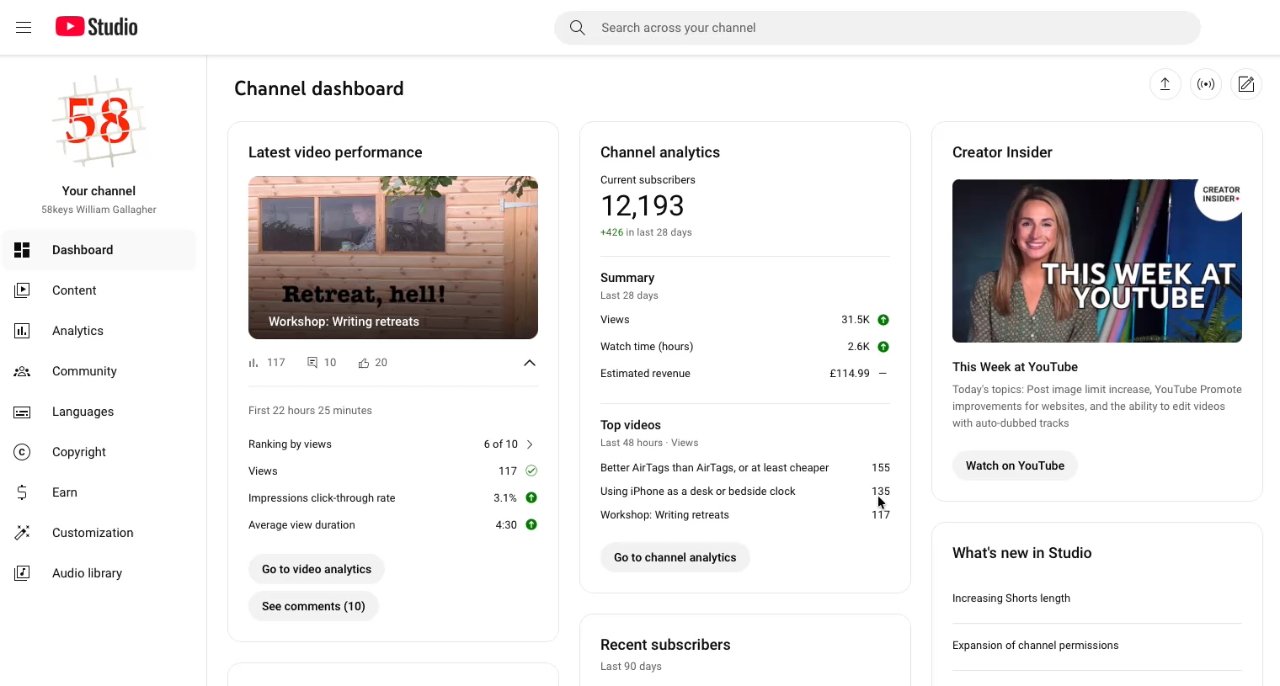
YouTube gives creators a Dashboard with analytics and reports
So while I get a fair amount of income from advertising on my channel, its financial worth has been greater because of what else it enables. I've got presentation and workshop commissions because of it, for instance, plus viewers actually asked me to make a Patreon addition.
Then, too, there is the non-financial side. I'm a drama scriptwriter at heart and don't get much practice at it, except I've now written hundreds of YouTube scripts. I believe I've got better at scriptwriting because of it, and that was originally my whole aim.
Making the idea happen
Technically, you need a camera, a microphone, and some video editing software. If you have an iPhone or an iPad, you already have all of these, as do Mac users with an iMac, a MacBook Air, or a MacBook Pro.
What you definitely need to buy is a tripod, or at least have something like a shelf where you can keep your iPhone steady during filming. I use a couple of Manfrotto tripods, although I've had them all so long that none of them are still sold.

Whether you shoot with the front or rear iPhone cameras, you need a tripod
If you have a Mac mini, a Mac Studio, or a Mac Pro, you also need to get a separate camera and microphone. Really whatever Mac you have, you need these, as for instance an external mic will always be better than even the studio-quality ones in the MacBook Pro.
When you're using an iPhone or an iPad, the built-in cameras are more than sufficient, especially when you shoot using the rear cameras. Use those rear ones if you possibly can, because they do look better than the front selfie ones.
That's even though the specifications suggest you should get the same quality from the front ones.
But then there is a great temptation to use the selfie camera because you can see on the screen that you are positioned correctly, that your face isn't half in the frame and half not.
Only, that exact same ability to see what your final recording will look like is the number one reason YouTube videos can look dreadful. For some absolutely unaccountable reason, YouTubers spend their lives looking at the iPhone screen rather than the lens.
You've seen this. It's why YouTubers seem shifty, like they can't look you in the eye.
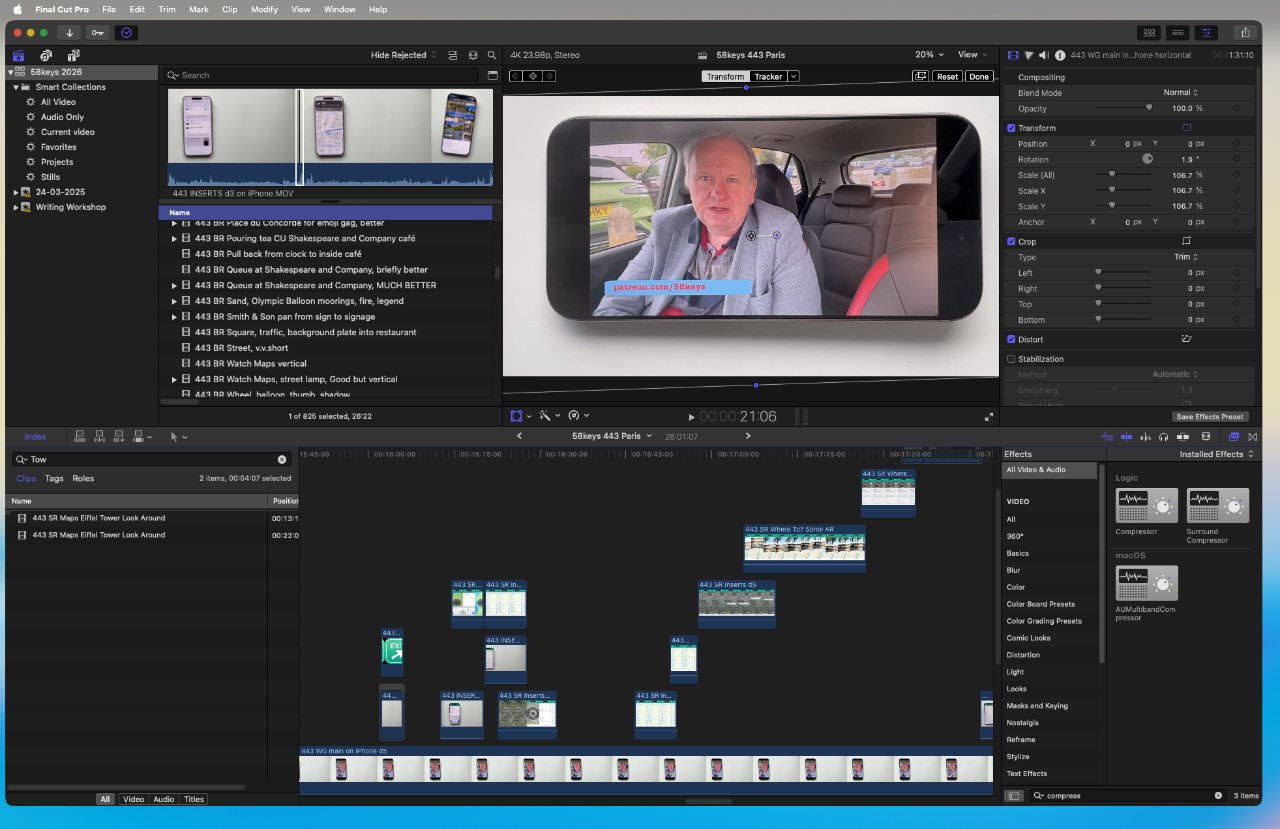
Editing a reasonably complex video in Final Cut Pro
If you use the front camera, check you're positioned when you start recording. Then from that moment on, stare at the iPhone's green dot in order to make eye contact with your viewer.
Shooting with the back cameras prevents all of this because all you can see is the lens. But you can't see if you're positioned correctly — except you do have options:
- Check the camera app on your Apple Watch
- Shoot a test video
- Put a mirror behind the iPhone
All of this is about looking good even when you're just using your iPhone to record the video. But iPhones have great microphones — that are on the base, facing away from you as you shoot video.
This is the real reason that your first purchase, when you can, should be an external microphone. I've gone throughn many, but currently relish the wireless Hollyland Lark M2S.
It's counter-intuitive, but viewers will put up with poor video much more than they will bad sound. Equally, though, there's no need to immediately invest in expensive microphones or cameras, just so long as your audio is clear.
At some point you will want to upgrade the microphone and maybe the camera, or perhaps to buy the excellent Elgato Prompter.
You'll also want to upgrade your video editing software, but you do already have a good one. Every Mac, iPhone, and iPad, comes with Apple's own iMovie, which is more than capable of editing YouTube videos.
Later if you start doing multiple camera setups, say with you and a guest, or you want to add overlays like animated captions, or you need to blur out moving car number plates, there is Apple's Final Cut Pro for $300. Or there's DaVinci Resolve, which while a professional video editing app, comes with a particularly generous free version which again will be more than adequate.
Then there is going to come a time when you want better lighting. To start with, just shoot in daylight in a well-lit room, and do not sit in front of a window.
After that, you can get ring lights that you position just beside your camera. They give you an even lighting, but they are also distractingly prone to being reflected if you wear glasses.

Left: head too low in the frame, looking at the screen instead of the lens, and with poor lighting. Right: the reverse
The left side of the image above has at least three problems, and one of them is poor lighting. To get the better, more even lighting in the version on the right, I have an Elgato Key Light on a stand to one side, and use a couple of different smaller ones to the other side.
That can include an Elgato Key Light Mini, and if that's starting to make this sound like an ad for Elgato, let me finish the job. I also rely on an Elgato Stream Deck.
With that, I can turn the Key Light on and adjust its brightness from my desk, plus I can press a Stream Deck button to switch on a Focus Mode and not get interrupted during filming.
Elgato is not advertising in this feature, though, and I can prove that by saying its Key Light is brilliant when it works. And very frustrating when it suddenly stops.
Video formats and resolutions
With the cameras in an iPhone, you can make 4K videos that are probably far too high quality — because your audiences will be watching them in a small iPhone screen too. Yet there's little downside to filming in the highest quality you can, and there are upsides:
- Some people will watch on TVs
- Low quality videos will look dated after a time
That last wouldn't matter very much if your niche was extremely topical. But the longer your videos remain relevant, they help keep growing your channel.
With more videos and each of them still worth watching years later, you get a long tail effect. You benefit by making yourself a bigger target for people who are searching YouTube.
There are downsides, though:
- Higher quality videos have very large file sizes
- Higher quality videos take longer to upload
My latest 58keys at time of writing is 28 minutes long and shot at 4K comes in at 10.2GB. It took many minutes to upload that to YouTube, though it's never worth timing it because upload speeds to the service vary enormously.
Once that video is uploaded, though, a couple of things happen — starting with how you can delete or archive off your original. Don't do that until the video has been released in case there's a problem, though.

Completely unnecessary and yet so useful: a Stream Deck set to control a couple of Elgato Key Lights
The other thing that happens is that YouTube itself processes your video. It makes versions of it in different resolutions so that it can then deliver the right one to suit a viewer's device and preferences.
So you don't have to worry about making a low-res version, a medium one, and a high-quality edition. But if you give YouTube a 4K one, it will make better-looking lower resolution versions.
One more thing about uploading, though. Give yourself far, far too much time to do it — I upload at least one day before my Wednesday videos are due to go out. When I'm better organized, I upload them on the previous Sunday.
That's because uploads can go wrong. You will sometimes see a download stop part way and there is nothing you can do to get it going again.
Except, what's happened is a problem with that particular YouTube server and there are at least thousands of those. So if you see an upload freeze, just start uploading the same video again as if it's a new one.
It's extremely unlikely that the second upload will also go wrong, but if it does, you just do it yet again.
And when you see that one copy has successfully uploaded, you can delete and cancel the failing ones.
Structuring your videos
If you can turn the camera on, talk for eight to ten minutes, turn it off and then just upload the lot to YouTube, then good for you. The odds are, though, that even if you actually can talk off the cuff, you'll make better videos if you don't.
Consider scripting them, or at least making yourself some bullet-point notes.
And when you inevitably stumble or want to take out a section, have something else visual to show instead. For 58keys, I can always show a screenshot of whatever app I'm talking about for instance, and other YouTubers cover up stumbles by having a second camera and cutting to that.

Final Cut Pro: covering up a bad jump cut by overlaying it with anything else.
Do not do jump cuts. That's where someone in camera suddenly jerks because a section has been cut out.
There is an argument that says jump cuts add excitement to a video, but it's less a school of thought, more a kindergarten. If you see a jerk, you're watching a jerk.
Or at the very least, for me, I'm off wondering what they cut out, what had they said that was so bad they had to edit it, and I'm no longer listening.
Lengths and durations
YouTube videos, including mine, tend to go on for as long as their creator thinks is needed to say whatever it is. This amount of time is usually around a third to a half longer than the viewer actually needs.
But still, it's up to you and it's up to what your audience will watch. However, there is one practical limitation, and it's to do with money.
YouTube now places ads on just about anything, whether or not you personally qualify to get any of the ad revenue this generates. But it will still not place ads in the middle of a video that is shorter than eight minutes.
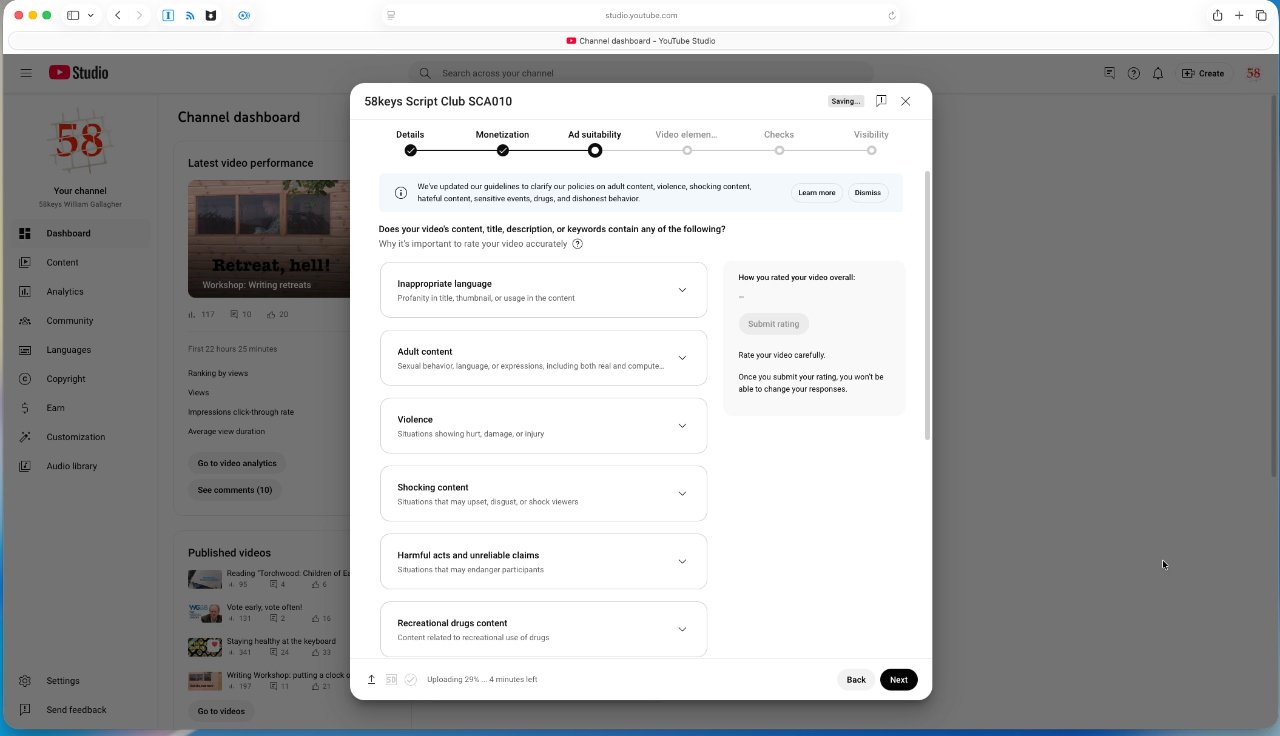
When you are eligible to earn advertising revenue, you have to confirm details about each video as you upload it
Consequently, if anyone took the time to count, you'd probably find that the giant majority of YouTube videos are about nine minutes long.
There are, though, also YouTube Shorts. Those are vertical videos that run for at most three minutes, although much shorter is preferred.
For a long time, the theory was that YouTube Shorts are more effective and will reach more people. But your mileage varies: shorts did nothing for my channel at all.
That issue of YouTube placing ads on everything is now a concern. I've taught YouTube channel making to various people and one organization was dead set against having ads because you can't control what gets shown in your videos.
I've argued that this organization may as well accept them now, because their videos are popular and YouTube will put ads in front of them regardless. I figure the organization might as well get a cut.
And I'm less concerned than they are about what specific ads get shown, because YouTube targets the ads to fit the videos.
If you are happy to take some money from YouTube, though, you have to qualify first. You must have at least 1,000 subscribers to your channel, for instance.
And also viewers must have seen at least 4,000 hours worth of your videos in the last 12 months. So if you have a single one-hour video, you might be waiting a while, but the more you have, the sooner you'll hit that figure and be eligible for a share in the advertising.
Keeping a channel running
Advertising is actually one way you could end up seeing your channel stop. Each time you post a video, you have to specify whether or not it includes various issues such as profanity, and if you don't do that right, you could eventually be blocked.
It's far more likely, though, that you will end the channel because you just stop getting around to posting to it.
That's once more probably because of how bitty the process is, the number of steps you have to go through just to get a video up. But you can't disregard the time it takes to make a video.
The fastest I have ever gone from an idea to uploading a video to YouTube is 90 minutes. But I remember that week so clearly because the very next video took over 40 hours.
Maybe a further consideration should be that you need to make your videos as simple as you can.
Yet YouTube is a visual medium. There are many videos that are just a medium close-up shot of the presenter speaking for nine minutes — and for some reason positioning them so low in the frame that you get a eyeful of the wall behind them.
Those videos work, or at least they work well enough. But if you can cutaway to a screenshot, if you can do another angle on the same thing, if you can combine takes from different locations, you are making the video visually more interesting.
Alternatively, just decide where you're going to film. My channel now has three weekly videos, each on very different sub-topics, and each is shot in a different place.

Even without watching any of my videos, you can see immediately when some belong in a series. A consistent visual identity helps with the poster images, but also within each video.
So for instance, one video is always filmed in a garden shed. I don't mention that, I don't expect any viewer to notice and certainly not to care, but it is immediately visually different to the other videos.
And curiously, many, many viewers have noticed and seemingly do care as I've been asked less about which iPad to buy, and more about which shed.
Any visual change is good in a video, but you can also be saving yourself a problem. I just found that in one shot I took outside, for example, that you can clearly see the whole number plate of a car. There is that blurring feature in Final Cut Pro and it's very impressive, but you always notice when something is blurred out.
So I had to think of a different angle, and a reason for that different angle. I shot that, then overlaid that new footage over the audio of the old one, and finished the video.
Finishing videos
I've primarily used my 58keys channel as an example here because it's mine and so I know every pixel of what I have to do to make it run. But take a look at the AppleInsider YouTube channel — it will appear at first to be very different to mine, yet behind the scenes it's the same.
Since it's such a large channel, it benefits from automating as much of the publishing process as it can. There's also a well-oiled machine that knows the best times to publish, and is practiced in when and where to promote videos too.
Plus there are simply many more videos on AppleInsider than I make, yet it's exactly as regular as my channel. It's broader than mine, but it's also still niche in the sense that you know it's never going to feature a video about coin collecting.
AppleInsider on YouTube is also made with more professional audio and camera equipment than I have. Maybe at some point I'll upgrade to a dedicated camera system, but if there's one lesson about YouTube, it's that the editorial decisions you make are at least as important as the technical ones.


