
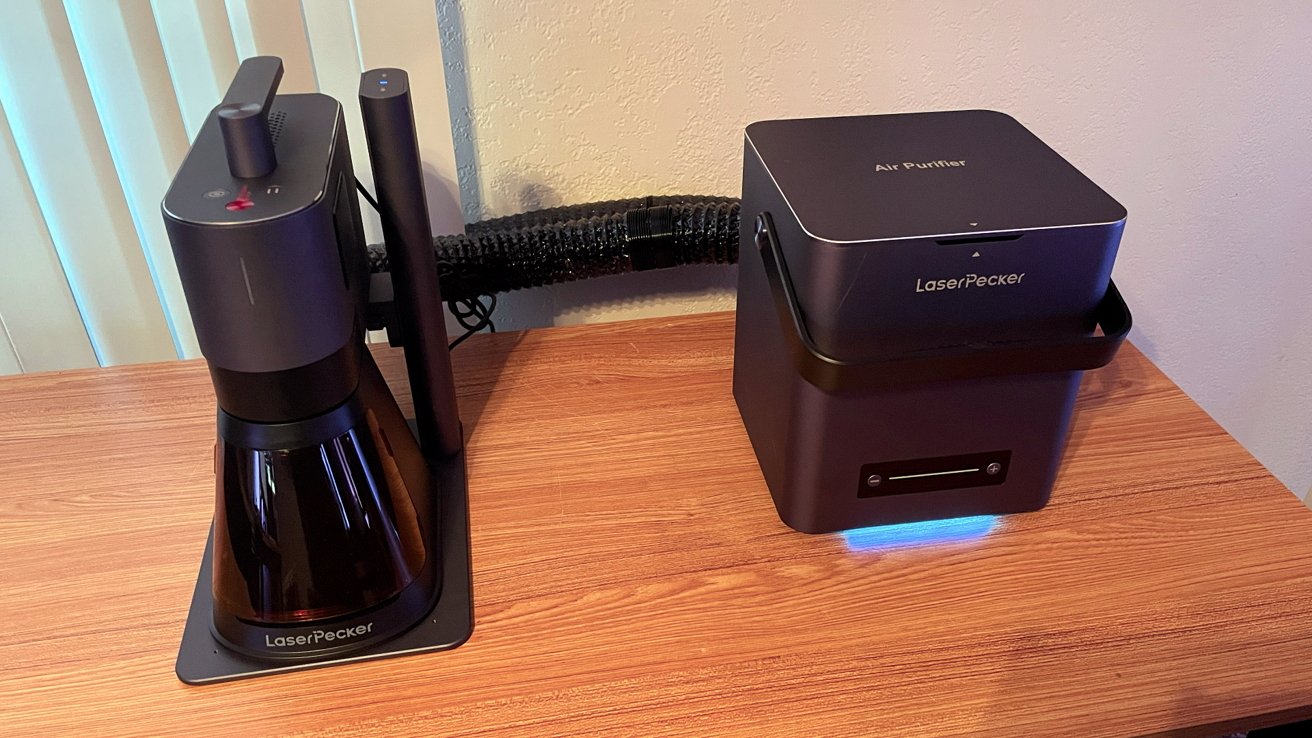
Obvious branding joke aside, the LaserPecker LP5 is a great laser engraving investment for a small Mac-centric Etsy business, but personalization does come at a hefty price.
Like many people, I am an avid Etsy shop customer. I am a "Forever Gamemaster" for tabletop role playing games and I am always looking for fun and cool accessories to store dice, cards, and other little fun things.
It's either buy it at markup from somebody else, or make it yourself.
If you buy it yourself, Etsy is filled with small shops catering to these needs. If you shop consistently, you begin to see patterns in materials and production.
Outside of handcrafted items and 3D printer goods, the type of craft I notice the most are laser-engraved and laser-cut products made with home engravers.
In 2025, crafters and sellers across Etsy and individual websites hone their skills to produce a near infinite array of crafts and goods. All with the need for customization, speed, and flexibility as the pillars for any successful side hustle or small business.
For many home businesses, spare rooms, garages, or external work sheds are not an option. Proper, functional equipment that delivers quality products while occupying a small workspace footprint is therefore incredibly valuable.
If there are universal truths in this world, one of them surely must be that with enough time, research, and investment, nearly every genre of technology can be improved to meet and exceed the needs of consumers. It was only a matter of time before home crafting technology relying on laser cutters and etchers would follow suit.
In an industry with many brands, the China-based company LaserPecker has made considerable strides since its founding in 2017 and the launch of its first product, the LP1 Pro in 2019.
LaserPecker continues to release new iterations of its laser etchers and cutters, winning several industry awards in the process. It's also garnered the support and approval of customers worldwide with innovations like dual laser machines, as well as a consistent build quality that eclipses other, cheaper products.
The latest projector offering is the LaserPecker LP5, a smart 20W Fiber and Diode laser engraver.
LaserPecker sent the LP5 and a variety of accessories for me to put through the paces in a small apartment environment to see if its products live up to the hype.
LaserPecker LP5 Review: An overview
The LaserPecker LP5 is touted as the industry's smallest 2-in-1 dual laser engraver, equipped with 20W fiber and 20W diode lasers. The lasers are capable of engraving and cutting a wide range of materials from stainless steel to aluminum, plastic, wood, leather, glass, and more.
My testing environment consisted of my one-bedroom apartment with minimal space, a dedicated crafting desk, and a patio door for added ventilation. What some may consider a very small home workspace.
LaserPecker LP5 Review: Specifications
- Dimensions: Laser Unit - 255 x 98 x 183mm (10.0 x 3.9 x 7.2 inches)
- Electric Stand - 198 x 286 x 323mm (7.8 x 11.3 x 12.7 inches)
- Conical Protective Cover - 167 x 231 x 160mm (6.5 x 9.1 x 6.3 inches)
- Product Weight: Laser Unit - 3.36 kg (7.4 pounds)
- Electric Stand - 2.28 kg (5 pounds)
- Conical Protective Cover - 0.38 kg (0.83 pounds)
- Total Weight: 6.02 kg13.3 pounds
- Laser Type: 20W 450nm Blue Diode Laser / +20W 1064nm Fiber Laser
- Supported Materials (20W 1064nm Fiber Laser): Stainless Steel, Aluminum, Brass, Silver, Plastic, Platinum, Titanium
- Supported Materials (20W 450nm Blue Diode Laser): Wood, Acrylic, Leather, Glass, Rock, Paper, Rubber
- Working Area: 120 x 160mm (Ellipse) 160 x 300mm (with the Slide Extension)
- Maximum Working Speed: 10000mm/s
- Cutting Depth (Brass/Stainless Steel/Aluminum/Titanium sheets): Up to 1mm
- Cutting Depth (Black Acrylic): Up to 15mm
- Cutting Depth (Basswood): Up to 20mm
- Max. Processing Height: 137mm
- Max. Rotary Engraving Diameter: 200 mm
LaserPecker LP5 Review: Opening the box
The LaserPecker LP5 arrived in a meticulously well-packed box with more foam padding and reinforcement than I have ever seen in a review product before.
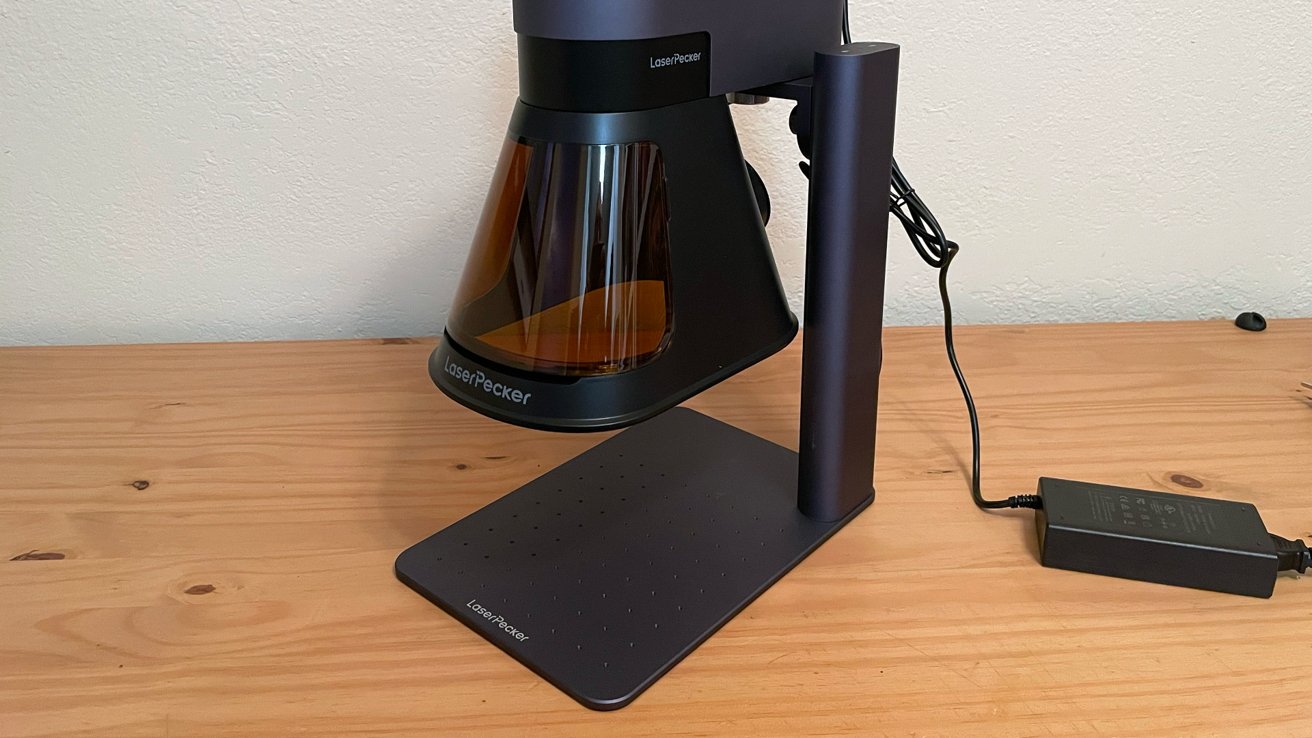
LaserPecker LP5 Review: The conical protector on the stand
The product box is clean and branded with LaserPecker logos and text, with each component box on the inside labeled very clearly.
The base LaserPecker LP5 model includes the following:
- LP5 Laser Unit
- Electric Stand (for raising and lowering the laser unit)
- Base Plate
- Conical Protective Cover
- Power Cable and Adapter
- USB-A to USB-C cable 1.5m x1
- USB-A to USB-C cable 0.6m x1
- Exhaust Pipe and Pipe Adapter
- USB Flash Drive
- L-Shaped Positioners x2
- Safety Glasses
- Toolbox
- User Manual
- Material Pack (aluminum sheets, wood sheets, leather sheet, granite disc, coins, and wood keychains)
Out of the box, one fact is abundantly clear: The LaserPecker LP5 is phenomenally well made.
Every piece and part are machined and precise. The laser unit is weighty but portable, and everything from the conical cover to the USB cables are the highest quality.
I was half expecting something that was average or even a little flimsy (having not been familiar with LaserPecker until now) but I was wrong. This hardware is next level in quality.
Absolutely nothing about the LaserPecker LP5 feels cheap or like an afterthought. Every single detail on the hardware is meticulous and just works, meaning the LaserPecker LP5 feels like the peak culmination of years of research, investment, and user feedback.
LaserPecker LP5 Review: Accessories
The focus of my review will be the LaserPecker LP5 itself, but I will also cover the functionality of the accessories LaserPecker sent along as well, as they offer bundles in their online store and a few of these are true game changers.
LaserPecker Desktop Air Purifier: A small, portable desktop air purifier that attaches to the LaserPecker LP5 via exhaust piping (included with the unit). It filters the air away from the workspace, toward an exhaust hood, or outside via door or window with a second exhaust pipe.
The Desktop Air Purifier includes extra filters, with the average lifespan of a filter lasting 3-6 months based on consistent use.
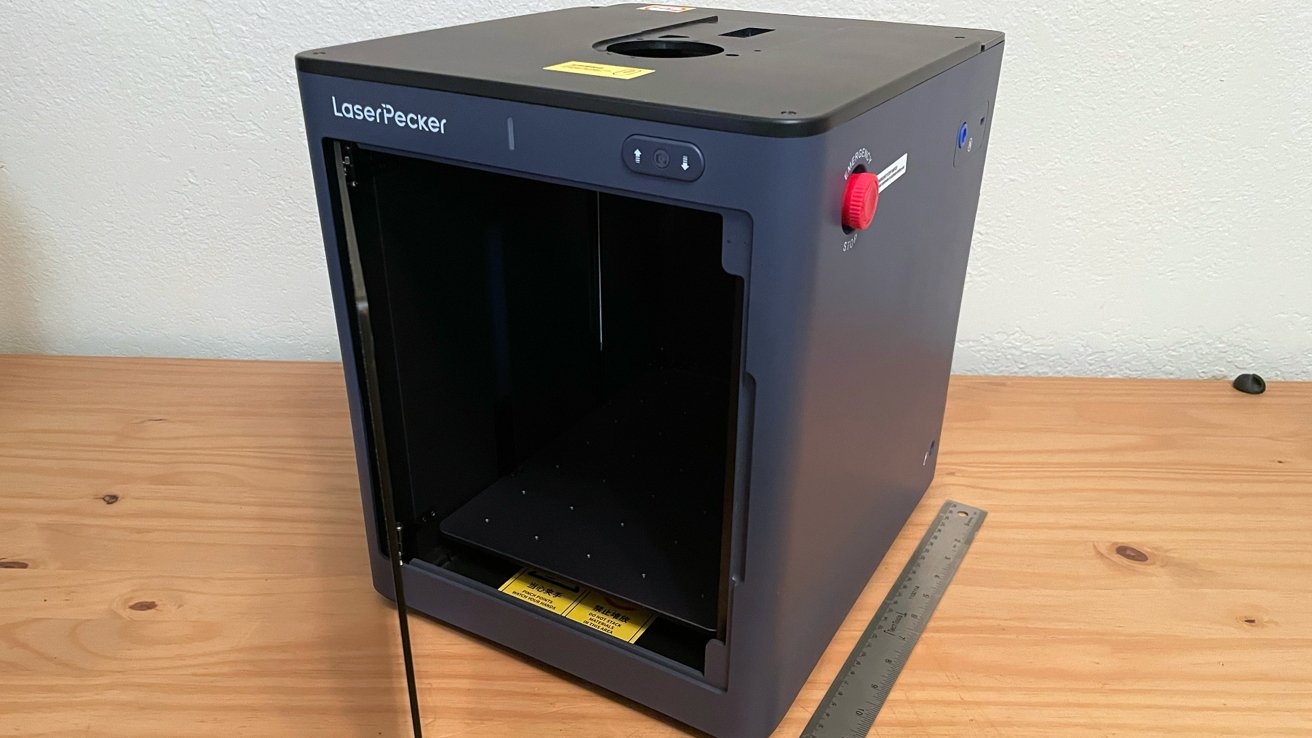
LaserPecker LP5 Review: The safety enclosure is great for previewing your engravings
LaserPecker Slide Extension: A portable slide extension designed to expand the working area of the LaserPecker LP5, allowing for larger work and easier batch processing.
The Slide Extension connects to the LaserPecker LP5 via USB and works in concert with the laser unit and processing software to move the slide extension as needed. This means you do not have to manually move the extension plate while working.
LaserPecker Rotary Extension: A portable extension for the LaserPecker LP5 that allows you to engrave cylinders, handles, bottles, etc.
It is a niche optional extra, but the quality of the build and integration is on the same level as everything else, and if I had the materials for a full test, I would have explored it further. I will in the future.
LaserPecker LP5 Safety Enclosure: An amazing enclosure that delivers added safety, less mess, and a fantastic internal smart camera system for fast and easy setup with image and live engraving previews.
LaserPecker LP5 Review: Setting up and the LaserPecker app
Unboxing and setting up the LaserPecker LP5 will take time. It is not a painful process at all, and I am happy to report that it is largely plug-and-play, but there are a few steps and small hurdles to overcome.
First, the components are clearly marked, and the assembly instructions are very clear, with LaserPecker quite literally including all the tools needed to assemble the LaserPecker LP5.
I had the laser unit, electric stand, and base plate assembled and on my desk in less than 20 minutes.
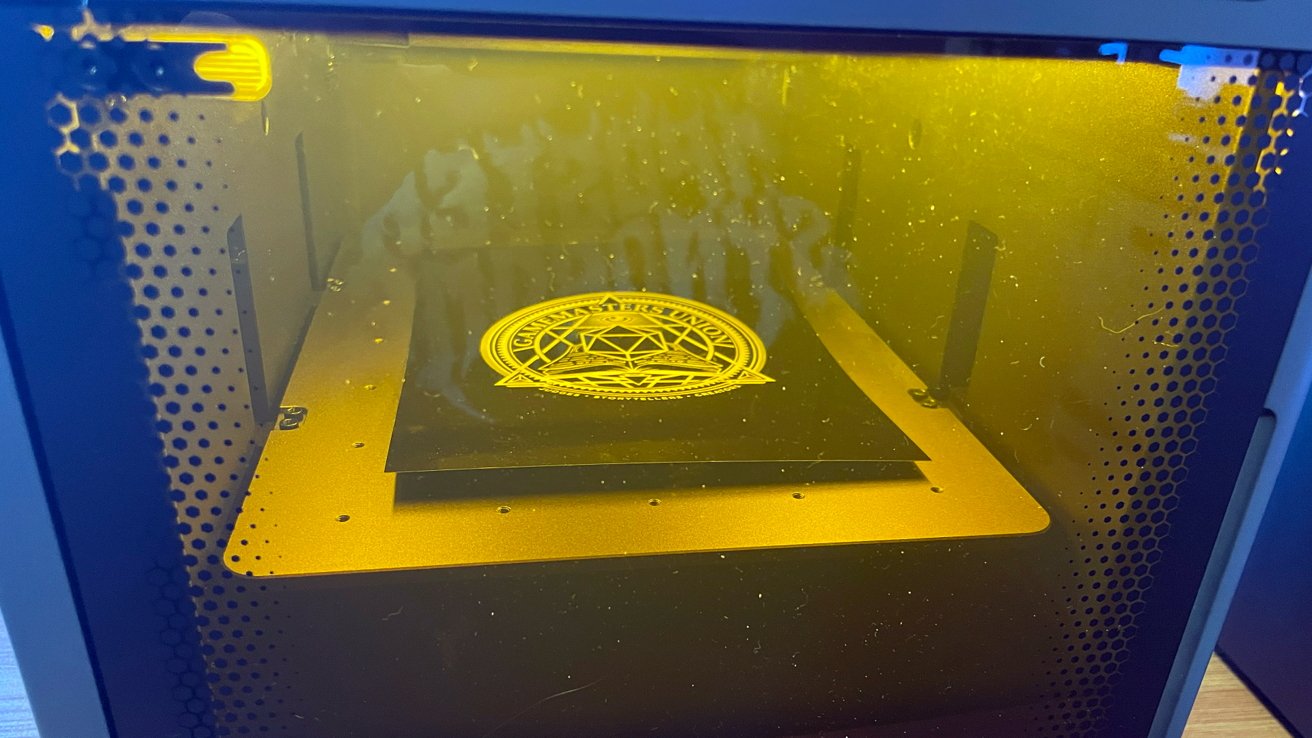
LaserPecker LP5 Review: Engraving in action
I also pre-attached the exhaust pipe and adapter to the exhaust vent on the laser unit. I knew that I would need to direct the exhaust outside of my patio door to reduce any strong odors produced by engraving.
I also unboxed and assembled the optional accessories (LaserPecker Desktop Air Purifier, LaserPecker Slide Extension, LaserPecker Rotary Extension, LaserPecker LP5 Safety Enclosure). This added another 30 minutes to the assembly process, but again, all the instructions are very clear and LaserPecker includes all the tools needed to assemble each piece.
Assembly was a smooth process, but I hit my first hiccup with the initial setup and connection of the LaserPecker LP5 for printing.
The LaserPecker LP5 connects via wired USB cable and Wi-Fi network, but to enable the Wi-Fi function, you must connect the laser unit to your Mac or PC via USB-A to USB-C first (USB-C port required on your computer) with the cable provided and initialize it though the LaserPecker Design Space app downloadable from the LaserPecker website.
Do not do what I did and set everything up for engraving, ventilation, etc., only to then realize you will have to move the unit closer to your computer for this process.
Once I connected via USB cable, I launched LaserPecker Design Space and powered on the LaserPecker LP5.
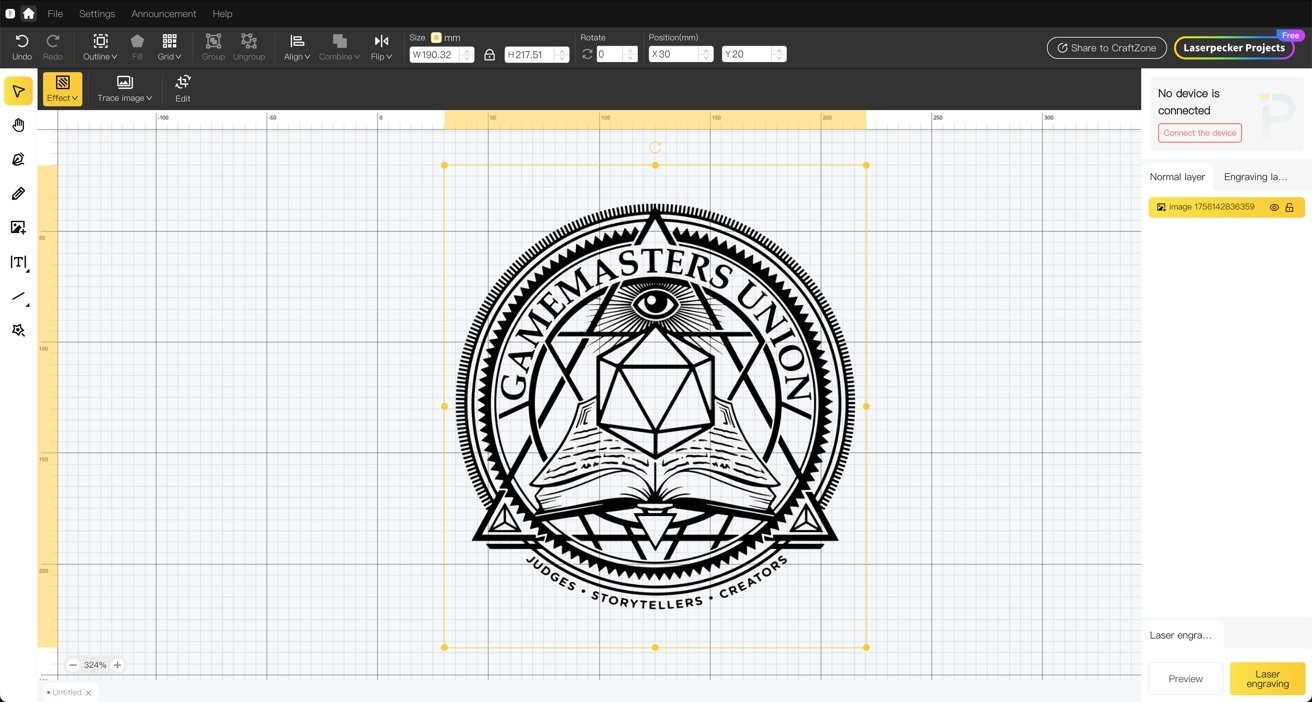
LaserPecker LP5 Review: The app for managing the engraver
I then discovered that the instructions in the app for allowing the unit to join the Wi-Fi network were not intuitive. I had to find a video on YouTube from LaserPecker to figure it out.
You must launch a new project in the app and then you can see the laser unit to add it to the network. I believe LaserPecker does it this way for businesses running multiple LaserPecker LP5 units so that specific projects feed to specific units.
This process took a few attempts, but it eventually worked with a series of power cycles. It was annoying due to it being the type where the order of operation in launching the app before powering on the LaserPecker LP5 matters.
Once I added the LaserPecker LP5 to my Wi-Fi network, I addressed the firmware updates prompted by the app. Again, this took multiple attempts to work properly, with the LaserPecker LP5 losing connection to the network and repeated failed download attempts.
When it did finally work, the update was a fairly slow process.
This is also a small thing, but CMD+Q does not close the LaserPecker Design Space app like every other application on Mac. In fact, the only way to close the app is by clicking the X in the window to receive the prompt to quit.
When the firmware updates were completed and I had relaunched/restarted everything, the LaserPecker LP5 worked perfectly with the network. I this was a permanent setup for me, I think I would opt for a static wired connection to save myself any possible future issues.
The LaserPecker Design Space app does not feel like a macOS application, but rather an 85 percent port over from Windows. In my research on LaserPecker, this seems to be consistent.
On the upside, this version of the app reads much improved, and with continued development, I hope they can dial the little annoying bits in.
LaserPecker LP5 Review: Engraving experience
The good news about the LaserPecker Design Space app and the LaserPecker LP5 is that once you are set up and running, it is a truly wonderful experience.
For my first tests, I used only the LaserPecker LP5 without any accessories to gauge the core experience and assess the difference the accessories make.
With the LaserPecker LP5 powered on and the app open, I started a new project and followed the tooltip and prompts in the app. This was all to import a PNG of my d20Monkey logo for a small test print on one of the basswood samples included with the LaserPecker LP5.
In minutes, I had the file open, sized, and ready to engrave with the Preview window and artboard template showing me where the logo would engrave on the base board.
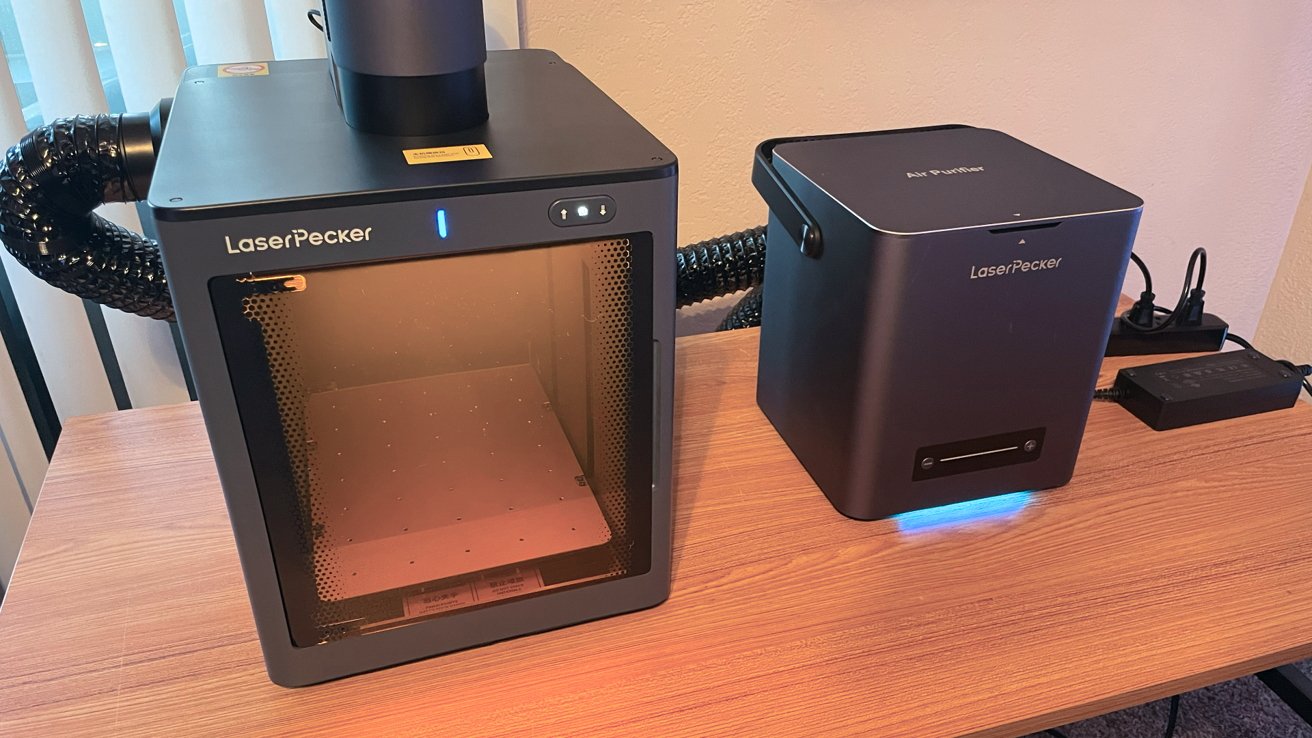
LaserPecker LP5 Review: You can see the engraving within the safety enclosure
The LaserPecker app includes a variety of presets for materials to make getting started even easier. You can always manually adjust the number of passes, power, depth, and frequency of each project.
The customization is deep, and you will need to research depths and settings to dial in the perfect pass manually. Thankfully, the LaserPecker website provided recommended settings for all materials.
With my preview confirmed, I lowered the conical enclosure for safety and engraved the logo, expecting several minutes to pass. Shockingly, the small logo on wood required less than a minute to process, and it looked great for a first pass.
To test the accessories, I opted for a more complex design on aluminum and utilized the Safety Enclosure and Air Purifier.
Once again, I loaded artwork into a project in moments, confirmed the settings based on the recommended parameters for aluminum, and set the LaserPecker LP5 to work. The total time for the larger, more detailed piece was minutes, but the result was perfection.
Again, I was floored. I bugged my editor, Mike Wuerthele, very early in the morning with what it spat out. He was similarly impressed, and he's a tough critic.
The addition of both accessories is a game-changer, and I cannot recommend them enough. Both pieces work wonderfully and bring so much value to the LaserPecker LP5 experience.
The quality of life that you get with those accessories from the Air Purifier is self-explanatory for a small apartment space like mine. The overall cleanliness, reduced noise, and safety of the Safety Enclosure is undeniable.
I also love the smart camera in the Safety Enclosure for batch engraving, as it provides a preview in the app to place the design where items are placed on the base board. This is huge for making the most out of a single batch engraving pass to maximize space on the small board.
LaserPecker LP5 Review: Noise and space
This brings me to a few of the downsides of the LaserPecker LP5. The first is the noise.
By no stretch of the imagination should anyone expect a powerful machine like the LaserPecker LP5 to be whisper-quiet. It isn't, and the exhaust noise is loud.
This is not a machine you run while people are sleeping or napping nearby. I personally do not mind the noise with the LaserPecker LP5, as it comes as a price for the quality work it does.

LaserPecker LP5 Review: An example engraving
Next is the relatively small work area. The entire work area of the LaserPecker LP5 is slightly smaller than 8.5 x 11 inches, and the inclusion of the Slide Extension helps with this, but it is not a huge size difference.
The Slide Extension primarily facilitates added batch process work and a bit more real estate. It works well, but it was not a game-changer for me, and anyone expecting to engrave large works should weigh this carefully.
LaserPecker LP5 Review: A Business in a box, with a steep investment cost
The final issue is the retail price. The LaserPecker LP5 Standard Bundle retails in the LaserPecker shop for $2,999 and does not include the Safety Enclosure or the Air Purifier.
LaserPecker offers bundles that include accessories, or you can purchase them individually. But with the cost of the LaserPecker LP5, $399 for the Air Purifier, and $599 for the Safety Enclosure, the price tag for the prime LaserPecker LP5 is steep.
You are absolutely getting top quality with the LaserPecker LP5. However, this is a cost equals quality situation, and a massive investment for the casual consumer.
The LaserPecker LP5 is aimed directly at small businesses or thriving Etsy creators with a need for solid work and batch engraving. This would be an amazing investment for aspiring business owners or side hustles.
It's an amazing investment, yes. What it is not, is a small investment.
LaserPecker LP5 Pros
- Easy setup
- Incredible build quality
- Fast, high-quality engraving
- Solid accessories
- Solid app performance (outside of Wi-Fi connection issues)
LaserPecker LP5 Cons
- Massively expensive
- Excessive Noise
- Fumes and smell noticeable without ventilation
- Tedious connection to Wi-Fi network
Rating: 4 out of 5
Where to buy the LaserPecker LP5
The LaserPecker LP5 is available in the LaserPecker store for $2,999. It's also available from Amazon, starting from $2,999.