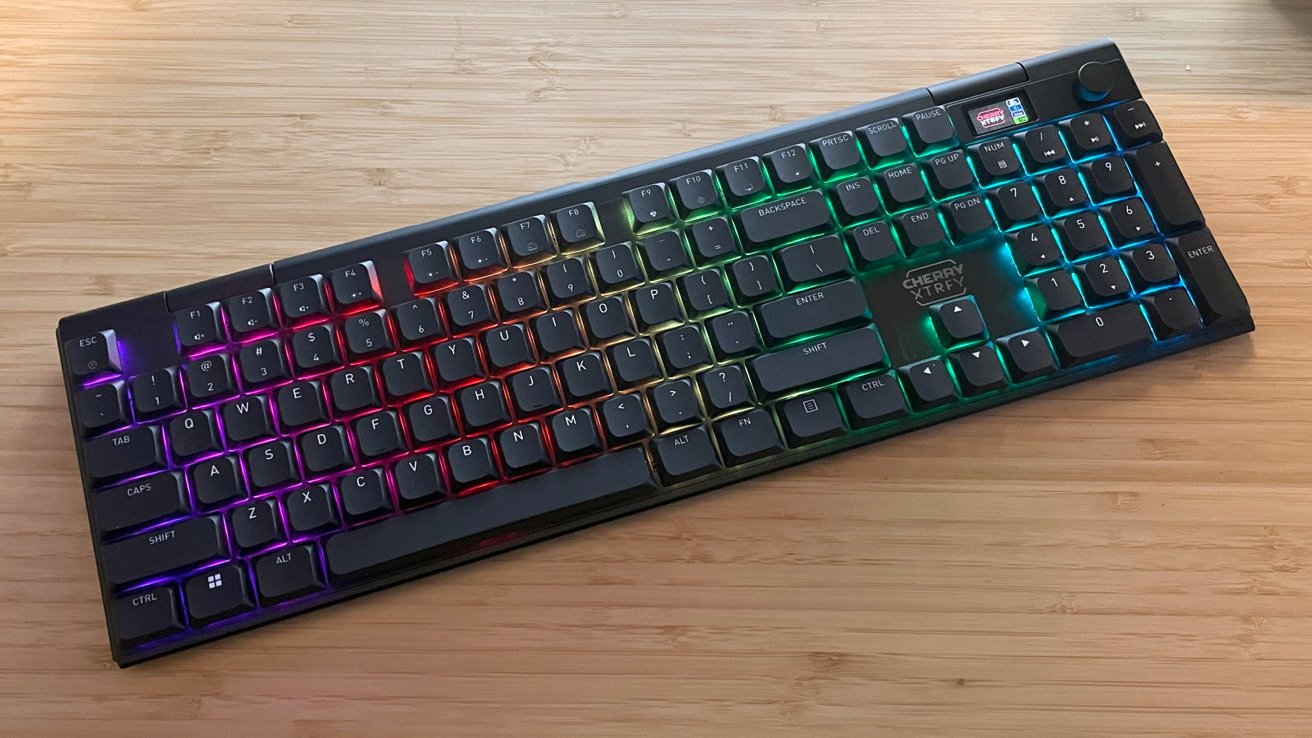
The Cherry XTRFY MX 10.1 may be a large mechanical keyboard and a bit expensive, but it is absolutely one of the best to come out from the manufacturer with good — but not perfect — Mac support.
Cherry carries the reputation of being one of the first manufacturers to produce keyboards and peripherals for home computing. It has a production history dating back to the vintage arcade machines of the 1950s.
For decades, it has produced top-quality computer keyboards and accessories. As someone with personal experience testing Cherry products, I was excited to be asked to look at one of their newest low-profile mechanical keyboards aimed at macOS and Windows users: The Cherry XTRFY MX 10.1.
I spent a week with the MX 10.1 as my daily use keyboard. All to see how it compares to other third-party manufacturers stepping into the Mac keyboard market.
Cherry XTRFY MX 10.1 Review: Unboxing
The MX 10.1 is a full-size, 100 percent low-profile mechanical keyboard. It arrives in a simple and sturdy box with Cherry vibrant red and black branding.
Cherry offers the MX 10.1 in two colors: black (with black keycaps) and silver (with white keycaps).
The color options here are basic and straightforward, but I appreciate that we have options to match light or dark-themed aesthetics. Especially considering Cherry does not have a history of offering a wide variety of colors.
Inside the box:
- Cherry XTRFY MX 10.1 keyboard
- USB-A to USB-C cable
- USB 2.4Ghz dongle
- Manual
Cherry XTRFY MX 10.1 Review: Specifications
- Layout: 100% QWERTY ANSI US Layout
- Connectivity: Cable Wired, 2.4GHz, Bluetooth 5.0
- Dimensions: 16.81in x 5.28in x 1.06in
- Weight: 39 oz.
- Case Material: Anodized Aluminum
- Plate Material: Metal
- Keycaps Profile: DSA Low-Profile
- Keycaps Material: PBT Plastic
- Hot-swappable: No
- Adjustable Feet: Yes
- RGB Backlight: Per-Key South-Facing LEDs. Still and Dynamic, Singular Color and RGB
Cherry XTRFY MX 10.1 Review: Build Quality
Out of the box, the MX 10.1 feels hefty and very, very durable.
The case is hard anodized aluminum, and the keys are smooth and easy to read. Everything from the adjustable feet to the radial dial, and the small LCD display looks and feels amazing.
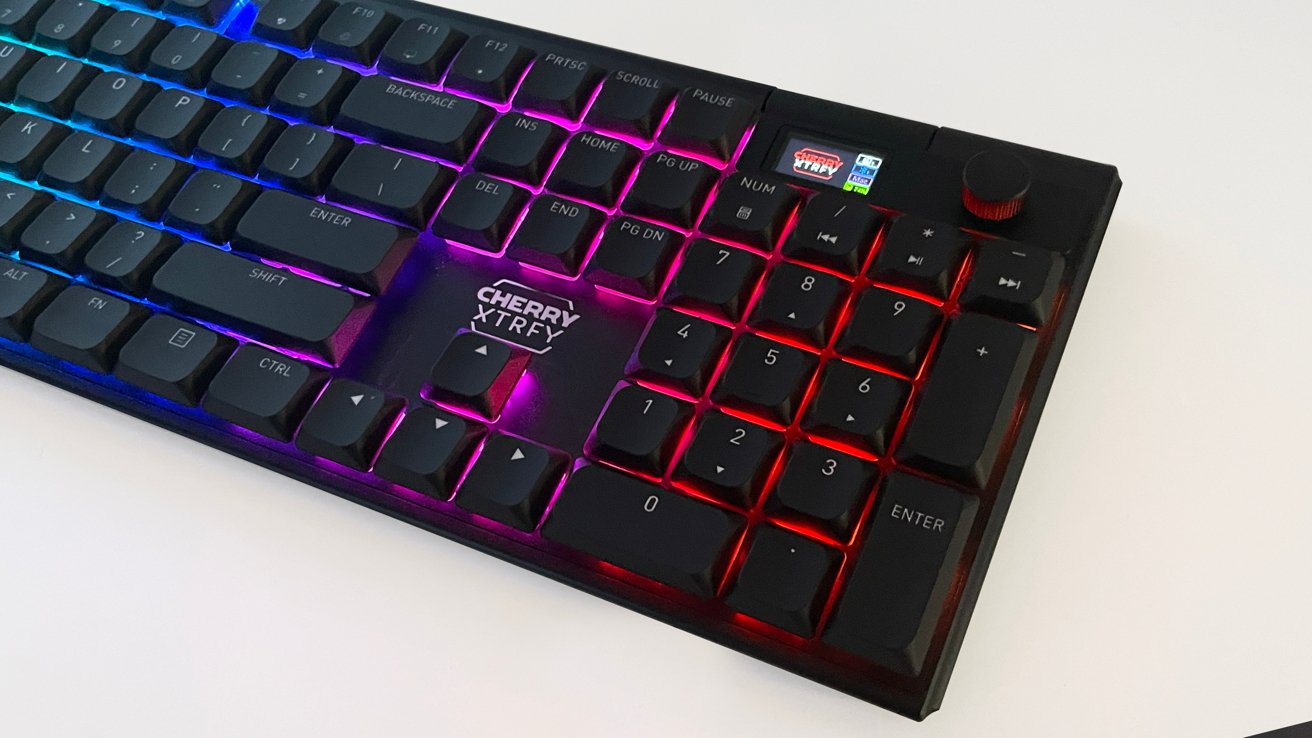
Cherry XTRFY MX 10.1 Review: The numpad on the right
Cherry has a solid track record with the build quality of its keyboards, from hard plastic to hard aluminum, like the MX 10.1. It's not surprising how excellent this keyboard looks and feels.
The components and pieces of the MX 10.1 feel high-end and long-lasting for daily use.
The instruction manual for the MX 10.1 looks like a small, staple-bound graphic novel. This is a step up from other Cherry manuals that fold out like a flimsy poster.
Cherry is a worldwide company, so it is not surprising to see it accommodate the wide range of languages needed across their consumer base. However, the smaller font size method of delivery left my Gen X eyes struggling a bit to read the setup instructions.
Cherry does not provide a PDF of the manual on its website product page or in its downloads section. I simply cannot understand why such a large manufacturer with a worldwide consumer base cannot be bothered to provide a simple instruction manual PDF.
The MX 10.1 utilizes Cherry MX Ultra Low-Profile 2.0 Tactile switches that are made exclusively by Cherry in Germany. With the keyboard not including key puller tools or additional keycaps and switches in the box, the MX 10.1 is not hot swappable.
The MX 10.1 features RGB LED keyboard lights, complete with a variety of color lights and preset configurations for color, pulses, waves, and so on.
The back of the keyboard has a single USB-C port and two switches. One simple switch for macOS or Windows use, and another for selecting the Bluetooth, Wi-Fi, or USB cable connection.
At the bottom of the keyboard are strong, foldable feet to adjust the height and typing angle of the MX 10.1. I appreciate this as someone who uses keyboards for both work and gaming.
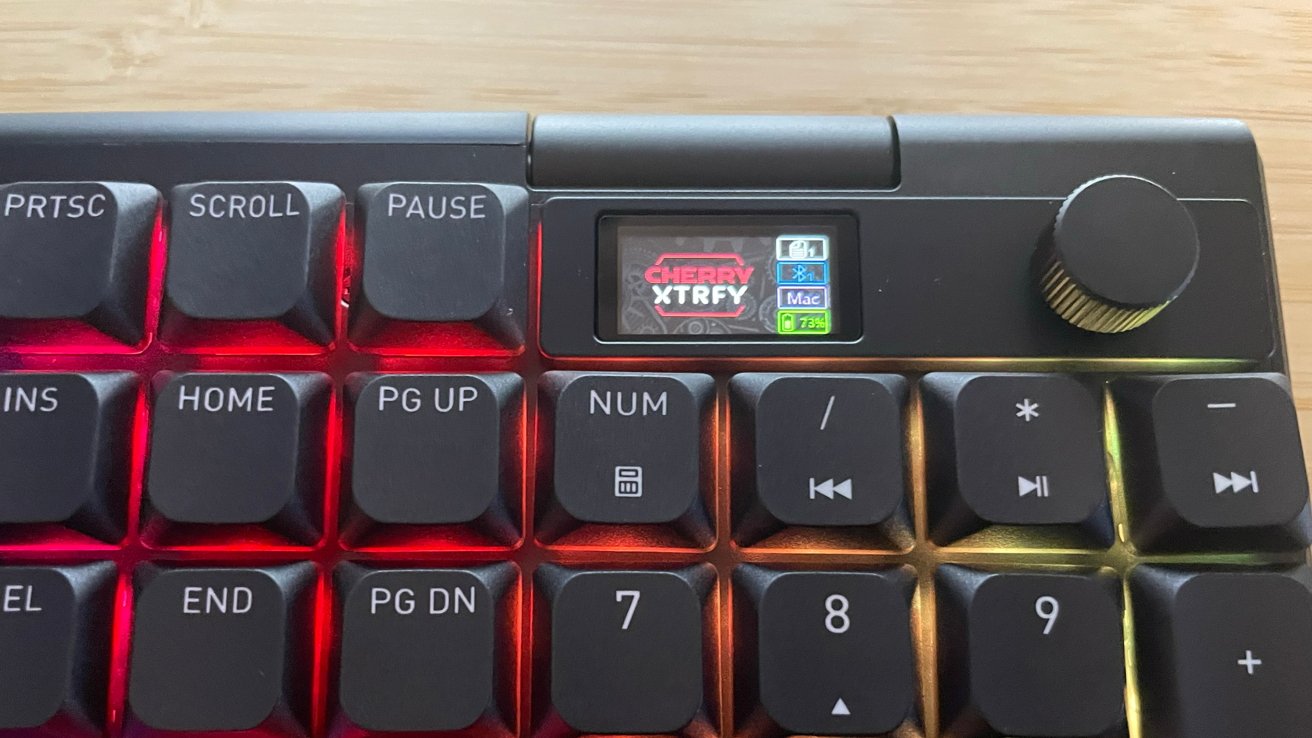
Cherry XTRFY MX 10.1 Review: A close-up of the screen
The party piece of the MX 10.1 is the combination radial dial and small LCD screen built into the keyboard. This combination allows hands-on adjustments to volume, lights, settings, brightness, speed, multiple profiles, Bluetooth pairing, and toggling through active media.
The LCD screen is bright and clear. The simple rotate-and-push controls for the onboard menu are easy to navigate and straightforward.
This is a novel addition, but I like tactile volume controls. The addition of extra menu/setting options for the MX 10.1 is an added value for macOS users.
Cherry XTRFY MX 10.1 Review: Continued Lack of Mac Options
Cherry offers a range of software options for its products, with the Cherry Keys and Cherry Utility focused on deep customizations from key bindings to the behavior of the keyboard backlighting.
However, a mark against Cherry remains in that all the proprietary Cherry software is Windows only, with no macOS options available.
The manual instructions, base functionality, and the settings menu on the LCD screen within the MX 10.1 allow it to work with both Windows and macOS. But the lack of Mac software excludes changing key binds, lighting, and macros.
Cherry is a large manufacturer, and putting its money where its mouth is with Mac user support should not be too much to ask.
Cherry XTRFY MX 10.1 Review: In use
Aside from the lack of Mac software, I tested the MX 10.1 for a month prior to writing this review. It was an excellent experience, outside of one specific issue I have in my workspace.
Pairing the MX 10.1 to my Mac Studio via Bluetooth was quick and painless.
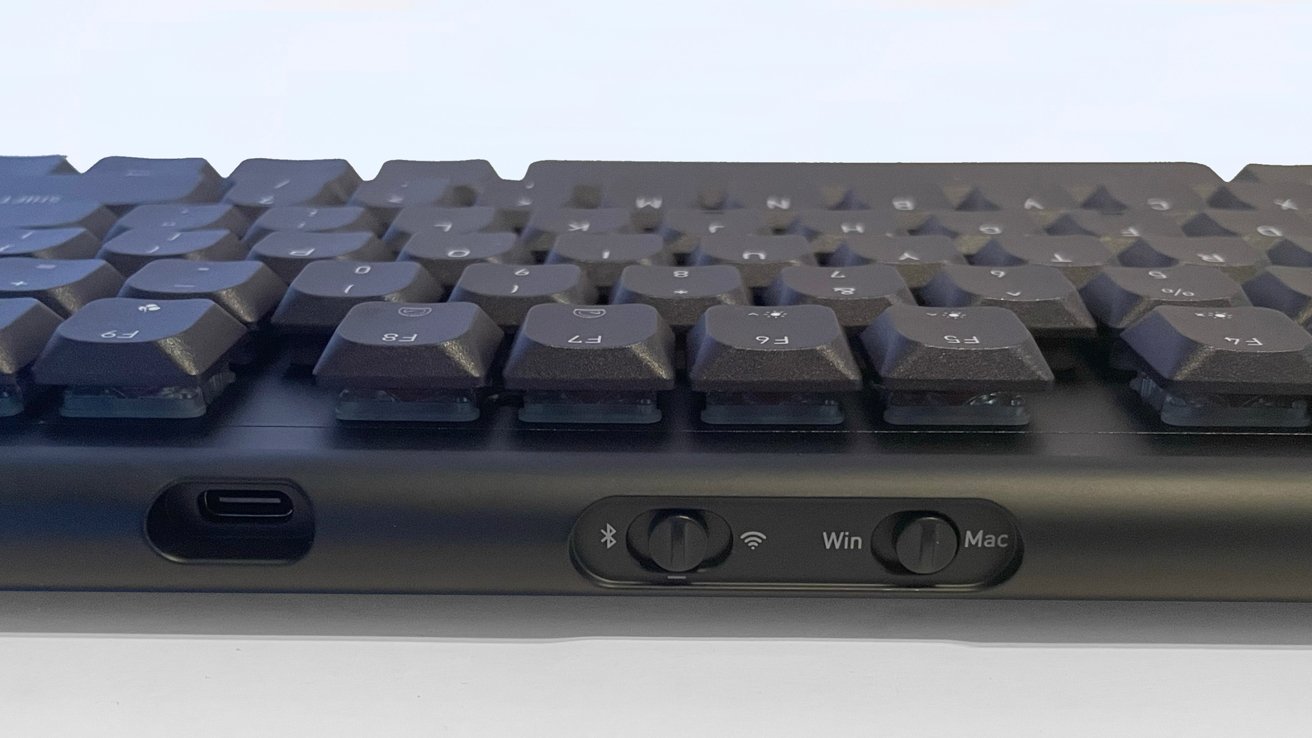
Cherry XTRFY MX 10.1 Review: Rear USB-C and switches
The MX 10.1 allows you to pair it to up to three devices through Bluetooth, using the radial dial to switch between paired devices with ease, as well as a USB cable connection for use and charging, and a USB 2.4Ghz dongle connection. I tested all of these features, and they all work wonderfully.
Typing on the MX 10.1 is smooth and wonderful, with the Cherry low-profile switches providing a soft resistance. You get to hear a muted "Thok" sound while working.
Gaming on the MX 10.1 is a smooth experience as well, as I connected it to my gaming PC to test both tactile quality and the multi-device swapping features.
My only working issue with the MX 10.1 is the footprint it occupies in my workspace. The MX 10.1 is a full-size keyboard with a full number pad that requires a larger footprint than a Mac Magic Keyboard.
I use a drawing tablet stylus with my dominant right hand and use key commands with my left hand on the keyboard. I am accustomed to a smaller keyboard footprint that is easier to move around.
With the MX 10.1, you will sacrifice workspace real estate.
The sturdy weight and rubber grips on the bottom of the MX 10.1 greatly reduce incidental sliding. For me, this hindered my usual muscle memory and workflow.
It is a very specific problem for me and for other illustrators who need a small keyboard for their non-drawing hand.
The weight and sturdiness are excellent features for typing, gaming, and traditional use that most consumers will appreciate. Outside of illustrating times, I did as well.
Cherry XTRFY MX 10.1 Review: Excellent mechanical keyboard
The MX 10.1 is an excellent mechanical keyboard and one of Cherry's finest offerings. From the build quality to the comfort of use, there are too many positives about the MX 10.1 that eclipse the small drawbacks.
The retail price of $249 pushes the MX 10.1 into a higher retail bracket for mechanical keyboards. This makes the MX 10.1 an investment rather than an impulse buy.
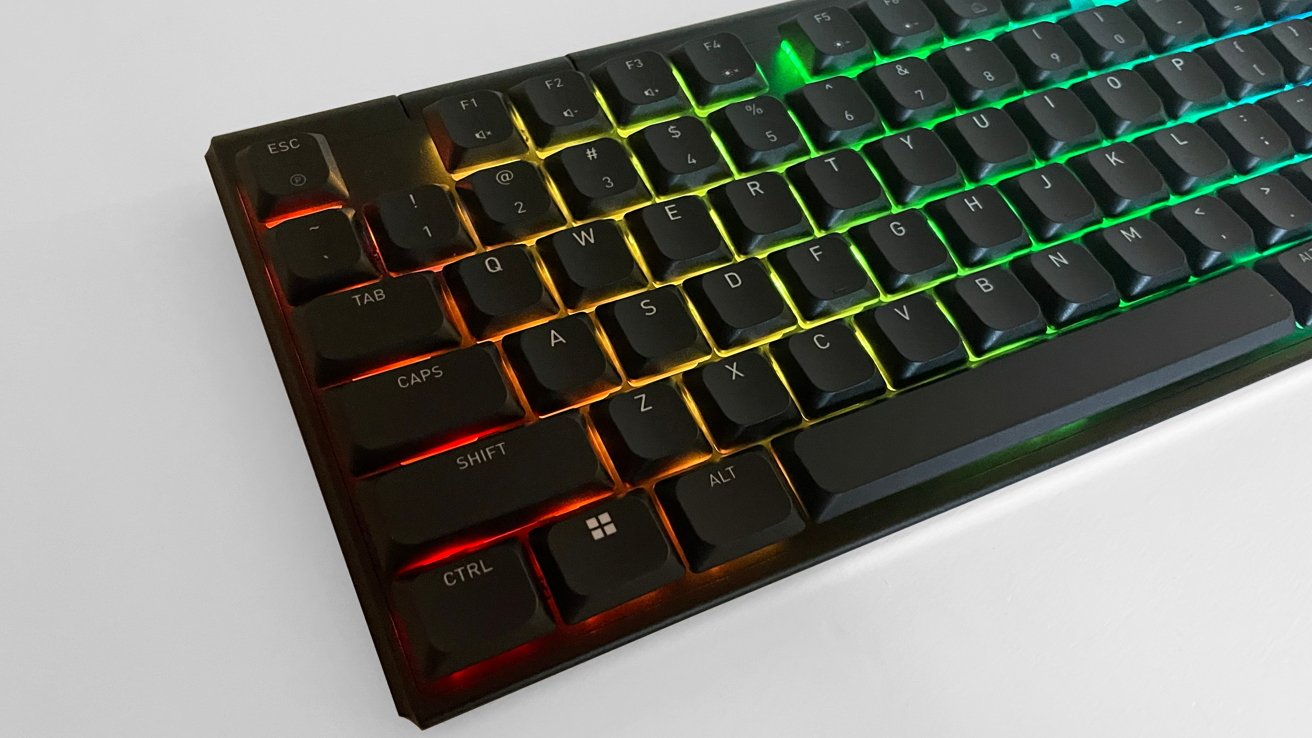
Cherry XTRFY MX 10.1 Review: From the left
This keyboard is not cheap in cost, but it is incredibly well-made and versatile for a low-profile mechanical keyboard. One that focuses on durability and long-term use.
The lack of Mac-specific software and the lack of hot-swapping functionality push it outside of the range of doing everything other mechanical keyboards can do. But the pros outweigh the cons in my opinion.
If you love low-profile keyboards and need a full-size option in your workspace, the MX 10.1 is solid.
Cherry XTRFY MX 10.1 Pros
- High build quality
- Instant familiarity for Mac users
- Quick swapping between Mac and Windows
- Connectivity with up to 5 devices
- Onboard radial dial and LCD screen for settings adjustments
Cherry XTRFY MX 10.1 Cons
- No macOS software support
- High cost for entry
- Non-user-friendly manual
Rating 4 out of 5
Where to buy the Cherry XTRFY MX 10.1
The Cherry XTRFY MX 10.1is available on the Cherry Amazon shop for $249.