The Ugreen NASync DH4300 is a very easy-to-use and affordable network attached storage appliance for beginners who need more capacity than your typical entry-level network storage appliance, or for folks who are still relying on a Time Capsule for backup.
We're getting to a point with cloud storage that in the long run, having a local cloud is a good idea. And, network attached storage (NAS) isn't just for networking experts anymore.
But, it's easy to underestimate needs. That local cloud basic user could go for entry-level options with two drives, which is fine for most, but when you start thinking about other stuff to do, simply isn't enough when data storage needs grow.
Going to a four-bay NAS can usually satisfy the capacity problem. But these sizes tend to be a bit harder to manage, since they're not necessarily aimed at complete beginners like the entry-level options.
The Ugreen NASync DH4300 Plus tries to bridge that gap by behaving like an entry-level NAS, but still providing space for a decent number of drives.
In effect, Ugreen supersizes the experience of the NASync DH2300, but with a few more additions to be more useful to those with greater needs.
Ugreen NASync DH4300 Plus review: Physical Design
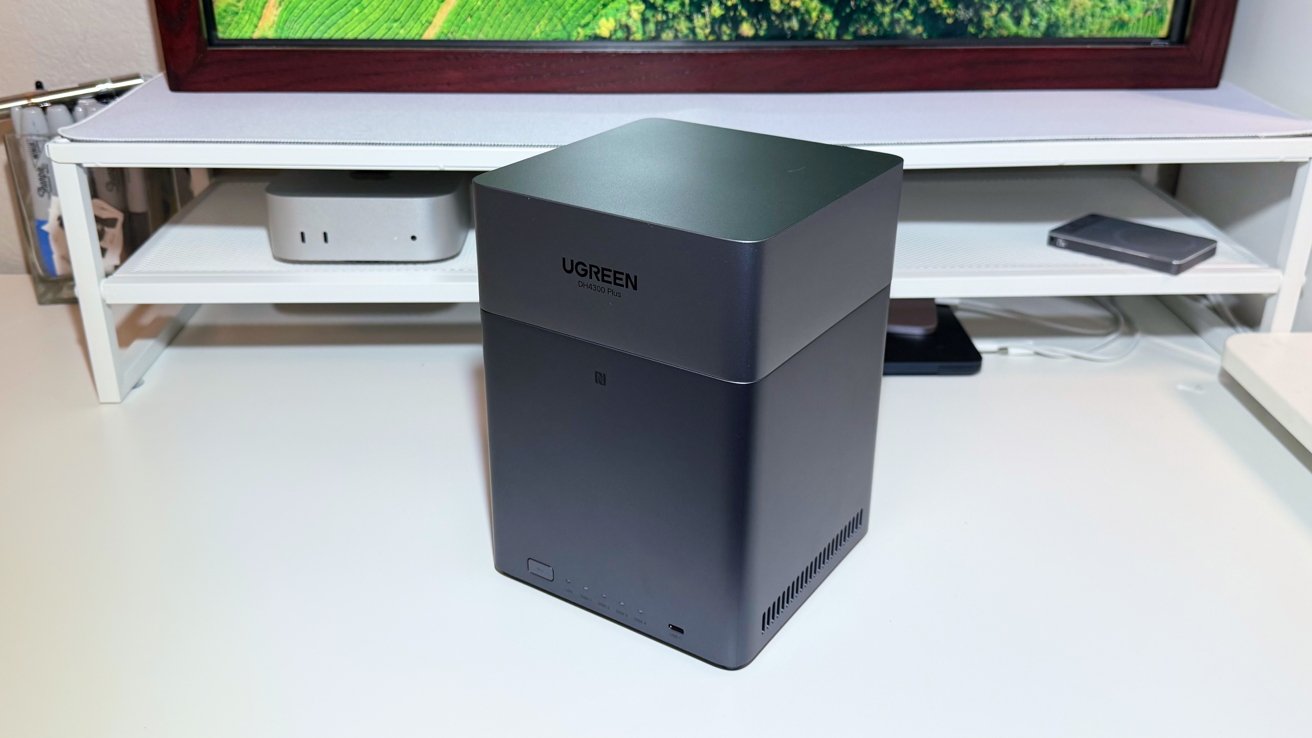
The DH4300 Plus has a design that is similar to that of the DH2300, in that it doesn't look like your typical NAS. Instead of an enclosure with a bunch of front-accessible bays, it's more tower-like and nondescript.
It is still a silver-aluminum tower, but a fair bit chunkier than the smaller sibling DH2300, simply because it has more space for drives. Its 6.1-inch by 6.1-inch footprint isn't massive, nor is its 8.5-inch height.
Again, it's not entirely a solid piece of aluminum. The top section is an easily-removable lid, used to access the drive bays.

Ugreen NASync DH4300 Plus review: From above, Mac Mini for scale
At the base of the unit are a number of drive and network indicators, a power button, and a USB-C port. To the sides are low-positioned air vents, while the back has more ports.
Ugreen NASync DH4300 Plus review: Ports and Connectivity
Like its smaller counterpart, the DH4300 Plus has a total of four connectable ports.
The front is a USB-C 3.2 Gen 1 port, ideally positioned for quickly ingesting data from connected devices. It's not lightning fast at 5Gbps, but it does the job.
The back eschews USB-C for USB-A, with a pair of Gen 1 connections positioned for peripherals and other drives. It's not the 10Gbps Gen 2, but it's enough and sufficient for the class.
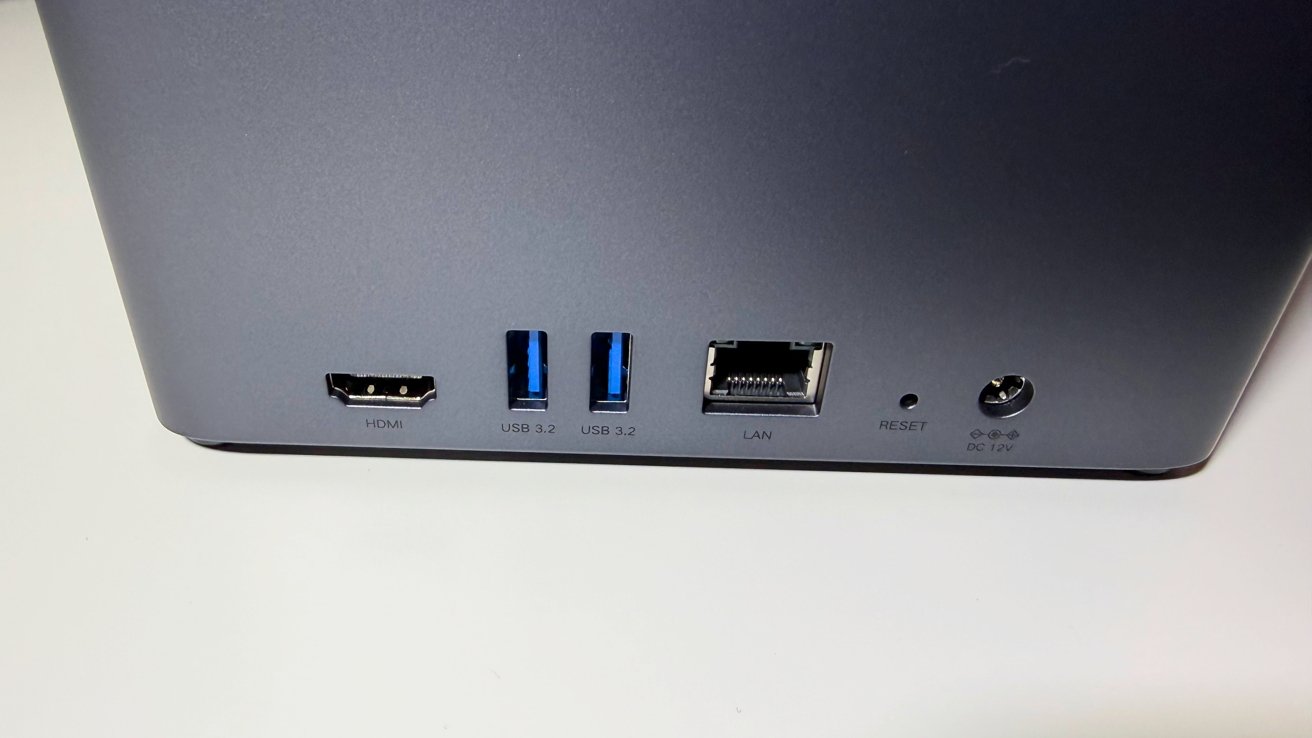
Ugreen NASync DH4300 Plus review: The rear port selection.
The rear also has an HDMI port, so you can connect the NAS up to a TV or a display. It can drive 4K 60Hz displays and monitors, so it's more than capable enough to show photos and videos stored on the device.
Rounding out the port list is 2.5 gigabit Ethernet. While not all home networks work beyond Gigabit Ethernet, having the ability to run faster when the rest of the network gets upgraded is good for prosumers.
Ugreen NASync DH4300 Plus review: Storage
Matching its larger size, the DH4300 has a larger capacity. This time it can take up to four 3.5-inch hard drives through its top panel.
Each drive is held in a plastic sled, which is slotted into place inside the NAS. All of this can be done without tools, making it still quite a beginner-friendly approach for setup and maintenance.
The total capacity, if using four 30-terabyte drives, is up to 120 terabytes. This is a lot for most users, and assuming you shell out the kilodollar plus for the drives, it will take some time before it is completely filled.
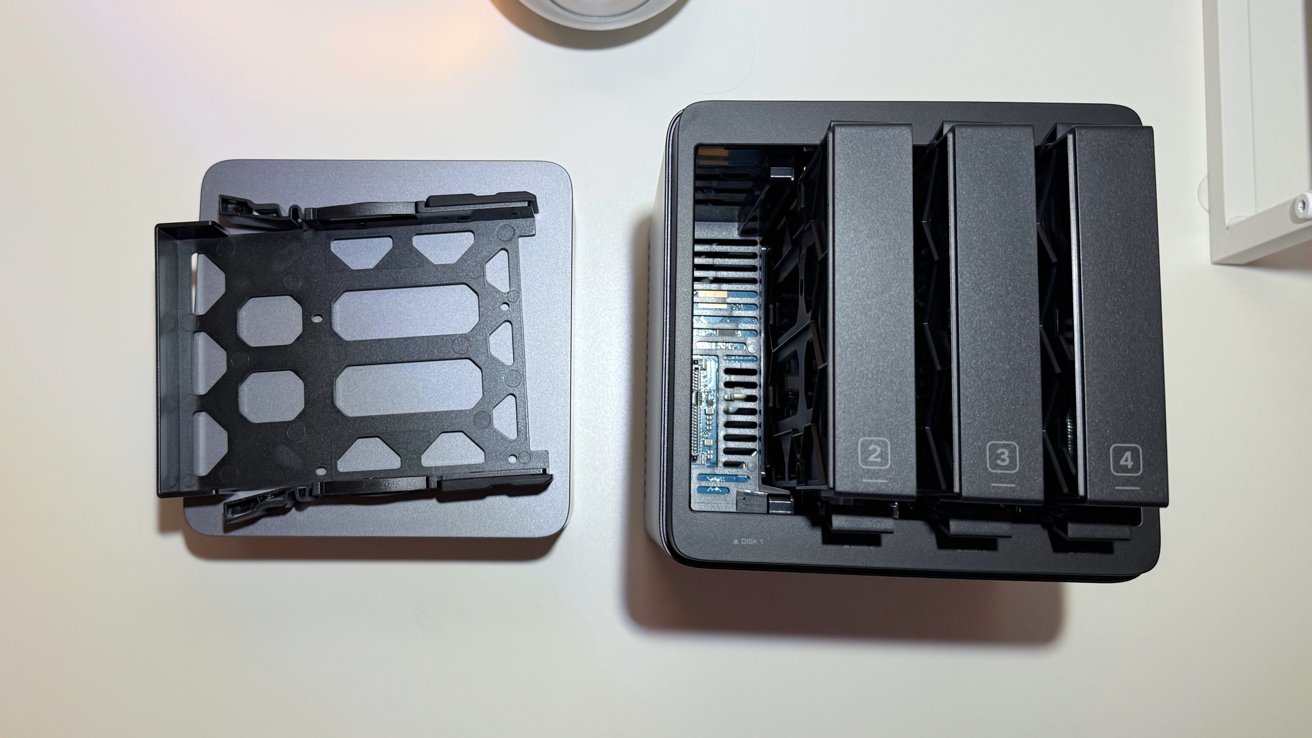
Ugreen NASync DH4300 Plus review: Installing drives through the top.
However, to reach this stratospheric capacity while not entirely bankrupting yourself, you will need to get old spinning metal hard drives instead of SSDs.
More high-spec NAS systems include options for M.2 NVMe drive slots, which can help cache data and speed up access times. While Ugreen does this for some NAS models, it doesn't for the DH4300 Plus.
This is fine, honestly. M.2 in most NAS models is overkill for gigabit and 2.5-gig ethernet anyway.
There is a 32GB eMMC built-in. This is system storage, not for user data storage.
Hard drives are the main focus here. Ugreen does still retain a full complement of RAID modes. Aside from Basic and JBOD, you also have RAID 0, 1, 5, 6, and 10.
This is very useful, especially considering how many drives you can install into the unit. Striping and redundancy are certainly options if you have masses of storage capacity available.
We tested the unit with four 4TB Seagate Red drives provided by Ugreen for the test. We also used four 24TB WD Red Pro, that retail for $479.99 on Amazon.
We didn't have any issues with either configuration, and both configurations in any RAID saturated the network.
Actually accessing the files on the network is secure, thanks to the use of encryption protocols including TLS/SSL, RSA, and AES. This includes accessing via Ugreen's mobile app, which is used to manage the NAS itself as well as provide access to various functions.
And, it can support Time Machine. We're not going to get into the procedure here, but UGreen has a video about it. The support document is a bit better, though.
Time Machine on the unit is not plug-and-play, it's not a full Time Capsule replacement, and a backup or restore will have to happen over gigabit Ethernet. But it does work.
It's time to get rid of those Time Capsules. This will do the job.
Ugreen NASync DH4300 Plus review: Functionality
As a bridge between a beginner NAS and something more complex, Ugreen covers a lot of ground, if not everything.
On the starter-side, there's the tap-to-configure function that lets users quickly set up everything from their iPhone and the companion app. It's a convenience function that others really should adopt.
That companion app also handles remotely accessing the various functions available from the NAS too.
The device runs on Ugreen's UGOS Pro. This is not the same as something like Synology's version, but it works well enough.
And, unlike Synology, Ugreen isn't going to cut off non-certified drives from use in the system.
The onboard features are also what you would expect from a NAS, including Photo storage, Sync and Backup, Downloads, Theater for viewing videos, and Online Office.
These are expanded on with AI functionality, as is to be expected in the current tech marketplace. For example, Photos will perform subject recognition, helping you track down those all-important cat photos from the collection.
So far, we haven't been that impressed with Ugreen's AI, but we have a predisposition as a general rule to avoid third-party AI. For most of the test period, we turned it off.
That said, as a more entry-level system, it doesn't have much in the way of expandable utility. There is Docker support, but not virtual machine support.
Running the system is an 8-core ARM CPU using A76 and A55 cores. The included 8GB of LPDDR4X memory is more than enough for storage, but the entire system is still a little slow when using the features.
Monitoring traffic, we saw no data sent elsewhere. Rumors circulated early that Ugreen was somehow sending a user's data to China, but let us be the latest to debunk that claim.
Your data is your data. It goes nowhere else than where you send it.
Ugreen NASync DH4300 Plus review: Beginner NAS with big storage potential
The Ugreen NASync DH4300 Plus is obviously a NAS for people who are new to the product category, or who don't want to spend time managing one. It's also for people who want a decent amount of storage, without limiting capacity to the two-bay beginner models.
Ugreen does a lot here to meet that goal. The tap-to-configure feature is massive for this category of user, and makes life easier for experienced users too.
As for virtual machines, that's not really an option here. Experienced users looking for that functionality will be looking elsewhere for more power and RAM anyway.
For prosumers and those willing to get their hands metaphorically dirty learning about high-end NAS use, other options may be better.
But, for those who want a reasonably easy to manage option that happens to hold a lot of data, the NASync DH4300 Plus isn't a bad choice to make.
Ugreen NASync DH4300 Plus Pros
- Good price to performance
- Tap-to-configure is very, very easy
- Not a monolith and easy to hide
Ugreen NASync DH4300 Plus Cons
- No M.2 storage for faster caching, but this isn't a giant problem
- Lacking processing grunt.
Rating: 4 out of 5
Where to buy the Ugreen NASync DH4300 Plus
The Ugreen NASync DH4300 Plus is available from Ugreen directly for $386.99. It is also available from Amazon, priced at $386.99.