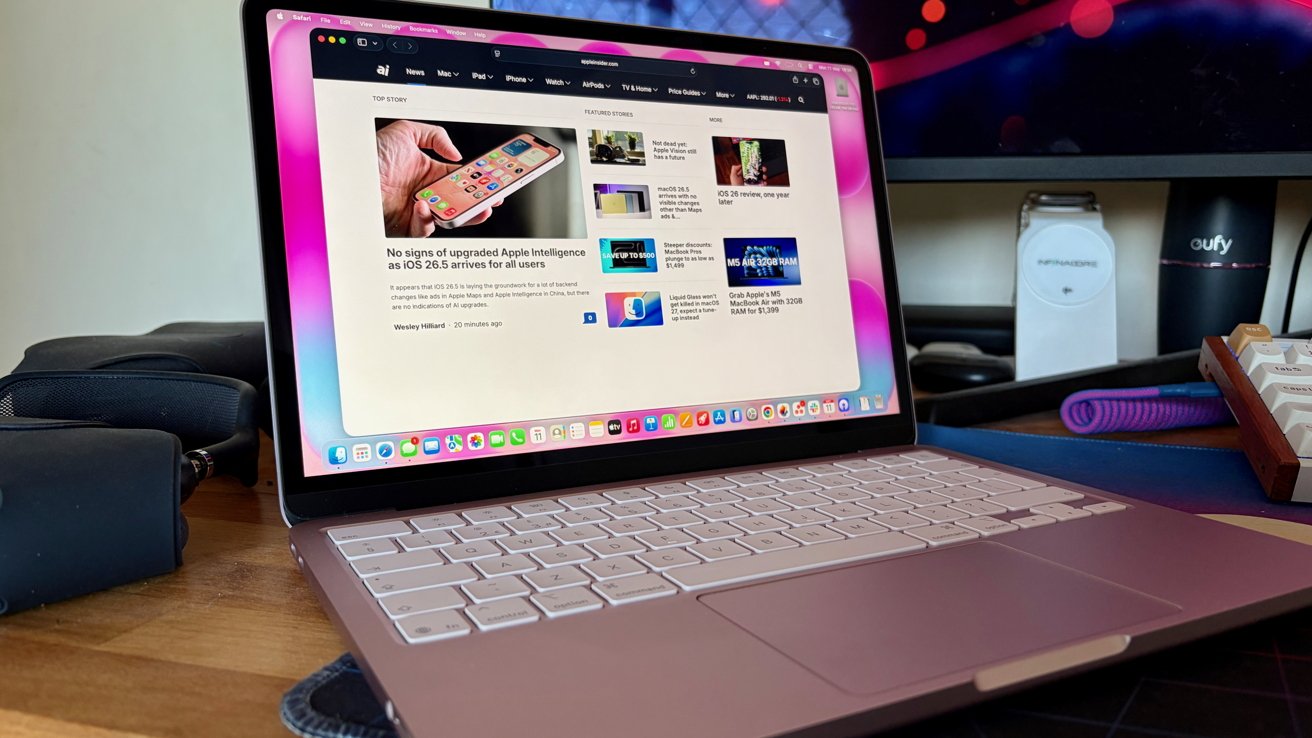
The MacBook Neo is not only the Apple laptop that the majority should buy, but it's also almost good enough to recommend to some MacBook Pro buyers as well.
I've been using a $599 Blush (read, pink) MacBook Neo for a few weeks now, and I'm in love. It's a wonderful little laptop whose iPhone-powering chip belies its capabilities.
I'm going to cut to the chase right out of the gate. Any worries about the performance of the Neo's A18 Pro chip were allayed within five minutes of unboxing the thing.
Couple that performance with an eminently portable design and some gorgeous colors, and Apple clearly has a winner. The MacBook Neo is flying off shelves at a rate Apple can't keep up with.

MacBook Neo
It's easy to see why, too. My normal machine is an M4 Pro 16-inch MacBook Pro, and the MacBook Neo has had me regularly questioning whether I should switch.
Ultimately, I can't for reasons that we'll get into. But I really wish I could. So much so that I'm left wondering whether I need another laptop for those times my MacBook aircraft carrier is just too big.
I probably do. Right?
MacBook Neo review: The little laptop that could
The MacBook Neo has a lot going for it, but it all starts with the form factor. With a 13-inch display, the MacBook Neo is small by many modern-day laptop standards. And that's a good thing.
Built like a tank, the MacBook Neo has a solid, quality feel to it. That's thanks to the use of Apple's familiar aluminum construction. Most other laptops at this price point use flimsy plastic.
That feel is key to the MacBook Neo's charm, too. Pick it up, and it feels like a machine that costs twice its price because it's just like a MacBook Air or Pro.
I mentioned it a moment ago, but it bears repeating. The MacBook Neo also feels incredibly solid in a way budget laptops never do.
But a budget laptop, the MacBook Neo is. And if it isn't felt in the fit and finish, it's definitely felt in the connectivity options.
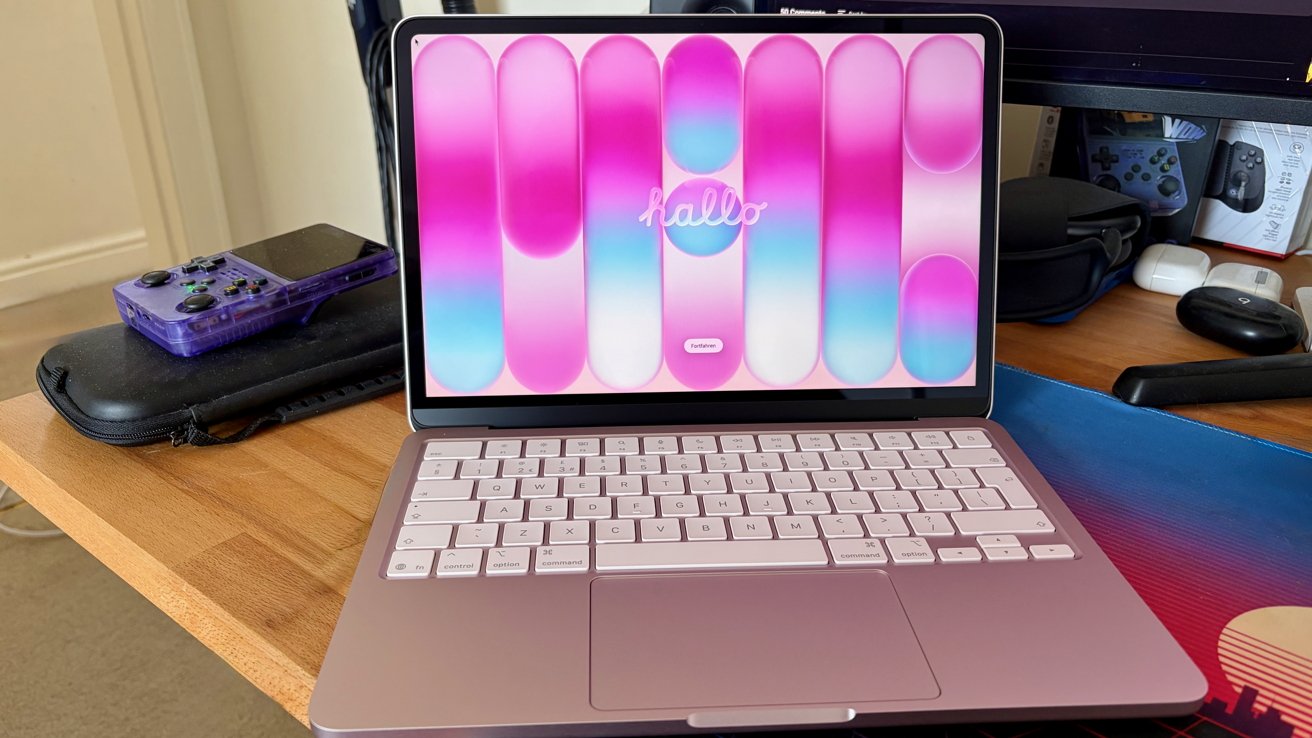
MacBook Neo review: Blush on the outside, blush on the inside
The MacBook Neo has just two USB-C ports, and only one of them is rated for 10Gbps USB 3 speeds. That means the other is limited to USB 2, or 480Mbps.
Charging is handled by either of those USB-C ports, so there's no MagSafe here. The only other port is a 3.5mm headphone jack.
Wireless connectivity is handled by Apple's N1 chip, bringing Wi-Fi 6E and Bluetooth 6 to the party. Both are fine, if not exciting. And they make sense given the target market.
Another area Apple saved some cash was the 13-inch display. It's a Liquid Retina display, so it can't boast the specs of the MacBook Pro I'm accustomed to.
In reality, that means it's limited to "just" 500 nits of brightness and carries an sRGB rating. There's no P3 wide color here, and there's no True Tone support. I hate the True Tone yellowing effect, but I know some use it heavily.
Continuing the cost-cutting, the MacBook Neo doesn't come with a Touch ID sensor as standard. That's only available if you give Apple the extra $100 for the 512GB SSD model.
That's right, extra. The base model comes with just 256GB of storage, which is either plenty or nowhere near enough, depending on how you use it.
So, what's left? The elephant in the room, of course.
MacBook Neo review: An iPhone chip, you say?
When I received the MacBook Neo, I was acutely aware that it was powered by the A18 Pro. It isn't even the same A18 Pro that shipped in the iPhone 16 Pro, because it has one fewer GPU core. It has five, by the way.
As someone who spends his days with an M4 Pro, I was curious as to how I would fare. After all, writing words into Google Chrome is more resource-intensive than it probably should be.
Thankfully, it turns out that the A18 Pro is pretty quick. I've previously argued that it could be called an M4 mini, and it benchmarks similarly to an M1 in multi-core tests. It's even faster when using just the one core.
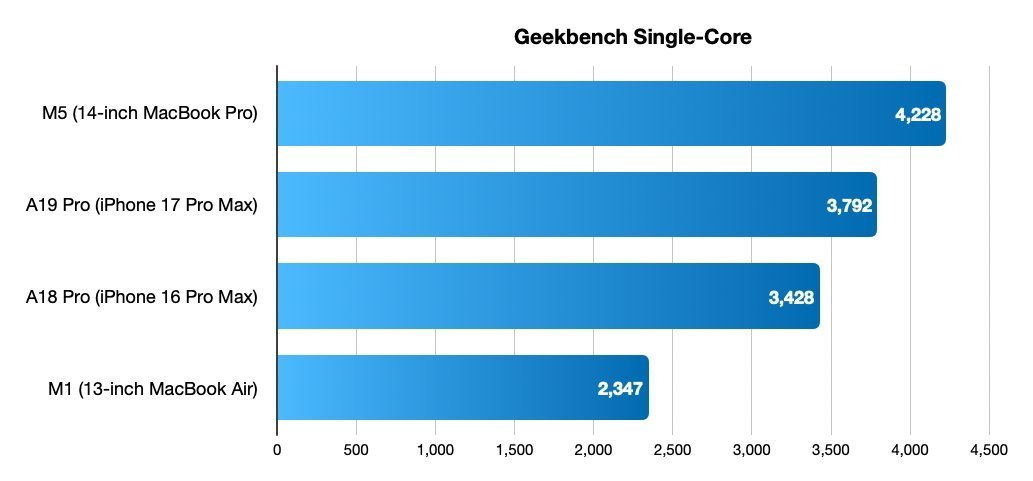
MacBook Neo review: The A18 Pro is no slouch
In use, I found the MacBook Neo to be perfectly usable when doing all of the things I do on the daily. That's multiple browsers, open with multiple tabs in each, a spot of light image editing in Pixelmator Pro, that sort of thing.
The only time I found the Neo to be less responsive than I'd like was when I was installing my apps. I'd had the machine for less than an hour, so I'm putting that at the feet of the relatively slow SSD.
I did try to play a game or two on the MacBook Neo, and my recommendation is that you don't. They work relatively well, but the small SSD can't handle more than one or two heavy-hitters at a time. And there's only so much that chip can do, too.
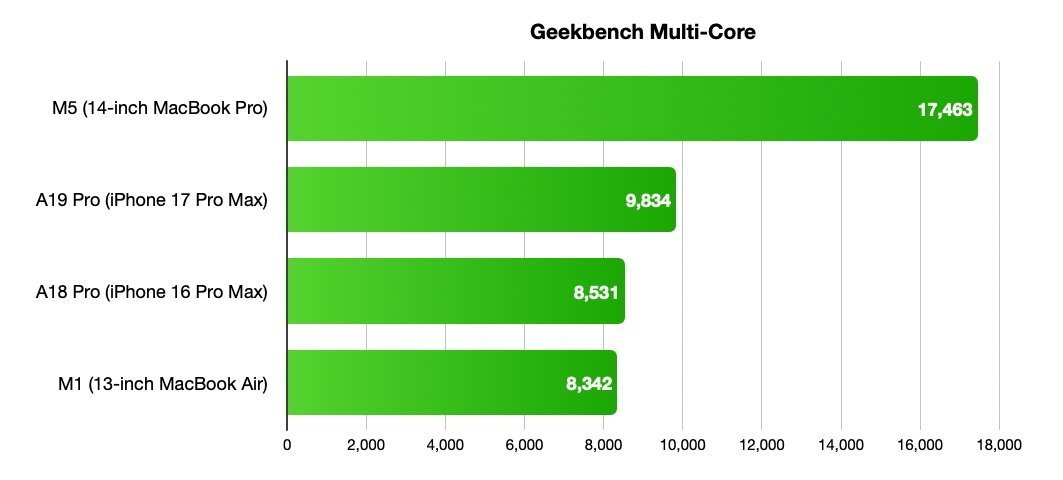
MacBook Neo review: An M1 by another name?
But Apple didn't build the MacBook Neo for people to play games on. It built it to do all of the things budget laptops do. Web browsing, some light image editing, and getting work done.
Those are exactly the kinds of things I've been using it for these last few weeks. And I have to say, I've found it nothing short of brilliant.
But it does have its limitations beyond the gaming and small SSD.
MacBook Neo review: It's still a $599 laptop, after all
In case it isn't clear yet, I'm a big fan of this MacBook Neo. I can even admit to quite liking the Blush color. It's silver in most lights, with a tint of pink in others.
But there are still times when I'm reminded that this is a $599 machine, not a $2,500. The first came when I plugged it into my monitor.
According to Apple's specs page, the MacBook Neo supports a single external display. And that monitor can have a resolution of up to 4K at 60Hz.
That'll be more than enough for most monitors a MacBook Neo is likely to be faced with. But I use an ultrawide with a resolution of 5120 x 1440. It supports a 144Hz refresh, too.
I was happy to give 60Hz a try, so I thought I'd try. After all, that resolution should use less bandwidth than the 4K Apple says the Neo supports.
Alas, something about that combination is amiss. All I get is a stretched image that tops out at 1080p.
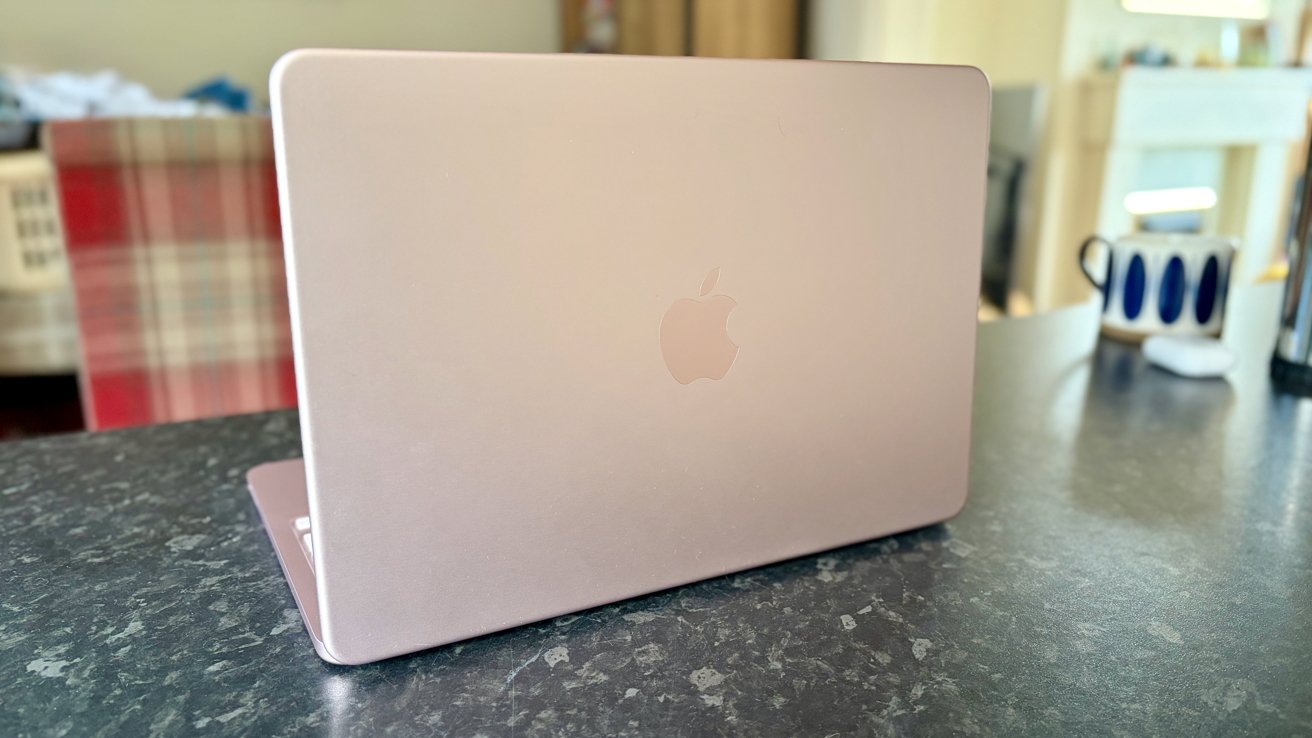
MacBook Neo review: It's pink, sort of
This could surely be rectified by using a DisplayLink dock, but I don't have one. A search of Reddit does give me confidence in this approach, at least.
This kind of limitation shouldn't be all that surprising given the A18 Pro's similarity to the M1. But it's still worth calling out, and it's enough to make the MacBook Neo a non-starter as my main machine.
One downside that I can't blame on the A18 Pro is battery life. While I found the Neo to be fine whenever away from the charger, it's no battery life champion.
Apple says it's good for 11 hours of web use and 16 hours of video streaming. Whether you get anywhere close to that will depend on various things, not least the display brightness.
But the issue comes when it's time to charge the thing. I'm in the UK, where Apple doesn't ship the MacBook Neo with any kind of charger. A USB-C cable, sure. But nothing to plug it into.
The good news is that you can use any charger that's rated for 20W or more. It'll charge faster if you give it more juice, but barely. That means charging the Neo takes longer than I'd like. Over three hours or so, in fact.
But at this point, it's clear that I'm nitpicking. And these issues aren't as big as they might seem when we remember the Neo's $599 price.
MacBook Neo review: The laptop most macOS users should buy
The MacBook Neo is a marvel. The fact that Apple was able to find a way to sell this thing for less than $600 makes it a laptop that's impossible not to recommend. It replaces the MacBook Air as the Mac most people should buy. Its 13-inch display isn't the best in a Mac, but it's better than almost anything at its price point.
Yes, the fact that it has an A18 Pro at its heart might be enough to give some people pause. But it really shouldn't. We knew what these A-series chips were capable of, and adding macOS makes it even better.
If anything, the MacBook Neo reminds me, once again, how much I'd love to see macOS come to the iPad, too. Imagine grabbing hold of the MacBook Neo's display, pulling it off its keyboard, and settling down on the sofa for an evening of idle browsing. It'd sell by the truckload.
As it is, the MacBook Neo is still selling faster than Apple can make them. I think it'll have to make a lot more before that's no longer true.
MacBook Neo review - Pros
- An incredible machine at the $599 price point
- Bright, beautiful colors
- Plenty of power in that A18 Pro for most
MacBook Neo review - Cons
- External display limitations
- Touch ID should be standard
- Charges slowly
MacBook Neo Rating: 4 out of 5
Where to buy Apple's MacBook Neo
The MacBook Neo is available now at Amazon, B&H Photo, and Expercom.
You can grab a slight discount on the standard $599 model at Amazon at press time, with a breakdown of available offers in our MacBook Neo Price Guide.