Phishing emails posing as Apple fraud warnings are leveraging large dollar amounts and urgent language to pressure users into calling malicious phone numbers.
The messages claim an Apple Pay transaction was blocked, an appointment was scheduled, or suspicious activity was detected on an Apple ID. The intent is to create urgency and move the victim into a fake support flow controlled by scammers.
These emails are not coming from Apple, despite logos, formatting, and sender names crafted to look convincing.
How the scam works
The phishing emails typically impersonate Apple billing or fraud teams and warn of a high dollar Apple Pay purchase at a physical Apple Store. They often include a case ID, timestamp, and technical sounding details to appear legitimate.
The messages tell you to call a number right away or show up for an appointment to fix a problem. But when you call, you'll end up talking to scammers pretending to be Apple Support, trying to get your Apple ID, verification codes, or payment info.
Apple doesn't set up fraud appointments through email. The company also doesn't ask users to fix billing problems by calling numbers in random messages.
Red flags in the phishing email
Several inconsistencies quickly reveal the messages as fraudulent. The sender's address doesn't come from an official Apple domain, even if the display name makes it seem like it does.
You'll often notice technical details like impossible IP addresses and awkward phrasing such as "Hello {Name}."
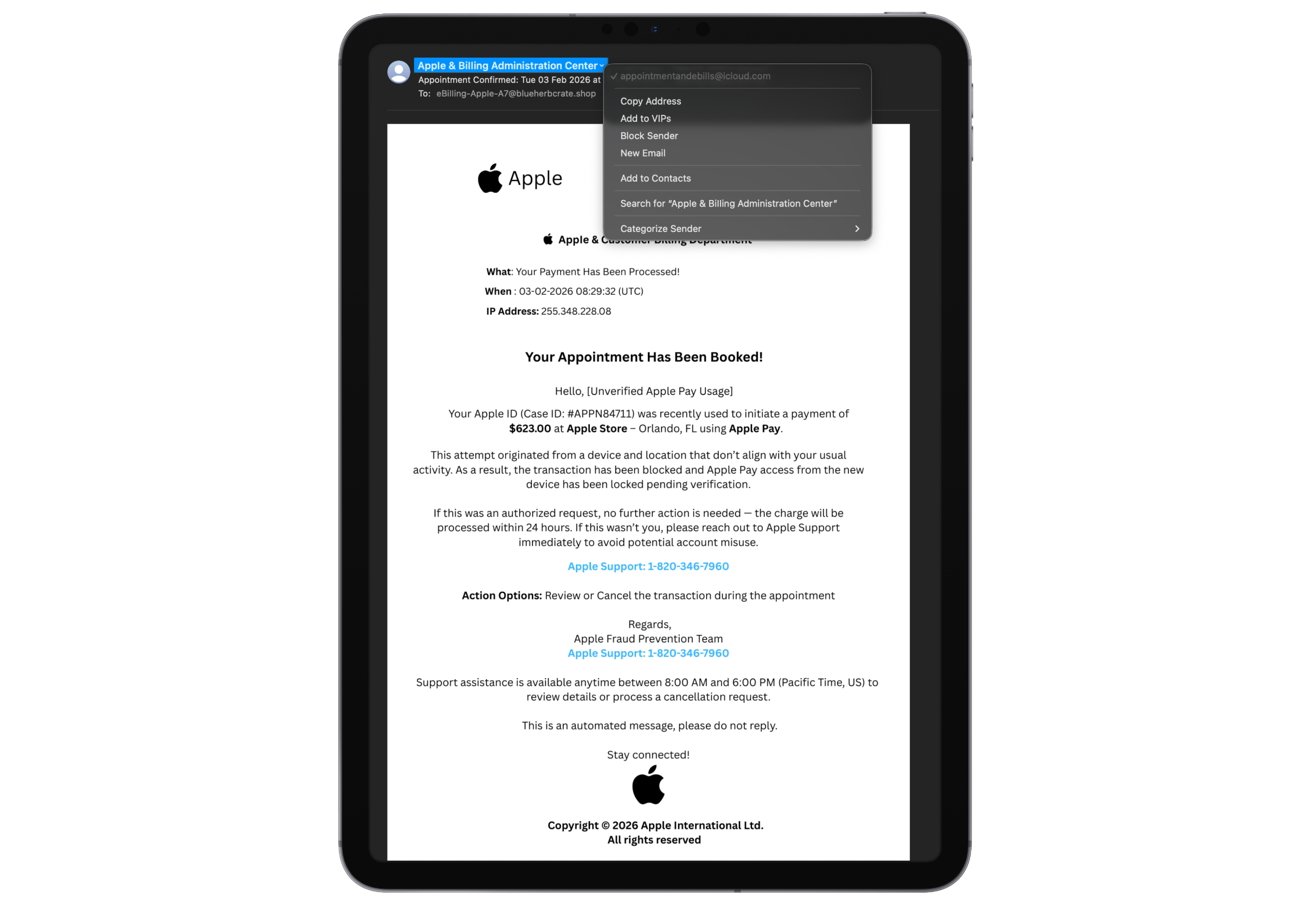
A phishing email that some Apple users have reported receiving
The phone number in the email is another red flag. When you search it online, you get unrelated and incorrect results, like links to public health or addiction support pages instead of Apple support.
The mismatch strongly suggests the number is part of a broader scam operation rather than a legitimate Apple contact channel. Apple support numbers always lead to Apple-owned domains and official help pages, not generic or unrelated search results.
The emails also rely heavily on urgency, warning that action is required immediately to prevent account misuse. Apple's real communications do not threaten sudden account lockouts or pressure users into rapid responses.
Apple's massive user base and strong brand trust make it a prime target for impersonation. Scammers know that Apple Pay fraud warnings trigger fear, especially when large dollar amounts are involved.
Attackers are always after the money, and phishing works because it targets our natural instincts instead of technical weaknesses. It's a sneaky way to get what they want.
How to stay safe
If you get an email from Apple that you didn't ask for, don't click on any links, call any numbers, or download any attachments. Instead, just open the Settings app on your device or go straight to Apple's official website by typing the address yourself.
Check your Apple ID purchase history and Apple Pay transactions manually. If there is a real issue, it will appear there without requiring an email prompt.
Report suspicious emails by forwarding them to Apple's abuse address, then delete the message. Using two factor authentication, strong unique passwords, and a default assumption that urgent billing emails are fake remains the most effective defense.
When in doubt, assume the message is fraudulent and verify everything through official Apple channels you access on your own terms.