The MacBook lineup has finished its shift over to the M5 chip generation, and has been joined by the MacBook Neo. Here's which model you should buy to fit your budget, as of early 2026.
Apple's catalog of products is set up to provide consumers with both something that fits their budget, and an upgrade path that seems very close together. This ranges from a value-focused device like the new MacBook Neo to the bank-busting side with the MacBook Pro.
While this was previously a two-tier system, with the MacBook Air being the entry-level option, the introduction of the MacBook Neo changes things. We now have the entry-level Neo, with Air becoming the mid-tier choice, and the Pro line as the premium and performance option.
This does shake up what consumers have to consider for their next MacBook upgrade. It also opens the market up to even more potential users, thanks to the cost-saving MacBook Neo.
Here's what we recommend when it comes to portable Mac models and configurations, depending on how much you are willing to spend.
MacBook buyer's guide spring 2026 - Overall price range
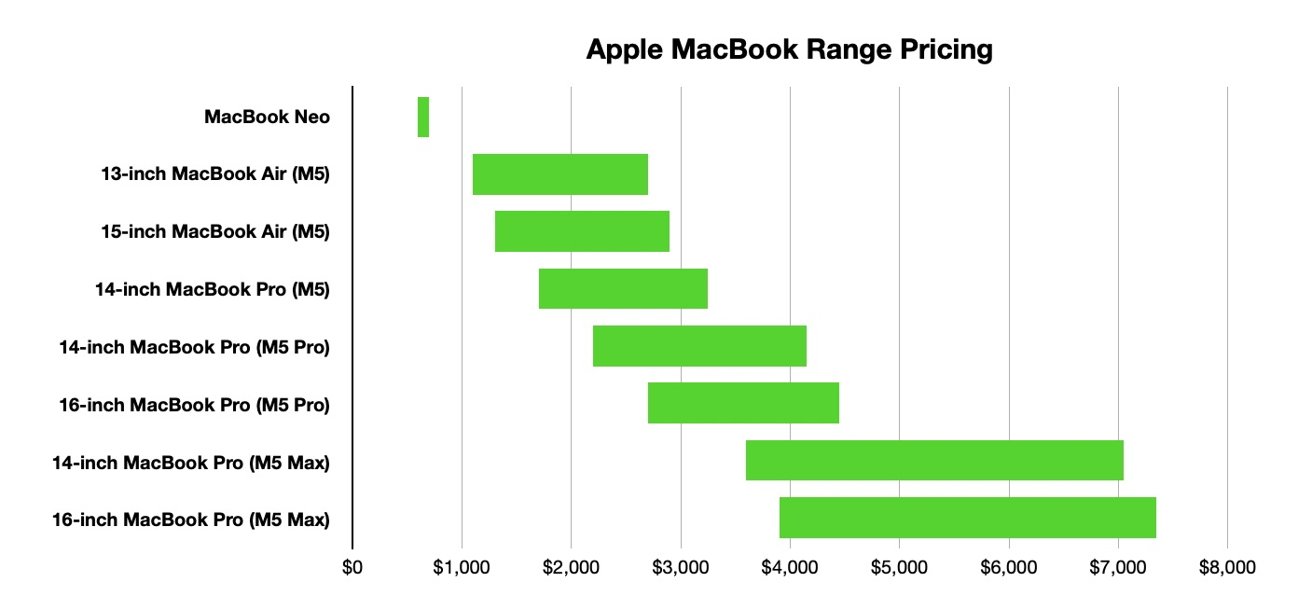
The price range of the MacBook product catalog has never been as wide as it currently is. Thanks to the introduction of the MacBook Neo, the range has been pushed to cover much lower price points than Apple usually caters towards.
At the cheapest end is the MacBook Neo, which can be acquired for as little as $599. The other end of the spectrum is the 16-inch MacBook Pro with M5 Max, the highest-tier chip, most memory, most storage, and Nano-texture glass, which can be bought for $7,349.
MacBook buyer's guide spring 2026 - Overall price range
That's a price difference of $6,750. For perspective, you can buy 12 of the cheapest-configuration MacBook Neo models for the same price as the top-specification MacBook Pro, and still have $161 left over.
The overall price range is markedly different versus the last time we looked at it in March 2025. There are two main differences this time around.
First, Apple has shifted the pricing and options around for the main group of Air and Pro models. In some cases, Apple has nixed the lowest storage configuration, in favor of making the next upgrade up the new baseline for that model's tier.
The other is, again, a byproduct of the existence of the MacBook Neo. This is the first time since doing these MacBook comparisons where there's a significant break between models.
Normally, Apple has its models priced in a way that there's considerable overlap. This is still quite true, as you will find that there are many occasions where you could pay for a chip upgrade or more storage or some other configuration change, and have something comparable in another model entirely.
This time, the Neo price range from $599 to $699 doesn't overlap with any other models at all. Indeed, there's a gap of $400 between the most expensive Neo model and the cheapest MacBook Air.

MacBook Neo
This massive price difference also brings up the possibility of a consumer buying two or more cheaper Neo models instead of a more expensive MacBook Air, for example. For the purposes of this price guide, AppleInsider will presume that the reader will have already thought about mass-MacBook Neo distribution before settling on buying just one model.
For the purposes of this comparison, we are going to divide the models up in a few general bands: Sub-$2,000, $2,000 to $3,000, and beyond $3,000.
MacBook buyer's guide spring 2026 - Storage and configuration
There are a few elements to take into account when dealing with the pricing of a particular MacBook configuration. Depending on the model, there could be a few levers at your disposal to finesse the price your way.
The minimalist option here are the MacBook Neo. There are only two configuration options, and that means a difference of $100 to double the storage and add Touch ID support.
For the Air and Pro, you have things like size to consider. The MacBook Air is sold in 13-inch and 15-inch varieties, while the MacBook Pro ships in 14-inch and 16-inch versions.
The size isn't the only display-related configuration option. For the Pro models, you can also add a Nano-texture treatment, which reduces the amount of glare and reflections.
When it comes to whether or not you should get Nano-texture, consider whether you really care that much about screen reflections. We are erring away from Nano-texture in our recommendations, but remember that it's an option that's just one memory downgrade away.
Depending on the model, there can be a choice of chips, and beyond M5, M5 Pro, and M5 Max at that. For example, you can get the M5 Max with a 32-core GPU or a 40-core GPU, increasing the chip options.
14" MacBook Pro M5
This also brings up the unified memory, which can also vary wildly between models. The amount of choice can also vary, such as having only one option in the Neo models or multiple under some Pro chip configurations.
You can also, in some cases, upgrade the included power adapter, but we won't go into that here. Apple will always offer the lowest compatible option for your selected model, but it may still provide alternatives for you to upgrade to if you wish.
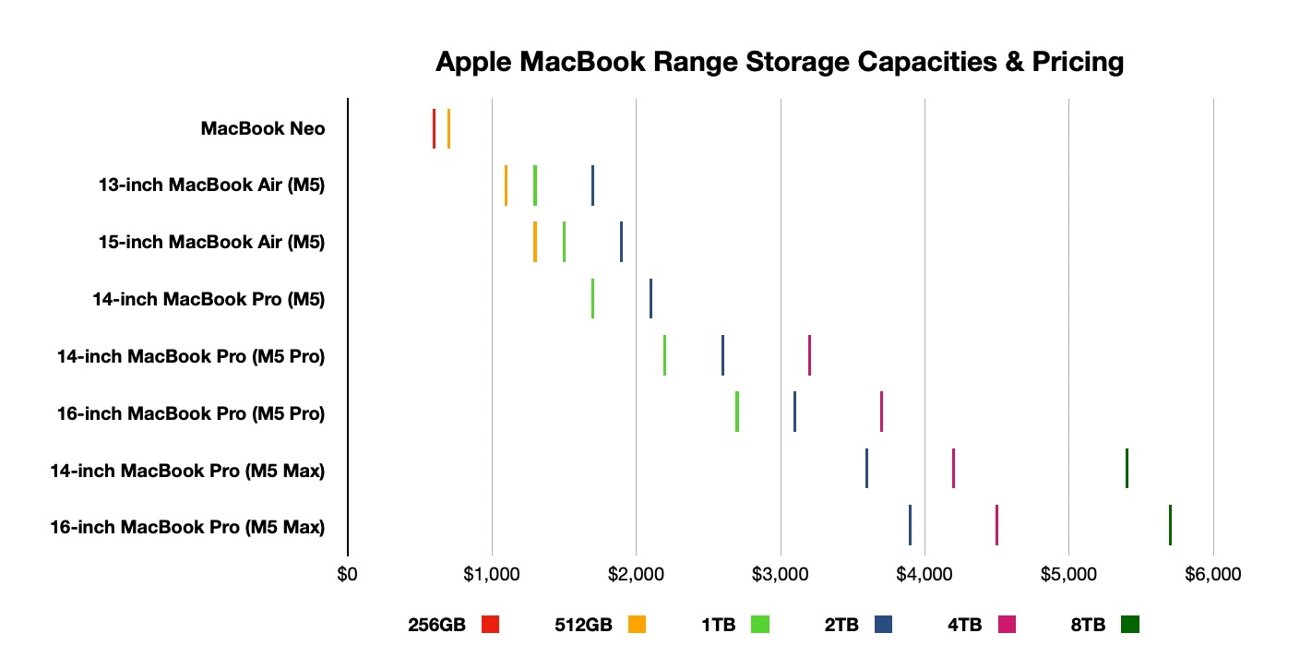
Lastly, there's storage, which can be one of the more expensive upgrade elements on the Apple storefront. Like memory, the more storage you include, the greater the cost, and this could be quite damaging to your wallet.
MacBook buyer's guide spring 2026 - Storage capacities and pricing
As the above graph shows, the cost of storage upgrades can be quite considerable.
In the case of the MacBook Pro, it costs $600 more to go from a 2TB capacity to a 4TB version. However, it's another $1,200 again if you go from 4TB to 8TB, which is $1,800 in total from 2TB to 8TB.
Since users aren't able to make changes to the internal components of a MacBook after purchase without replacing the entire device, you will be stuck with whatever configuration you order, with little recourse. Short of selling your MacBook and buying another in a better configuration, there's little you can do about this.
However, of all of the components in a MacBook, the thing you have most control over after purchase is storage. Using an external drive, you can add more capacity beyond the internal limit, which is something you cannot change for any other component.
The general purchasing advice from AppleInsider is to consider more modest storage capacities and take advantage of external storage instead of paying for higher levels. Memory and the CPU are not upgradable post-purchase, so you're better off paying more for them than for storage.
Customers should also seriously consider their computing needs. While those with a need for high-performance hardware may want a MacBook Pro, such as video editors, people with more modest requirements could get away with something lower-powered and significantly cheaper.
If you need a device for browsing YouTube instead of making content for the site, there's no shame in picking up a MacBook Neo or a MacBook Air instead of a full-fat MacBook Pro.
Your bank account may thank you for it.
MacBook buyer's guide spring 2026 - Below $2,000
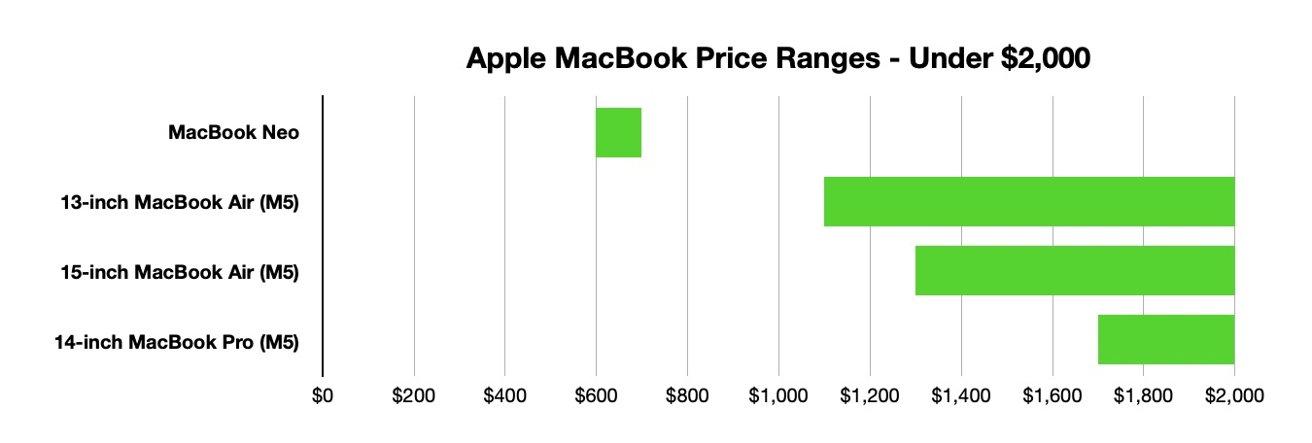
The easiest section to talk about is the very low budget end of the range. It's because there's not much choice available.
$599 is the start of the entire lot, with a MacBook Neo using an A18 Pro chip and 256GB of storage. For just $100 more, you can upgrade to double the storage and gain Touch ID support as well, and you really should consider it.
There's then a gulf until $1,099, when the first MacBook Air becomes an option. The 13-inch M5 MacBook Air has the 8-core GPU version, 16GB of memory, and 512GB of storage.
At $1,199, you have the option to upgrade to the 10-core GPU, but things get really unusual at $1,299. The 8-core GPU option is no longer available as Apple doesn't provide any variant for it in terms of memory or storage, forcing the update.
MacBook buyer's guide spring 2026 - Sub-$2,000 price ranges
At this level though, you could have the 13-inch with the chip update and save $100, or you could get the 15-inch MacBook Air with the upper-tier chip, 16GB of memory, and 512GB of storage. The bigger screen option is better for most people here.
Getting to $1,399, you can use the 10-core GPU chip in the 13-inch along with either a 24GB memory upgrade or a shift to 1TB of storage for the same price, or save $100 on the previous 15-inch choices. Memory's your best bet here, as previously discussed.
At $1,499, the 15-inch gets the same memory and storage options, or there's the $100 saving for the same configurations in the smaller size. Again, memory rules here.
M5 MacBook Air
The 13-inch again pulls ahead in terms of options at $1,599, opening up the ability to go for the full 32GB of memory and 512GB of storage, or for 24GB and 1TB instead. That storage upgrade is in the realm of "useful" so getting memory and storage boosts here can work out to be good.
A similar situation occurs again at $1,699, bringing the 15-inch up to the same options, while also opening up 2TB on the 13-inch. Though you could also go for the cheapest 14-inch MacBook Pro.
Equipped with 1TB of storage and 16GB of memory, it is a decent package, but not massively so unless better thermal management and lower throttling is more your thing.
The next real configuration choice, if we ignore the $150 fee for Nano-texture on the Pro, would be $1,899. That means a 24GB and 2TB 13-inch MacBook Air, a 32GB and 1TB 15-inch MacBook Air, or adding $24GB of memory to the 14-inch M5 MacBook Pro. The 15-inch MacBook Air edges things here.
These are your last real options sub-$2,000, unless you happen upon a great deal.
MacBook buyer's guide spring 2026 - $2,000 to $3,000
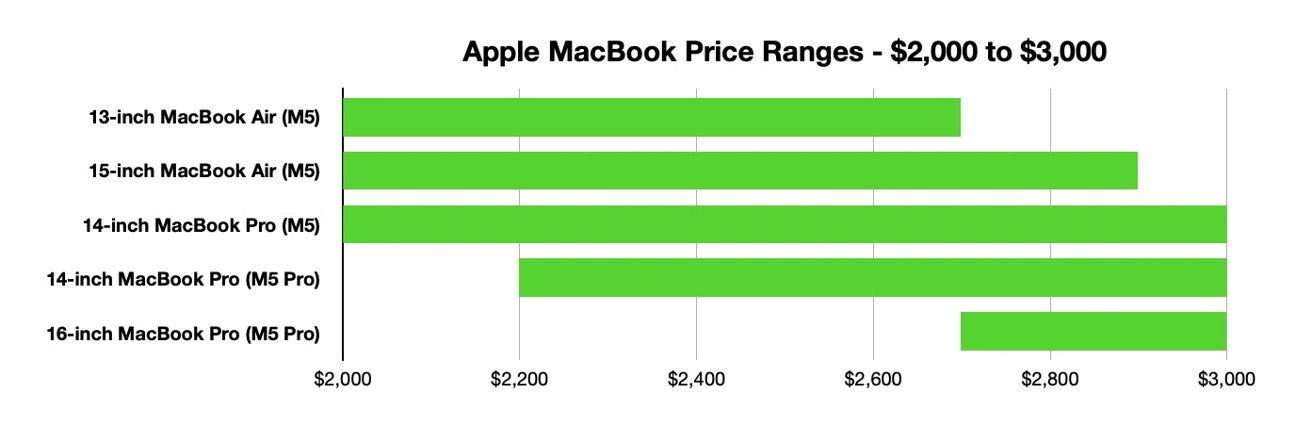
The $2,000 to $3,000 section is the most interesting and the most complicated section to look at. This is because there is a lot of crossover between the two different sizes of MacBook Air and the three different tiers of MacBook Pro in this relatively small monetary window.
There's a lot more crossover this time around, because Apple has increased the storage capacity of the MacBook Air from 2TB this time last year to 4TB. There's still a maximum of four models to consider for some price levels, but there are more price points that this happens to compared to last year.
At $2,099, it is possible to configure a 15-inch MacBook Pro with 24GB of memory and 2TB of storage. The real competitor here is the M5 14-inch MacBook Pro with 32GB of memory and 1TB of storage if you want performance, while the Pro with 16GB memory and 2TB pales in comparison.
MacBook buyer's guide spring 2026 - Price ranges from $2,000 to $3,000
Going to $2,199, a new option appears in the form of the M5 Pro 14-inch MacBook Pro. Switching from a 10-core CPU to a 15-core version, as well as the GPU upgrade from 10 cores to 16 cores, is a great choice, especially when you get 24GB of memory and 1TB of storage by default.
Sure, you could save $100 and get the M5 MacBook Pro with more memory, but the processing performance arguably is the better selection. If you can stretch to $2,299, you could get a 15-inch MacBook Air with 32GB of memory and 2TB of storage.
Getting to $2,399, you really should consider getting the better M5 Pro chip in the 14-inch MacBook Pro, with an 18-core CPU and a 20-core GPU and the same 24GB memory and 1TB storage as the previous Pro recommendation.
14" MacBook Pro M5 Pro & M5 Max
A $2,499 to $2,599 budget will be best put toward the 15-core CPU version of the M5 Pro 14-inch MacBook Pro with 48GB memory and 1TB of storage. If storage is your thing, consider the 13-inch MacBook Air with 24GB of memory and a maximum 4TB SSD, or the 15-inch version with 16GB of memory.
The $2,699 level is an interesting one, since we see the 13-inch MacBook Air at its maximum spec of 32GB of memory and 4TB of storage. The 15-inch will do the same at $2,899, but you can get it to $2,699 if you dip the memory to 24GB.
You could also feasibly get the M5 14-inch MacBook Pro with 16GB of memory and 4TB of storage for the same price, but really you should go for the bigger memory and curtail storage here. Even the M5 Pro 14-inch MacBook Pro is good here, with both chip varieties being $100 either side with 48GB of memory and 1TB of storage.
However, this is also where the 16-inch MacBook Pro comes to play with the 18-core version of the M5 Pro. At $2,699, you can get 24GB of memory and 1TB of storage, as well as that larger screen.
Getting to $2,899, we say goodbye to the 15-inch MacBook Air, which gets to its highest specification with 32GB of memory and 4TB of storage. If you want performance, then the 14-inch MacBook Pro with 18-core M5 Pro, 48GB of memory, and 1TB of storage is your better option, and $100 cheaper too.
Hitting the upper end of this short scale at $2,999, the M5 MacBook Pro isn't really a feasible option anymore. At this level, you'd be better off going for the M5 Pro models, as the only real extra you will be paying for here is storage capacity, up until its $3,099 maximum.
MacBook buyer's guide spring 2026 - $3,000 and more
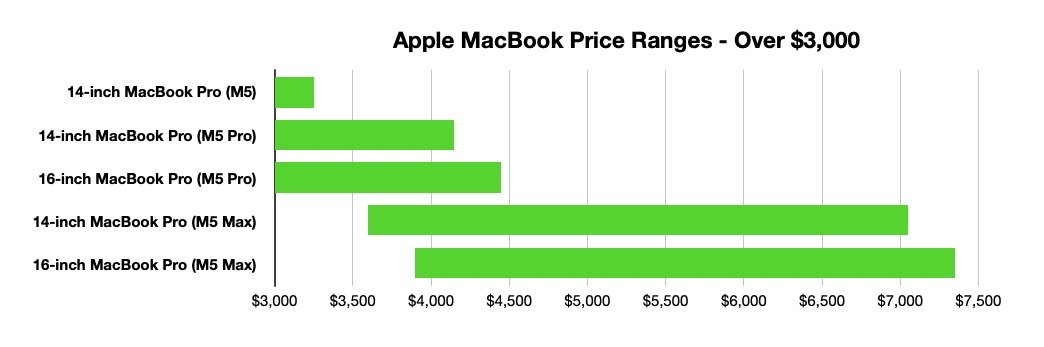
Heading into the $3,000 section, we say goodbye to the M5 MacBook Pro, as your only real choices are the M5 Pro versions, at least until $3,599. In each case, you should be going for the upper-tier 18-core CPU and erring toward higher memory configurations before adding more storage.
At $3,399, that would mean a 14-inch MacBook Pro with the upper M5 Pro chip, 64GB of memory, and 2TB of storage. For the 16-inch MacBook Pro, you can save $100 on the same chip and memory, while cutting the storage to 1TB.
The M5 Max is an option when you get to $3,599, as the 14-inch MacBook Pro can be equipped with the 18-core CPU and 32-core GPU version, 32GB of memory, and 2TB of storage. For $100 more, you could get the 16-inch MacBook Pro with M5 Pro, 64GB of memory, and 2TB of storage.
MacBook buyer's guide spring 2026 - $3,000 and more
At $3,899, the 16-inch version of the M5 Max comes into play, with the 32-core GPU, 2TB of storage, and 36GB of memory. You could get a fully-laden 14-inch MacBook Pro with M5 Pro for just $100 more, but you're better off going for the Max-tier performance options instead of paying for that 4TB storage option.
Once we go past the $4,299 price point, which is the last possible configuration of the 16-inch MacBook Pro with M5 Pro and the highest memory and storage options, the decision becomes fairly simple. It's whether you would prefer more memory or a larger display.
We're at a level where you're getting the M5 Max anyway, but there's a small 8-core difference between the 32-core GPU and the 40-core version. You will also need to pay that chip upgrade fee if you want any more memory, otherwise you're limited to 36GB.

16" MacBook Pro M5 Pro & M5 Max
Be aware that the $300 listed chip upgrade fee is really $400 in the configurator, since you're upgraded from 36GB to 48GB at a minimum.
Proceeding upward, each step effectively becomes a decision of getting the bigger screen, the next memory upgrade level, or more storage capacity. From 14 inches to 16 inches, you're paying $300 for the privilege for a start.
The memory from 48GB to 64GB is relatively cheap here, as you're adding $200 to the cost of something that's already configured to more than $4,000. The 128GB upgrade may be too excessive as a $800 charge on top of the 64GB level, but if you need it, it's worth it.
It's also still a far better option than paying $600 to go from 2TB of storage to 4TB, or the $1,200 to go from 4TB to 8TB.
At this nosebleed level of expenditure, seriously consider whether you should even bother going to 8TB of storage. That $1,200 could easily go to something more useful, like a display for your desk, or even two MacBook Neos.
Where to buy and save on Apple's MacBook line
Our comprehensive Apple Mac Price Guide offers easy price comparison across the MacBook Neo, MacBook Air, and MacBook Pro range. Select the screen size and product line of your choosing and find deals and sale prices across hundreds of configurations.
You can jump straight to the Price Guides for the products referenced in this buyer's guide below:
- Best MacBook Neo prices
- Best 13-inch MacBook Air M5 Prices
- Best 15-inch MacBook Air M5 Prices
- Best 14-inch MacBook Pro M5 Prices
- Best 14-inch MacBook Pro M5 Pro & M5 Max Prices
- Best 16-inch MacBook Pro M5 Pro & M5 Max Prices