
The Apple Vision Pro was just updated with Apple's state-of-the-art M5 chip. Here's how it compares to the M2 Apple Vision Pro.
The original version of the Apple Vision Pro, announced during WWDC 2023, marked Apple's entry into the virtual reality headset market. Since then, the product line has received no hardware upgrades — until now.
On Wednesday, Apple debuted the M5 system-on-chip. As expected, the M5 has made its way to the iPad Pro and the 14-inch MacBook Pro, as well as the Apple Vision Pro.
Visually, the M5 version of the Apple Vision Pro is identical to its M2-based predecessor, but there's more to it than meets the eye. The M5 chip allows for greatly improved performance and battery life on the Apple Vision Pro. It even enables new hardware features.
Here's how the new-and-improved Apple Vision Pro with the M5 chip stands up to the original M2 model, released more than a year and a half ago.
M5 Apple Vision Pro vs. M2 Apple Vision Pro: Technical Specifications
| Specifications | Apple Vision Pro (M5) | Apple Vision Pro (M2) |
|---|---|---|
| Starting Price (launch) | $3499 | $3499 |
| Weight (ounces) | 26.4 - 28.2 | 21.2 - 22.9 |
| System-on-chip | M5 10-core CPU 10-core GPU 16-core Neural Engine Neural Accelerators Hardware-accelerated ray tracing 153GB/s memory bandwidth |
M2 8-core CPU 10-core GPU 16-core Neural Engine 100GB/s memory bandwidth |
| Display | dual Micro-OLED 23 million pixels 3D display system 7.5micron pixel pitch Refresh rates up to 120Hz |
Dual Micro-OLED 23 million pixels 3D display system 7.5-micron pixel pitch Refresh rates up to 100Hz |
| Resolution | cca. 3660 x 3200 pixels per eye | cca. 3660 x 3200 pixels per eye |
| Biometrics | Optic ID | Optic ID | Connectivity | WiFi 6 (802.11ax) Bluetooth 5.3 |
WiFi 6 (802.11ax) Bluetooth 5.3 |
| Camera System | Stereoscopic 3D main camera system Spatial photo and video capture 18 mm, /2.00 aperture 6.5 stereo megapixels |
Stereoscopic 3D main camera system Spatial photo and video capture 18 mm, /2.00 aperture 6.5 stereo megapixels |
| Sensors | 2 high-resolution main cameras 6 world-facing tracking cameras 4 eye-tracking cameras TrueDepth camera LiDAR Scanner 4 inertial measurement units (IMUs) Flicker sensor Ambient light sensor |
2 high-resolution main cameras 6 world-facing tracking cameras 4 eye-tracking cameras TrueDepth camera LiDAR Scanner 4 inertial measurement units (IMUs) Flicker sensor Ambient light sensor |
| Audio Technology | Spatial Audio with dynamic head tracking Personalized Spatial Audio and audio ray tracing Sixmic array with directional beamforming H2 to H2 ultra-low-latency connection to select AirPods models |
Spatial Audio with dynamic head tracking Personalized Spatial Audio and audio ray tracing Sixmic array with directional beamforming H2 to H2 ultra-low-latency connection to select AirPods models |
| Battery Life (Video playback time) | Up to 3 hours | Up to 2.5 hours |
| Power Adapter | 40W dynamic power adapter with 60W max | 30W power adapter |
| Storage | 256GB 512GB 1TB |
256GB 512GB 1TB |
M5 Apple Vision Pro vs. M2 Apple Vision Pro: Design, weight, headbands
While the Apple Vision Pro received a hardware upgrade, the headset design remains unchanged. Both variants of the Apple Vision Pro feature the same rounded design, consisting largely of aluminum and curved glass on the front.
-xl.jpg)
M5 Apple Vision Pro vs. M2 Apple Vision Pro: Apple's tried-and-true design is here to stay.
In short, the M5 Apple Vision Pro looks exactly like the preceding M2 model, though it seems to be slightly heavier.
The M5 Apple Vision Pro weighs in at between 26.4 and 28.2 ounces, depending on the Light Seal and headband used. The M2 version of the Apple Vision Pro, meanwhile, can weigh anywhere from 21.2 to 22.9 ounces.
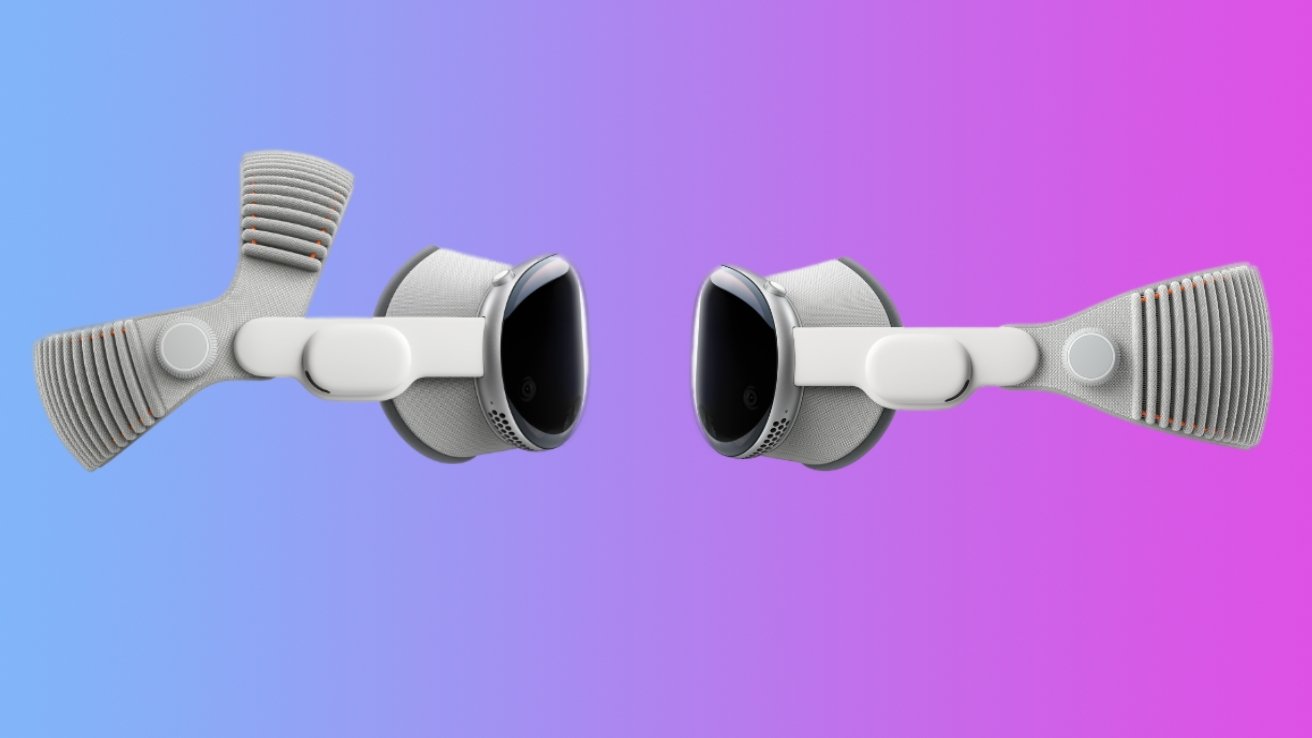
In terms of headbands, the M5 Apple Vision Pro ships with an all-new Dual Knit headband. As its name implies, it consists of two adjustable straps, unlike the Solo Knit band that was bundled with the original M2 Apple Vision Pro.
The upper and lower straps can be adjusted independently, using the dual-function Fit dial on the side of the headband. This enables precise adjustments for a more comfortable, personalized fit with the Dual Knit band.
Apple says both straps are 3D-knitted as single pieces, which enables stretching and breathability. The lower band also features tungsten inserts, which serve as counterweights for added balance.
Still, both the Dual Knit and Solo Knit bands are compatible with the original M2 variant of the Apple Vision Pro. The Dual Knit band can be purchased separately from Apple for $99.
The M5 Apple Vision Pro is likely very similar in weight to the M2 Apple Vision Pro, but the weight ranges Apple provides include the bands. Understandably, the dual band is heavier thanks to the counterweights, but it's likely not a drastic change coming from the Solo Knit.
M5 Apple Vision Pro vs. M2 Apple Vision Pro: Displays
The original M2 Apple Vision Pro has a dual Micro-OLED display that offers roughly 3660 by 3200 pixels per eye. The revamped M5 model uses the same display.
-xl.jpg)
M5 Apple Vision Pro vs. M2 Apple Vision Pro: The M5 model can render 10% more pixels and offers a 120Hz display refresh rate.
Even so, Apple claims the M5 variant of the Apple Vision Pro can render 10 percent more pixels on the custom micro-OLED displays. While both the M2 and M5 models have the same display setup, the M2 Apple Vision Pro likely ran visionOS at less than native resolution, scaled.
Given that Apple said the M5 Apple Vision Pro renders 10% more pixels, this means its displays run at a higher resolution. This is most likely the full, native display resolution. It's difficult to say for sure just yet, though.
While this ultimately doesn't sound like much, the increase in pixels should allow for sharper images and improved text readability. The 10% increase in resolution will likely result in a sharper Mac Virtual Display experience as well.
Still, it's more than likely not a drastic improvement coming from the original M2 Apple Vision Pro.
Another equally minor improvement has to do with the displays' refresh rates. While the preceding M2 variant of the Apple Vision Pro supported refresh rates of 90Hz, 96Hz, and 100Hz, the display on the M5 model takes things a step further.
Apple says this additional refresh rate will allow for reduced motion blur when wearers are actively viewing their physical surroundings. The 120Hz refresh rate should also allow for a smoother experience using the Mac Virtual Display feature.
Whether or not the 120Hz refresh rate is a useful improvement depends entirely on who you ask. Some users may see it as a particularly useful update, as wearers are now less likely to get motion sickness.
Even so, refresh rates of up to 120Hz have been available on the iPad Pro since 2017, and on Apple's high-end iPhones since 2021, as part of a feature called "ProMotion."
The display upgrades are arguably mediocre at best, and they're not exactly a reason to upgrade to the M5 Apple Vision Pro. The performance enhancements of the M5 chip, on the other hand, are more impressive.
M5 Apple Vision Pro vs. M2 Apple Vision Pro: Performance
The original Apple Vision Pro shipped with Apple's M2 chip. It sported an 8-core GPU, together with a 10-core GPU, and a 16-core Neural Engine.
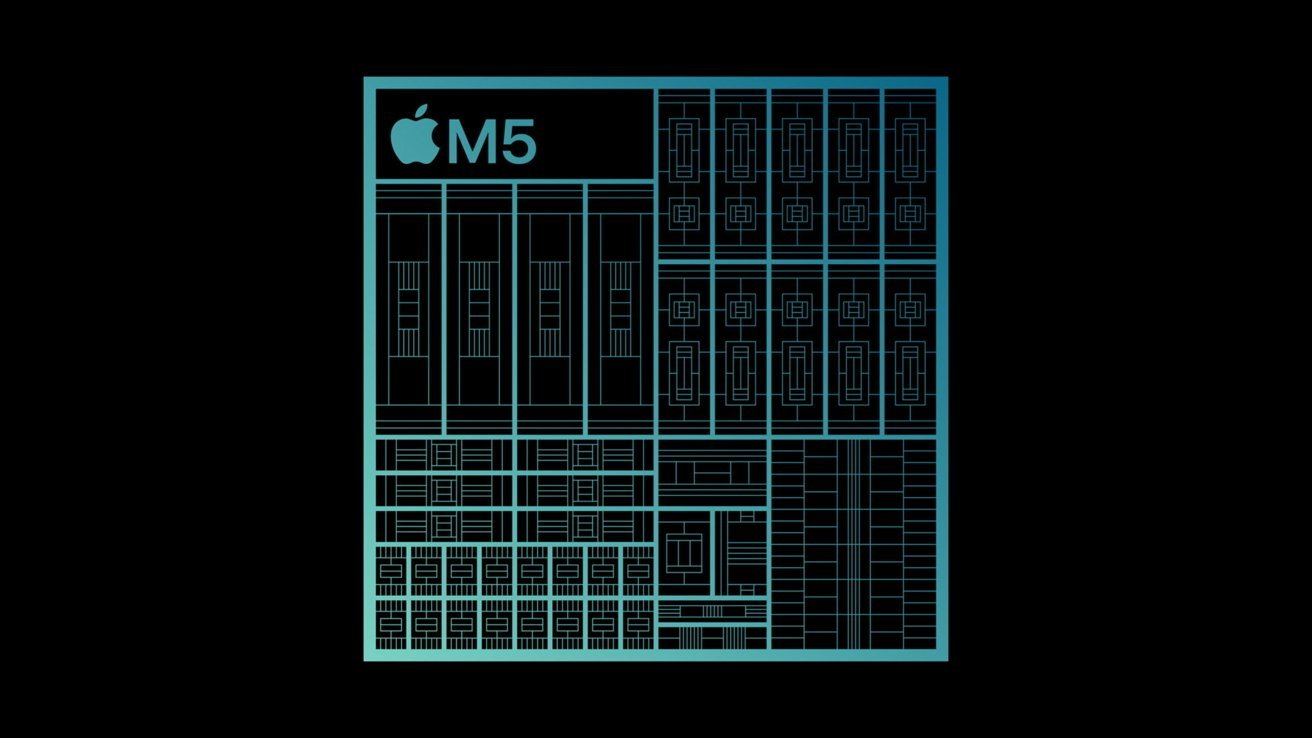
M5 Apple Vision Pro vs. M2 Apple Vision Pro: The M5 GPU features two additional cores, compared to the M2 chip in the original Apple Vision Pro.
The version of the Apple Vision Pro that was previewed on October 15, meanwhile, features Apple's M5 chip. The system-on-chip consists of a 10-CPU cores, 10 GPU cores, and a 16-core Neural Engine.
The M5 variant of the Apple Vision Pro thus features two additional CPU cores, and Apple says it delivers improved multithreaded performance. This allows for faster load times across apps and widgets, and more responsive web browsing.
In terms of graphics processing hardware, the M5 chip in the updated Apple Vision Pro features a 10-core GPU, while the M2 in the original model had 8 GPU cores. The M5 GPU also supports hardware-accelerated ray-tracing, a feature not available on the original M2 Apple Vision Pro.
Hardware-accelerated ray-tracing allows for detailed lighting effects and shadows. It's often used in more recent, graphics-intensive games.
The M5 GPU also has another advantage over the much older M2 GPU — Neural Accelerators. With the M5, much like the A19 chip in the iPhone 17, Apple included a Neural Accelerator in each GPU core.
They matter for AI-related tasks, as does the Neural Engine. The M5 chip features an improved 16-core Neural Engine that makes AI-powered features run up to 50% faster than on the preceding M2 model of the Apple Vision Pro.
This includes experiences like capturing Personas or making spatial scenes from photos, or using Image Playground.
Also relevant for artificial intelligence performance is memory bandwidth. With the M5 chip in the updated Apple Vision Pro, Apple increased the unified memory bandwidth to 153GB/s, up from 100GB/s on the M2 chip in the original model.
Beyond mentioning the 50% faster AI experiences on the M5 chip, Apple offered no direct CPU or GPU performance comparisons to the preceding M2 variant of the Apple Vision Pro.
As such, it remains to be seen exactly how revamped M5 Apple Vision Pro will perform in the real world.
There are currently no available benchmarks for the updated Apple Vision Pro. Still, leaked M5 iPad Pro Geekbench scores offer an idea of what we can expect with the M5 Apple Vision Pro.
AppleInsider did some number crunching to explain the performance improvements we could see with the M5 chip, particularly the 10-core GPU variant. Based on the M5 iPad Pro benchmark and M4 benchmarks, we calculated the expected performance of an M5 MacBook Air.
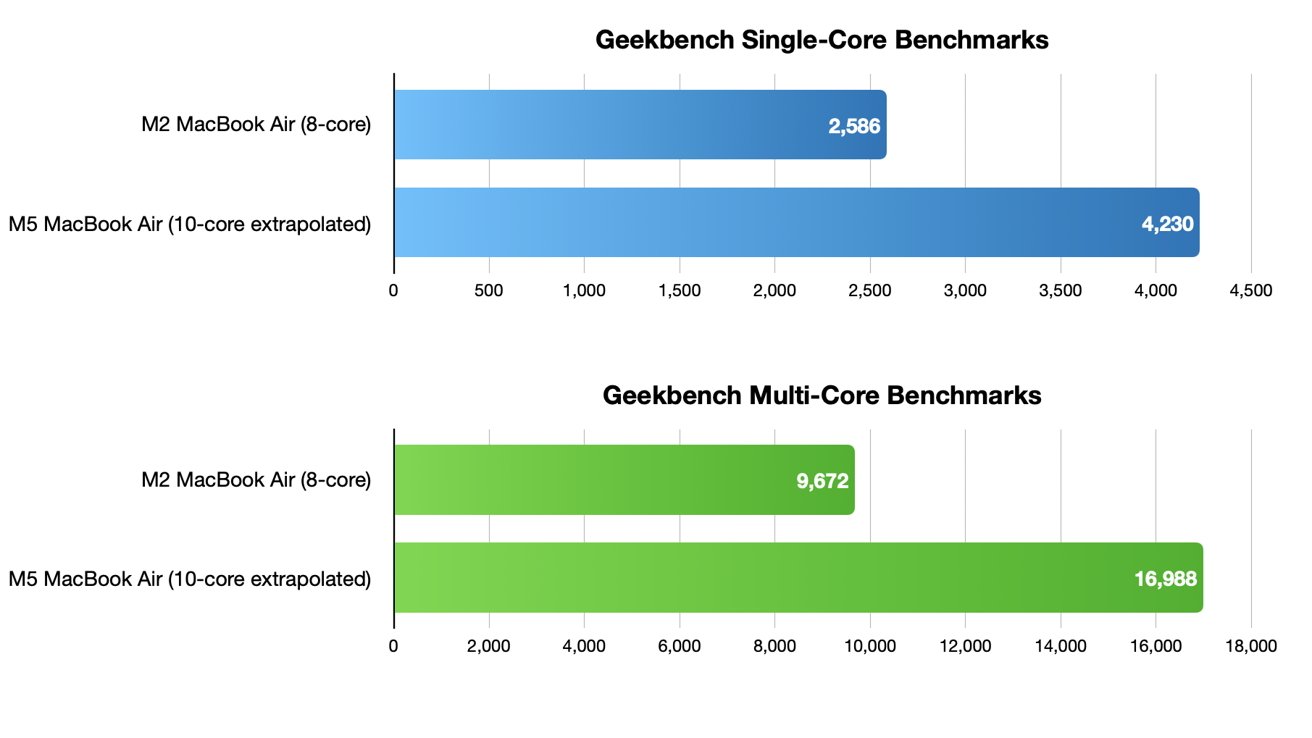
M5 Apple Vision Pro vs. M2 Apple Vision Pro: The M5 offers noticeably better multi-core performance, relative to the M2.
The M5 MacBook Air should deliver similar performance to the M5 Apple Vision Pro, as it will most likely use a 10-core GPU. Similarly, the M2 MacBook Air has an 8-core GPU, like the M2 Apple Vision Pro. With that in mind, we compared the available results.
In Geekbench 6, the M5 MacBook Air is expected to deliver a single-core CPU performance score of 4,230 points, up from 2,586 on the M2 MacBook Air.
Multi-core performance on the M5 MacBook Air, meanwhile, should be greatly improved at around 16,988 points. The M2 MacBook Air, meanwhile, has a multi-core performance score of 9,672 points in Geekbench 6.
Overall, the M5 Apple Vision Pro will most likely deliver noticeable multi-core CPU performance. The two extra GPU cores compared to the M2 model, coupled with hardware-accelerated ray-tracing and PSVR2 controller support, will allow for a better gaming experience.
The performance upgrades delivered with the M5 Apple Vision Pro could ultimately lead to more impressive 3D titles in the future. The new hardware won't just benefit gamers, though.
The user experience in visionOS, passthrough, and day-to-day tasks will be noticeable. Similarly, the multi-window experience of running and using apps on an infinite canvas will be greatly improved.
Apple also says AI features will be up to 50% faster, so the performance upgrades are definitely there.
M5 Apple Vision Pro vs M2 Apple Vision Pro: Battery life and charging
The M5 Apple Vision Pro ships with a 40W dynamic power adapter, with a maximum of 60W. The original M2 Apple Vision Pro, meanwhile, shipped with a standard 30W power adapter.
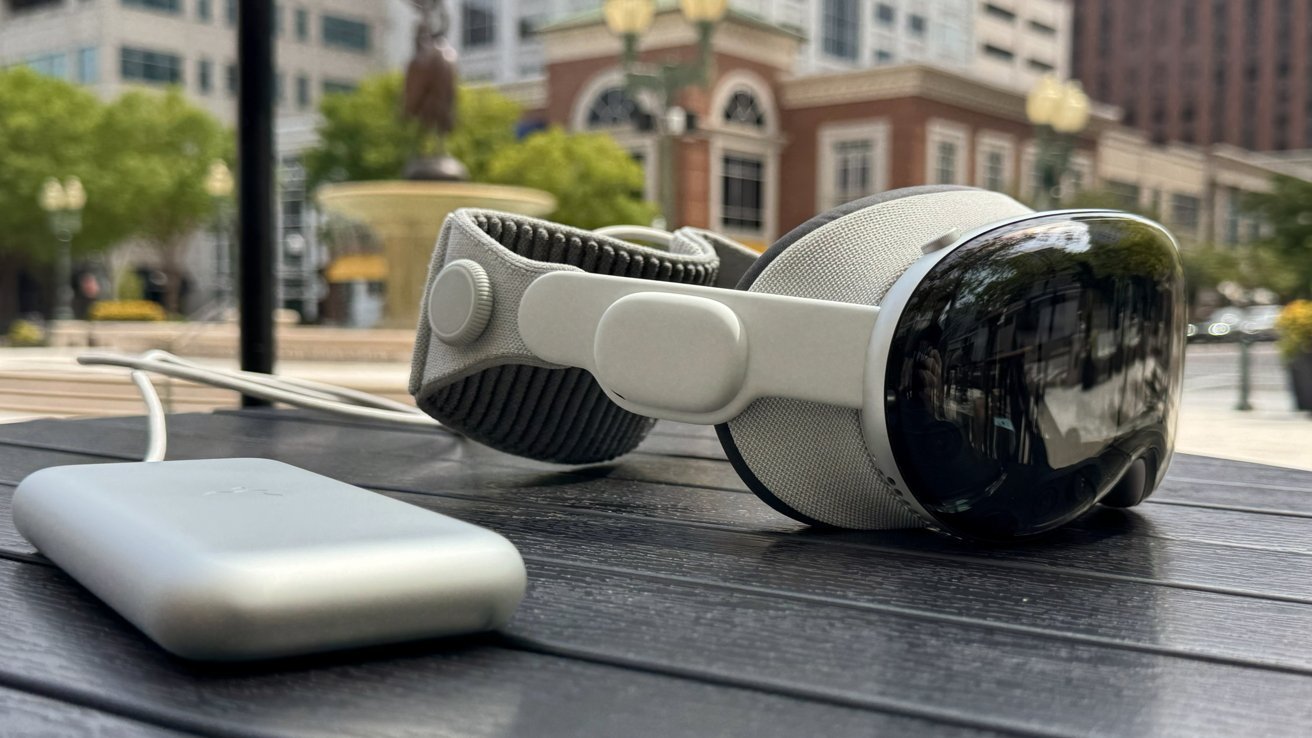
M5 Apple Vision Pro vs. M2 Apple Vision Pro: The M5 model ships with a 40W dynamic power adapter, and offers 30 minutes of additional video playback time.
The new adapter should allow for faster charging. Apple also upgraded the battery with the M5 Apple Vision Pro. The "high-performance" battery now delivers a total of 3 hours of video playback on a single charge, up from 2.5 hours on the M2 model.
That's an extra 30 minutes of video playback, which is not a whole lot. The longer battery life will make it possible to view full-length feature films on a single charge, but is otherwise negligible.
Beyond the M5 chip, slightly better display, and improved battery life, the M5 Apple Vision Pro has no differences to its M2 predecessor.
M5 Apple Vision Pro vs. M2 Apple Vision Pro: Audio hardware, cameras, connectivity
Both the M5 and M2 models of the Apple Vision Pro have 12 cameras, five sensors, and six microphones. The input is processed by the R1 chip, which is also present on both models.
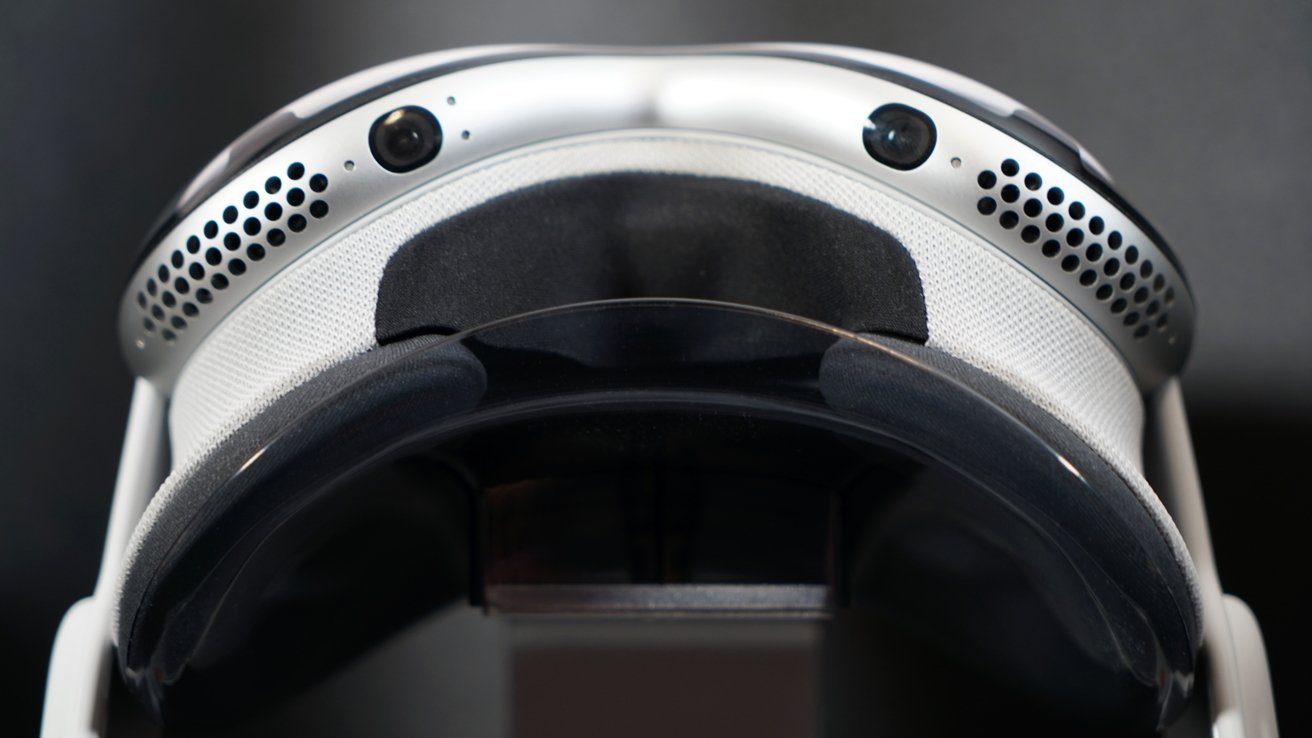
M5 Apple Vision Pro vs. M2 Apple Vision Pro: The same sensors are present on both models.
To be more specific, both Apple Vision Pro models feature 2 high-resolution main cameras, 6 world-facing tracking cameras, 4 eye-tracking cameras, and one TrueDepth camera. There's also a LiDAR Scanner, 4 inertial measurement units, along with a Flicker sensor and Ambient light sensor.
The Stereoscopic 3D main camera system on both models is capable of spatial photo and video capture. It features an 18 mm sensor with an f/2.00 aperture and 6.5 stereo megapixels.
Video playback on the M5 and M2 Apple Vision Pro is available in the same formats: HEVC, MVHEVC, H.264, HDR with Dolby Vision, HDR10, and HLG.
The six-mic array supports Personalized Spatial Audio and audio ray tracing. It also offers directional beamforming and supports an H2 to H2 ultra-low-latency connection to select AirPods models.
The M5 and M5 models of the Apple Vision Pro support the following audio formats: AAC, MP3, Apple Lossless, FLAC, Dolby Digital, Dolby Digital Plus, and Dolby Atmos.
Connectivity features remain unchanged as well. WiFi 6 (802.11ax) and Bluetooth 5.3 are available on the M5 Apple Vision Pro, as well as its M2-based predecessor.
visionOS 26 is similarly available for both the M2 and M5 variants of the Apple Vision Pro.
M5 Apple Vision Pro vs. M2 Apple Vision Pro: Should you upgrade?
For most users, there is arguably little reason to upgrade. Unless you need hardware-accelerated ray tracing or a 120Hz refresh rate, you're not missing out on much.
The M5 offers an impressive performance upgrade, but this alone is not enough to justify paying the full $3500 price tag. Apple does not let you trade in your M2 Apple Vision Pro at the time of writing.
You do get 30 additional minutes of video playback on the M5 Apple Vision Pro. Still, that's somewhat of an underwhelming upgrade, considering it's been more than a year and a half since the M2 Apple Vision Pro was made available to the public.
On the other hand, Apple Vision Pro wearers who routinely watch full-length films do have a reason to get the M5 model. The extra 30 minutes is the difference between finishing a movie with time to spare and the battery dying in the credits.
Whether or not you should get the updated Apple Vision Pro depends largely on your workflow, and whether or not you're into spatial computing or gaming. If you find the device to be useful in your day-to-day life, then you'll likely want to pick up the M5 Apple Vision Pro for its improved performance and battery life.
Even so, the Apple Vision Pro is still an "early adopter product", as Apple CEO Tim Cook put it. For the average consumer, there's ultimately not much of a reason to get the original model, let alone the new-and-improved M5 variant.
Where to buy the M5 Apple Vision Pro and M2 Apple Vision Pro
The M5 Apple Vision Pro can be ordered at Apple.com starting at $3,499, while deals on closeout M2 models can be found on eBay.
You can also snag discounts on accessories for the Apple Vision Pro, including head straps, cases, and stands, at Amazon and in our Apple Vision Price Guide.







